Buying Guide
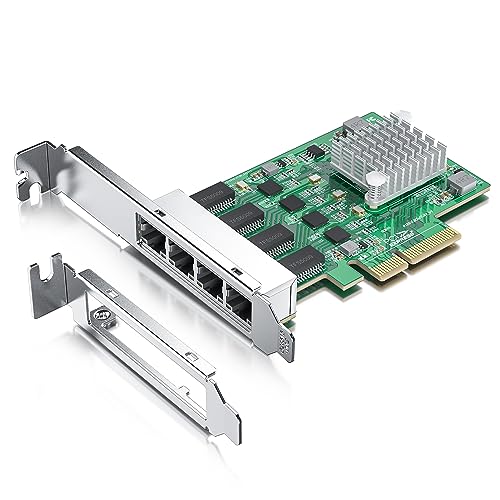
Choosing among the best 4-port network cards starts with the network media and link speed required at the host. A four-port adapter can serve very different roles: a 10GbE server uplink, a 2.5GbE NAS or workstation interface, a Gigabit fiber card, a PoE source, or a firewall and software-router interface. The specifications below are more useful than treating every quad-port card as interchangeable.
Match port speed to the network
The GLOTRENDS ST7223 is the only selected model with four documented 10Gb RJ45 ports. It is intended for high-density copper links and can negotiate down to 1Gbps. Its 10Gb capability makes it suitable when the surrounding switches, storage devices, and cabling are built for that rate. It also uses PCIe 3.0 x8, so the host must have an appropriate slot and enough expansion bandwidth.
Several selected cards support 2.5GbE. The StarTech PR42GI-NETWORK-CARD uses four Intel I225-V controllers, while the DERAPID card uses four Intel I226 ports. Binardat, H!Fiber, Ipolex, and GLOTRENDS LE8445 use Realtek-based designs documented for 2.5Gbps operation. These cards also support slower Ethernet modes, which helps when a switch or endpoint is still operating at 1Gbps or below.
For a conventional Gigabit network, Intel I350-based cards remain a distinct class. The H!Fiber Intel I350 model documents four 10/100/1000Mbps RJ45 ports, while the StarTech ST4000SPEXI and other I350 selections in the source pool show similar server-oriented capabilities. If the network infrastructure is Gigabit, a 1GbE card can be a more direct specification match than selecting a faster interface that the rest of the network cannot use.
Choose copper, SFP, or PoE
Most cards in this comparison use RJ45 copper ports. That is the simplest match for standard Ethernet patch cables. The StarTech P041GI is different: it has four open 1Gb SFP slots. The listing says it accepts singlemode and multimode MSA-compliant modules as well as direct-attach copper cables. This makes it the better fit when the installation already uses fiber, requires longer cable runs, or needs a link less affected by electromagnetic interference.
PoE changes the selection process again. The StarTech ST4000PEXPSE is not merely a multi-port data adapter; it supplies power to compatible PoE devices. Its listing specifies IEEE 802.3at Type 1 compliance and up to 25.5 watts per port. That makes it appropriate for compatible cameras and wireless access points, but it is a specialized choice. A standard NIC is more suitable when the connected equipment receives power elsewhere.
Check the PCIe slot and case
PCIe fit has two parts: the electrical lane requirement and the physical bracket. The DERAPID, Binardat, and Ipolex listings document compatibility with x4, x8, and x16 slots. The StarTech P041GI works in x2 or larger slots according to its listing, while the ST7223 specifies PCIe 3.0 x8. Check the motherboard manual rather than assuming that a physically longer slot supplies every required lane.
A low-profile bracket is important for slim desktops, compact servers, and some NAS or appliance-style builds. The StarTech PR42GI-NETWORK-CARD, DERAPID, Binardat, H!Fiber, Ipolex, and GLOTRENDS LE8445 listings document low-profile bracket support. The StarTech PoE card does not show that feature in the supplied evidence, so its chassis fit should be verified before installation.
Review operating-system support
Operating-system coverage varies considerably. The StarTech PR42GI-NETWORK-CARD lists Windows, Windows Server, VMware, and Linux. The GLOTRENDS LE8445 specifically lists Windows, Linux, macOS, OpenWrt, pfSense, and OPNsense, making it notable for firewall and router builds. The H!Fiber and Ipolex 2.5GbE cards list several Linux distributions and older VMware versions, but each has documented limitations.
The H!Fiber RTL8125 listing says VMware ESXi 7.0 and Mac OS are unsupported. Ipolex excludes ESXi 7/8, FreeBSD, hot swapping, and Mac OS. These are not minor details for a server or appliance deployment. Confirm the exact driver and hypervisor version before selecting a card, especially when the host will boot from or manage the network adapter remotely.
Look for management and offload features
VLAN tagging, PXE boot, Wake on LAN, jumbo frames, link aggregation, and virtualization support can matter more than peak link speed. The StarTech P041GI documents link aggregation, PXE, VLAN tagging, 9K jumbo frames, SR-IOV, and VMDq. The StarTech PR42GI-NETWORK-CARD adds Intel vPro and independent controllers. The ST7223 goes further with SR-IOV, VMDq, NVO offloads, ADQ, DDP, DPDK, iSCSI, and NFS offloading.
Storage and firewall builders should compare the specific features needed by their software. Ipolex lists iSCSI, FCoE, DPDK, jumbo frames, and Wake on LAN. H!Fiber lists VLAN, WOL, PXE, DPDK, and jumbo frames. The GLOTRENDS LE8445 emphasizes firewall, software-router, NAS link aggregation, and network-isolation applications, but gives less detail about virtualization offloads.
Consider installation and cooling details
A heatsink or other thermal provision is useful when several ports operate at once, although the supplied listings do not establish independent temperature or throughput results. StarTech documents a built-in heatsink on the PR42GI-NETWORK-CARD and P041GI, while DERAPID describes an alloy heatsink.
Some cards require additional host-power planning. The selected PoE card can provide power through its RJ45 ports, and the GLOTRENDS PoE+ listing in the source pool notes a 12V connector for higher per-port PoE demand. For the selected StarTech PoE model, confirm the host system and connected device requirements before deployment. In every case, use the included bracket that matches the chassis and install the driver appropriate to the operating system.
Final Recommendation
StarTech PR42GI-NETWORK-CARD 4-Port 2.5GbE ranks first overall in this specification-based comparison under the published weighted criteria.
GLOTRENDS ST7223 is the first overall specification-based choice among these best 4-port network cards because it documents four 10Gb RJ45 ports plus the most extensive virtualization, tunnel, storage-offload, and PXE features. It is not the universal answer: the PCIe x8 interface and 10Gb focus make it a specialized fit.
For a more moderate multi-gigabit design, StarTech PR42GI-NETWORK-CARD is the top 4-port network cards choice for its Intel I225-V controllers, broad platform coverage, management features, and low-profile bracket. Choose StarTech P041GI when the network uses SFP fiber or direct-attach cables. Choose StarTech ST4000PEXPSE when powering compatible PoE devices is central to the installation.
DERAPID, Binardat, H!Fiber, Ipolex, and GLOTRENDS LE8445 cover different 2.5GbE priorities, from flexible slots and broad OS lists to storage features and firewall compatibility. For a documented Intel I350 Gigabit design, the H!Fiber model is the selected fit. The right card is therefore determined by the switch media, PCIe slot, chassis, operating system, and required management features rather than port count alone.
Frequently Asked Questions
What should I check before installing one of the best 4-port network cards?
Confirm the PCIe lane requirement, available slot, case profile, operating system, and driver support. Also verify whether the card uses RJ45, SFP, or PoE and whether the connected switch or devices support the same design. For cards with a low-profile bracket, check that the bracket is included and that the host case accepts it.
Are four 2.5GbE ports better than four Gigabit ports?
They provide a higher documented link rate, but the benefit depends on the switch, cabling, storage, and endpoints. A Gigabit card can still be the appropriate specification match for a Gigabit network, particularly when an Intel I350-based design or established driver support is required. Faster ports do not by themselves change the capabilities of slower network equipment.
When should I choose a 4-port SFP card?
Choose the StarTech P041GI when you need four open 1Gb SFP connections, fiber media, or direct-attach copper compatibility. Its listing identifies support for singlemode and multimode MSA-compliant modules. Remember that the modules or cables are separate from the card, and confirm that their speed and fiber type match the switch and cabling plan.
Can a 4-port card power cameras or access points?
Only a PoE model is designed to supply power. The selected StarTech ST4000PEXPSE documents IEEE 802.3at support and up to 25.5 watts per port for compatible PoE devices. A normal RJ45 card provides data connectivity but should not be treated as a power source. Check the device’s PoE class and power requirement before connecting it.
Which selected card fits a firewall or software-router build?
GLOTRENDS LE8445 is the clearest documented match because its listing specifically identifies firewall, soft-router, NAS link-aggregation, and network-isolation applications. It also lists OpenWrt, pfSense, and OPNsense compatibility. Verify the exact software version and driver process for the intended host before deployment.