Buying Guide
Choosing among the best composite video converters starts with identifying the direction of the signal. The selected products convert an older analog source into HDMI for a newer television, monitor, or projector. They are not interchangeable with HDMI-to-RCA units, and the listings consistently describe the conversion as one-way. Check that the source has yellow, white, and red RCA outputs, or S-Video where supported, and that the display has an HDMI input.
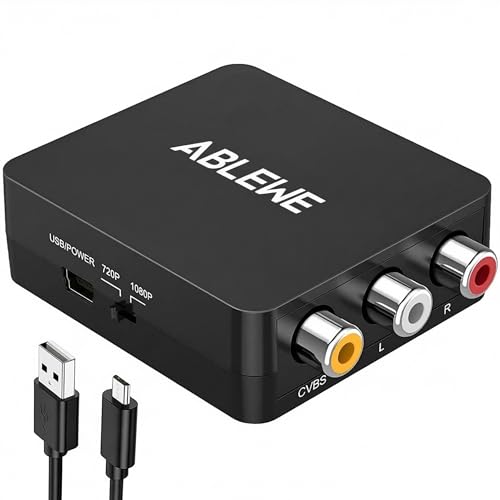
A standard RCA converter is sufficient when the source has composite video and left/right audio. Models such as the DigitConvert, ABLEWE, Portta, WENTER, CAMWAY, TAIKURA, and PROZOR accept the familiar yellow, white, and red connection. This design fits many VCRs, DVD players, set-top boxes, camcorders, and older game consoles.
If the source also offers S-Video, a dual-input design may provide more flexibility. EASYCEL accepts RCA composite or S-Video and lets you select the active input. PARUIEN also supports both connection types and supplies the associated cables. The BITFUNX RetroScaler2X goes further by documenting composite, S-Video, and YPbPr component input, although its output specification is different from the 720p/1080p upscalers.
Check the output specification
Most of the best composite video converters in this comparison list HDMI output up to 720p or 1080p, commonly at 60Hz. That makes these units suitable for displays that no longer provide analog video inputs. The listed output resolution describes what the converter sends to the display; it does not change the original source into newly captured high-definition detail.
The RetroScaler2X is a specialist exception. It converts NTSC sources to 480p and PAL sources to 576p, while offering line-doubler, filter, and pass-through modes. That specification may be more relevant to a retro-gaming setup than a generic 1080p label, particularly when native aspect ratio and signal options are priorities.
Older games and video recordings often use a 4:3 image. A converter with a physical ratio switch can make setup easier when a modern screen otherwise displays the image in a stretched format. CAMWAY, TAIKURA, and PROZOR document 4:3/16:9 switching. The RetroScaler2X documents native aspect-ratio preservation, while PARUIEN states that its default output is 16:9 and does not support 4:3.
Format support is another important check. DigitConvert, ABLEWE, WENTER, Portta, and the other standard upscalers list PAL and NTSC variants; DigitConvert additionally lists SECAM, PAL/M, and PAL/N. A source and display still need to use compatible standards, so read the format details rather than assuming every analog signal will behave identically.
Review power and cable requirements
These converters require power in addition to the video connections. Many selected models use a USB power cable connected to a 5V source, while EASYCEL lists an AC power adapter in its package. A USB cable does not necessarily mean a wall adapter is included. The listings for DigitConvert, ABLEWE, CAMWAY, TAIKURA, PROZOR, Portta, WENTER, and others specify USB power but exclude or do not list the adapter.
Cable contents vary considerably. WENTER includes RCA, HDMI, and Micro-USB cables. PROZOR includes an AV cable, HDMI cable, and USB power cable. TAIKURA includes HDMI and USB cables, but its listing says a 3-RCA cable may be needed for certain DVD, VSH, or VCR connections. EASYCEL and PARUIEN are useful when a mixed-input installation needs S-Video and RCA cabling supplied together.
Choose based on the source device
For a basic VCR, DVD player, or set-top box, a standard RCA-to-HDMI unit such as Portta, ABLEWE, or DigitConvert covers the documented connection type. For a retro console setup, CAMWAY, TAIKURA, and PROZOR add aspect-ratio control. For a collection that includes S-Video equipment, EASYCEL or PARUIEN is a better fit. For multiple retro signal types and specialized processing modes, the BITFUNX RetroScaler2X is the most distinctive option in this selected group.
Read the one-way limitation
The selected converters are source-to-display devices. They take analog composite or S-Video input and produce HDMI output. They do not convert HDMI back to RCA, and the listings do not describe recording, capture, or bidirectional operation. If the intended setup starts with an HDMI source and ends at an older analog display, a different product category is required.
Final Recommendation
PROZOR RCA to HDMI Converter with 4:3/16:9 Switch ranks first overall in this specification-based comparison under the published weighted criteria.
EASYCEL RCA/S-Video to HDMI Converter is the first overall specification-based choice among these best composite video converters because it combines two legacy input types, selectable input handling, 720p/1080p output, HDMI and 3.5mm audio outputs, and a listed AC adapter. It is the most flexible general-purpose option when the source connection is not yet fixed.
Choose CAMWAY or TAIKURA when 4:3/16:9 switching is central to the setup. PROZOR is a strong cable-bundle alternative with the same ratio controls. PARUIEN and EASYCEL are the practical picks for S-Video equipment. For specialized retro-console inputs and processing modes, BITFUNX RetroScaler2X deserves attention even though its documented output is 480p/576p rather than 1080p.
The top composite video converters are not all solving the same connection problem. Confirm the source connector, video standard, desired output resolution, aspect-ratio needs, and included cables before selecting one. Also plan for the required 5V power source when the listing does not include a wall adapter.
Frequently Asked Questions
What do the best composite video converters connect?
They connect older devices with analog composite RCA outputs to a modern HDMI display. Selected examples include VCRs, VHS players, DVD players, set-top boxes, Wii, PS2, N64, Xbox, and other listed legacy sources. EASYCEL and PARUIEN additionally support S-Video, while BITFUNX RetroScaler2X also documents YPbPr component input.
Do these converters work in both directions?
No. The selected RCA-to-HDMI products are one-way devices. They accept analog video and audio from the source and send HDMI to the display. The listings specifically warn that HDMI-to-RCA conversion is not supported. A setup using an HDMI source and an older RCA display needs an HDMI-to-composite converter instead.
Is 1080p output the same as a 1080p source?
No. A listed 1080p output means the converter can send the converted signal at that HDMI format. The original RCA or S-Video source remains standard-definition analog video. The product listings document upscaling or output formats, not creation of new source detail.
Which selected model supports S-Video?
EASYCEL and PARUIEN both document RCA and S-Video inputs. BITFUNX RetroScaler2X also lists composite and S-Video, along with YPbPr component input. If S-Video is important, verify that the chosen model includes the needed cable and that the source actually provides an S-Video output.
Do I need a separate power adapter?
Often, yes. Many selected models include a USB power cable but say that the 5V wall adapter is not included. EASYCEL lists an AC power adapter, while the other package details vary. Check the package contents and provide the required 5V source before connecting the converter.