Buying Guide
The best digital deadbolts differ less in their basic purpose than in how they grant access, connect to a home, and handle power. Start by deciding whether you need a local keypad only or a connected lock that can be managed remotely. A keypad-only model can be a sensible fit for a front door where you want codes and a physical key but do not need notifications. Connected models add app control, activity records, scheduled access, and sometimes voice commands.
Choose the access methods you will actually use
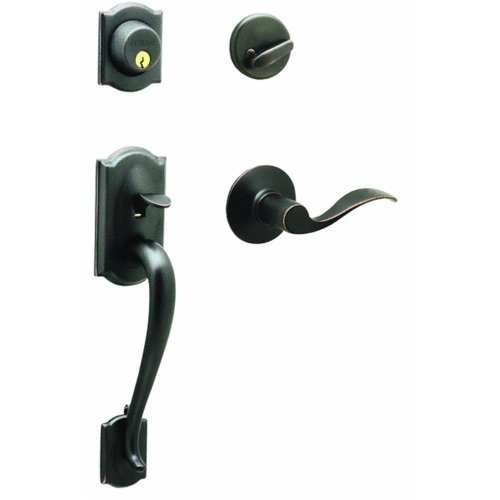
A keypad is the simplest digital entry method in this comparison. The Kwikset Powerbolt 250, Kwikset SmartCode 260, and Schlage Camelot focus on illuminated code entry and traditional key backup. They can suit households that want to stop carrying keys while keeping a familiar mechanical option.
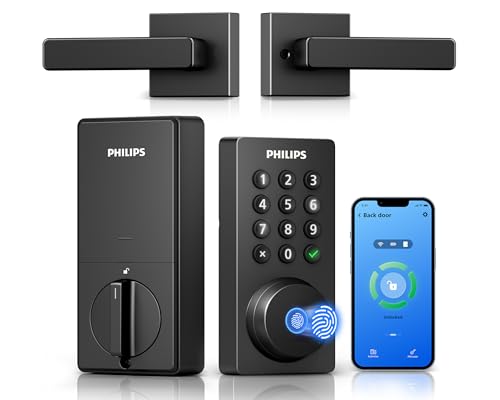
Fingerprint access removes the need to remember or share a code. The Veise KS02A documents storage for 20 fingerprints, while the Veise RZ07 and Philips DDL-241-BK list capacity for up to 50. The Veise VE027-K adds IC-card access, and the eufy C220 adds Apple Watch access. Count the people and devices that need entry before choosing a model with a smaller capacity.
Some locks provide several methods at once. The ULTRALOQ Bolt SE lists fingerprint, passcode, smartphone app, web portal, eKey or code sharing, voice control, and mechanical keys. The range is useful, but more methods can also mean more setup decisions. A simpler lock may be preferable if most users will only enter a PIN.
Decide whether remote control is necessary
Built-in Wi-Fi allows remote management without an additional gateway on models such as the Philips DDL-241-BK, Philips handle-set model, Philips DDL242X-1HW, Veise VE027-K, and eufy C220. Their listings describe remote locking or unlocking, notifications, access history, or app-based user management. Check the network requirements: the Philips listings specify 2.4GHz Wi-Fi, and the first Philips model notes a recommended router-to-lock distance.
Not every connected-looking lock includes remote access on its own. The Veise RZ07 requires the Veise G2 gateway for remote access and voice control. The Veise VE017 similarly requires a G1 gateway for those functions. The ULTRALOQ Bolt SE supports built-in Wi-Fi and Matter over Thread, but Matter remote features require a compatible hub. These requirements should be part of the installation plan rather than an afterthought.
Compare codes, schedules, and temporary access
Code capacity matters for families, guests, cleaners, and rentals. The Philips DDL-241-BK lists 100 smart passcodes and supports permanent, recurring, date-range, and offline one-time codes. The Veise RZ07 lists more than 250 user codes plus one-time, permanent, scheduled, and recurring options. The Veise VE027-K lists 100 custom passcodes and several digital-key types.
Local keypad models can still provide useful sharing controls. The SmartCode 260 lists 50 user codes and 10 one-time codes; the Powerbolt 250 lists 25 user codes and five one-time codes. The Schlage Camelot lists up to 19 codes. Choose permanent codes for regular users and expiring or one-time codes for occasional access when the lock supports them.
Review battery and backup details
Every battery-powered lock needs a backup plan. The Schlage Camelot listing specifies a 9V battery and up to two years of typical battery life. Several keypad models use four AA batteries, including the Veise KS02A, Kwikset Powerbolt 250, and Kwikset SmartCode 260. The Philips DDL-241-BK and ULTRALOQ Bolt SE use larger battery configurations, with stated life of up to six months and up to 18 months respectively.
Published battery-life figures are usage-dependent, so treat them as listing estimates rather than guarantees. Look for low-battery alerts and a mechanical key. The Philips DDL-241-BK includes a physical key, while the ULTRALOQ Bolt SE lists two mechanical keys. Also note when batteries are not included, as stated for several models in this comparison.
Check door fit and weather specifications
Measure door thickness, backset, bore, and handing before buying. The Philips DDL-241-BK, Veise RZ07, Veise VE027-K, and Philips DDL-241-BK listing support doors from 1-3/8 to 2 inches in the supplied evidence. Schlage specifies a 2-3/8- or 2-3/4-inch backset and 1-3/8- to 1-3/4-inch door thickness. The eufy C220 is described as compatible with most standard deadbolts and bores under 54mm after spacer removal.
Weather ratings are useful when the exterior side is exposed. The ULTRALOQ Bolt SE and Veise VE027-K list IP65, while the Veise RZ07 lists IP55. The Veise KS02A, Philips DDL242X-1HW, and both Kwikset models provide different levels of environmental or durability documentation. An IP rating does not replace checking the door design, installation instructions, and local exposure.
Consider installation and daily controls
Most selected models describe screwdriver installation without hardwiring. The ULTRALOQ Bolt SE states a 10-minute installation, and the Veise VE027-K describes a 10- to 15-minute process with automatic left- or right-hand detection. The Philips handle-set model may be more suitable when replacing both the deadbolt and handle rather than only the existing deadbolt.
Useful daily controls include auto-lock, one-touch locking, silent mode, passage mode, vacation mode, and wrong-code lockout. Auto-lock ranges vary: some models allow settings from 10 to 180 seconds, while Kwikset models use preset intervals. If you frequently carry groceries or need quiet nighttime entry, prioritize the specific control documented for that routine.
Final Recommendation
ULTRALOQ Bolt SE Wi-Fi Smart Lock ranks first overall in this specification-based comparison under the published weighted criteria.
ULTRALOQ Bolt SE Wi-Fi Smart Lock is the first overall specification-based choice among these best digital deadbolts. Its combination of seven entry methods, built-in Wi-Fi, Matter over Thread support, 50-fingerprint and 50-code capacity, IP65 protection, and up to 18 months of stated battery life gives it the broadest documented feature set. The Matter hub requirement should be considered before purchase.
For direct Wi-Fi and large passcode capacity, the Philips DDL-241-BK is a strong alternative. The Veise VE027-K is better suited to households wanting many entry methods, while the Veise RZ07 is the more management-oriented option for rentals and offices. The eufy C220 makes sense for users already building around eufy devices.
If remote access is unnecessary, the Veise KS02A, Kwikset SmartCode 260, Kwikset Powerbolt 250, and Schlage Camelot offer more focused keypad designs. The Schlage is notable for its stated battery life and backset information, while the Kwikset SmartCode 260 offers the largest local code capacity among the conventional keypad options listed here. These are the top digital deadbolts to consider when you want local controls rather than app administration.
Frequently Asked Questions
Are the best digital deadbolts always Wi-Fi models?
No. The Schlage Camelot, Kwikset Powerbolt 250, Kwikset SmartCode 260, and Veise KS02A document keypad-based entry without built-in remote app control. Wi-Fi is useful for remote access, notifications, and activity records, but it is not required for keyless entry.
Do these digital deadbolts require a hub?
It depends on the model. The Philips DDL-241-BK, Philips handle-set model, Veise VE027-K, and eufy C220 describe built-in Wi-Fi without a bridge. The Veise RZ07 requires a G2 gateway for remote access and voice control, while the Veise VE017 requires a G1 gateway for those features. Matter functions on the ULTRALOQ Bolt SE require a compatible Matter over Thread hub.
What should I measure before installing a digital deadbolt?
Check door thickness, backset, bore diameter, and whether the door is left- or right-handed. The supplied listings show that compatibility varies: Schlage specifies backset options, several models specify 1-3/8- to 2-inch door thickness, and eufy references standard deadbolts and bores under 54mm. Confirm the existing preparation against the model’s installation information.
Are fingerprints more useful than keypad codes?
Fingerprints can provide quick entry without carrying a key or remembering a PIN, but they are not necessary for every household. Keypad models such as the Kwikset SmartCode 260 and Schlage Camelot may be a better fit when shared access is occasional or when you prefer a simpler local design. Fingerprint models are more useful when multiple regular users need fast, individual access.
Choose a model with a low-battery alert, keep the documented mechanical key available, and follow the specified battery type. The Schlage Camelot uses a 9V battery, while many other models use AA batteries. Several listings state that batteries are not included, so plan for the correct replacements during installation.