Buying Guide
Picking among the best dual band network cards means weighing wireless standard, slot type, and antenna design before anything else. Every card in this roundup operates on 2.4 GHz and 5 GHz, but the generations and form factors differ enough that a careful look at the spec sheet pays off. The guidance below focuses on the categories that actually separate the top dual band network cards from generic Wi-Fi adapters, all grounded in the supplied evidence for the ten selected models.
Match the Wireless Standard to Your Router
The wireless standard defines the ceiling of what a dual band card can do. If your router already supports Wi-Fi 6, an 802.11ax card is the natural fit because the chipset will document 1024QAM and the wider 160 MHz channels used by higher-end models.
Compare Dual Band Throughput Numbers
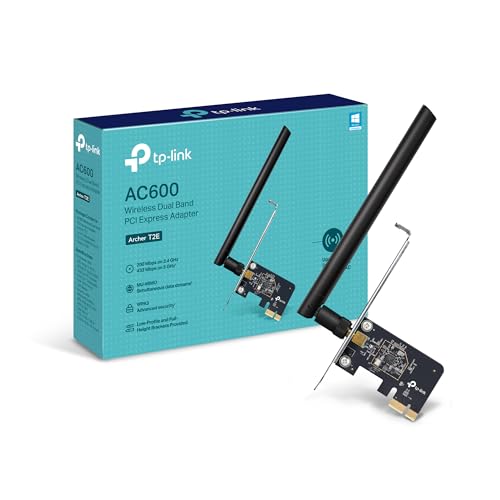
Dual band throughput tells you how the card splits capacity between the two bands. The TP-Link Archer TX20E and DERAPID AX1800 cards publish 1201 Mbps on 5 GHz with 574 Mbps on 2.4 GHz, which is the AX1800 tier. The FENVI FV-AC1200S hits 867 Mbps on 5 GHz with 300 Mbps on 2.4 GHz, and the TP-Link Archer T2E AC600 sits lower still. Pick the tier that aligns with the speed your router can actually deliver, since no card can exceed its connecting router.
Bluetooth Generation and Use Case
Most of the PCIe and Mini PCIe cards in this guide bundle Bluetooth alongside Wi-Fi, which removes the need for a separate USB dongle. The TP-Link Archer TX3000E pairs Wi-Fi 6 with Bluetooth 5.3, while the TP-Link Archer TX55E, TP-Link Archer TX20E, FENVI AX3000, REKONG MPE-AX3000H, and DERAPID AX1800 use Bluetooth 5.2. The TP-Link Archer T2E AC600 does not list Bluetooth at all, so factor in whether your headset, controller, or keyboard needs a Bluetooth radio.
The right slot matters as much as the chipset. PCIe cards such as the TP-Link Archer TX3000E, TP-Link Archer TX55E, TP-Link Archer TX20E, FENVI AX3000, DERAPID AX1800, FENVI FV-AC1200S, and TP-Link Archer T2E AC600 drop into a PCIe x1 slot, and many include both standard and low-profile brackets for mini towers. The REKONG MPE-AX3000H uses the older half Mini PCIe slot, which is common in legacy laptops but absent from modern boards. Always confirm the slot before ordering, especially for laptop replacements.
Antenna Design and Coverage
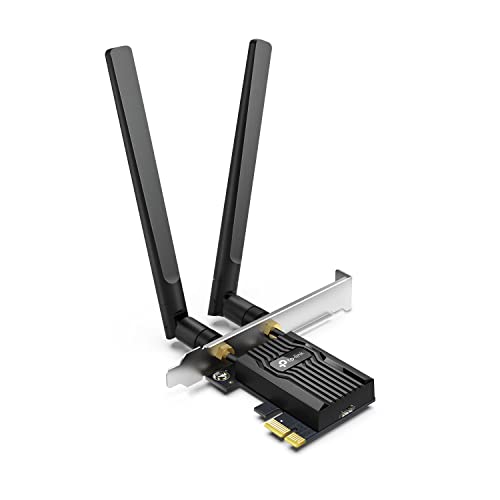
Antennas decide how well the card copes with distance and walls. The TP-Link Archer TX3000E uses two multi-directional antennas on a magnetized base that can sit on a desk, which is unusual for this category. The TP-Link Archer TX55E, TP-Link Archer TX20E, and DERAPID AX1800 use two high-gain external antennas, with the DERAPID listing 6 dBi antennas aimed at wall penetration. The FENVI FV-AC1200S uses high-gain external antennas with anti-interference design notes. The TP-Link Archer T2E AC600 uses a single high-gain antenna.
Security and Operating System Support
WPA3 support is documented on the TP-Link Archer TX3000E, TP-Link Archer TX55E, TP-Link Archer TX20E, FENVI AX3000, FENVI FV-AC1200S, TP-Link Archer T2E AC600, DERAPID AX1800, and REKONG MPE-AX3000H, which covers the full Wi-Fi 6 lineup plus several Wi-Fi 5 options. OS support is generally Windows 10 and Windows 11 64-bit across the modern cards, while the TP-Link Archer T2E AC600 and FENVI FV-AC1200S keep things simple with straightforward Windows driver packages.
Final recommendation
TP-Link Archer TX3000E AX3000 Wi-Fi 6 PCIe Card ranks first overall in this specification-based comparison under the published weighted criteria.
The final choice among the best dual band network cards depends on the documented features that match your intended use.
After weighing wireless standard, dual band throughput, Bluetooth, form factor, antenna design, and security, the TP-Link Archer TX3000E stands out as the first overall specification-based choice among the top dual band network cards in this comparison. Its combination of Wi-Fi 6 AX3000 speeds, Bluetooth 5.3, magnetized antenna base, and broad OFDMA plus MU-MIMO support covers nearly every desktop use case. For shoppers who want a close second that balances performance and bracket flexibility, the TP-Link Archer TX55E is the natural follow-up, while the TP-Link Archer TX20E is a sensible AX1800 step for systems that do not need 160 MHz channels.
Frequently Asked Questions
What makes a card one of the best dual band network cards for a desktop in 2026?
Look for documented Wi-Fi 6 with OFDMA and MU-MIMO, an AX3000 or AX1800 speed class, and dual external antennas. Models like the TP-Link Archer TX3000E and FENVI AX3000 meet those marks, while the TP-Link Archer TX20E and DERAPID AX1800 cover the AX1800 tier.
Are PCIe dual band cards faster than USB dual band adapters?
The PCIe cards in this guide, including the TP-Link Archer TX3000E, TP-Link Archer TX55E, FENVI AX3000, and FENVI FV-AC1200S, use PCIe x1 slots for a direct link to the motherboard, which usually yields stronger signal and lower latency than USB adapters. They also typically support Bluetooth, which many USB adapters handle less consistently.
Can the best dual band network cards upgrade an older laptop?
Yes, but only if the laptop has the right slot. Check your service manual for the slot type and any BIOS whitelist before installing.
Do I still need Bluetooth on a dual band network card?
If you already rely on Bluetooth headsets, controllers, or keyboards, picking a card with Bluetooth saves a USB port. The TP-Link Archer TX3000E and REKONG MPE-AX3000H both document Bluetooth 5.2 or higher, while the TP-Link Archer T2E AC600 omits Bluetooth entirely.
How do I choose between AX3000 and AX1800 cards in this list?
AX3000 cards like the TP-Link Archer TX3000E and FENVI AX3000 publish 2402 Mbps on 5 GHz with 160 MHz channels, which suits busy networks and Wi-Fi 6 routers. AX1800 cards like the TP-Link Archer TX20E and DERAPID AX1800 publish 1201 Mbps on 5 GHz without 160 MHz channels, which is enough for typical home internet connections.