Buying Guide
The best dual band usb network adapters give a computer two radios in one stick: a 2.4 GHz band for range and walls, and a 5 GHz band for higher speed at shorter distances. Picking the right one comes down to a few specification choices that match how and where the adapter will be used.
Wi-Fi Generation and Speed Class
The Wi-Fi generation printed on the box defines the ceiling of the connection. Wi-Fi 6 (802.11ax) adapters such as the TP-Link Archer TX30U Plus, NETGEAR Nighthawk A7500, ASUS USB-AX57 Nano, MSI AX1800 Nano, Nineplus N21CA, and D-Link DWA-X1850 list AX1800 speeds, which combine roughly 574 Mbps on 2.4 GHz with 1201 Mbps on 5 GHz. Wi-Fi 5 (802.11ac) adapters like the TP-Link Archer T3U Plus, TP-Link Archer T3U, Blueshadow AC1300, and NETGEAR A6150 use AC1200 or AC1300 classes that pair 300 to 400 Mbps on 2.4 GHz with 867 Mbps on 5 GHz.
Higher generation numbers do not directly translate into real-world throughput, but they do bring efficiency features like OFDMA and higher-order QAM that reduce congestion on busy networks. For new purchases in 2026, a Wi-Fi 6 adapter is a reasonable long-term choice if the host router also supports Wi-Fi 6.
Antenna Design and Range Tuning
Antenna design is the second most visible difference across the best dual band usb network adapters. Nano adapters such as the TP-Link Archer T2U Nano, TP-Link Archer T3U Nano, ASUS USB-AX57 Nano, and MSI AX1800 Nano rely on internal antennas and are designed to be left plugged in without blocking adjacent USB ports.
Adapters with external antennas take the opposite approach. The TP-Link Archer T3U Plus documents a 5 dBi high-gain multi-directional antenna that can be rotated toward the router, and the TP-Link Archer TX30U Plus lists dual high-gain antennas with beamforming. The NETGEAR Nighthawk A7500 also documents a flexible antenna for tuning signal direction. Nano designs are better for travel and tight spaces, while external antennas are typically better for fixed desktops with the router across the room.
USB Interface and Throughput
The USB interface decides how much of the wireless speed can actually move through the cable. USB 3.0 adapters such as the TP-Link Archer T3U Plus, TP-Link Archer T3U, TP-Link Archer TX30U Plus, NETGEAR Nighthawk A7500, Blueshadow AC1300, and D-Link DWA-X1850 are documented with up to 10 times the link rate of USB 2.0. The NETGEAR A6150 and the older TP-Link Archer T2U Nano use USB 2.0, which is fine for AC600 to AC1200 speed classes but can throttle higher AC1300 or AX1800 throughput.
Security and Efficiency Features
Modern efficiency features are now common across the top dual band usb network adapters. MU-MIMO appears on the TP-Link Archer T3U Plus, TP-Link Archer T3U, TP-Link Archer TX30U Plus, NETGEAR A6150, MSI AX1800 Nano, ASUS USB-AX57 Nano, Nineplus N21CA, Blueshadow AC1300, and the D-Link DWA-X1850. OFDMA and BSS Coloring show up on the Wi-Fi 6 entries. For wireless security, the newest adapters document WPA3, including the TP-Link Archer TX30U Plus, ASUS USB-AX57 Nano, MSI AX1800 Nano, Nineplus N21CA, and D-Link DWA-X1850. The NETGEAR A6150 documents WPA2 and WPA3 compatibility, which keeps older routers in the loop.
Operating-System Support
Most listed adapters focus on Windows 10 and Windows 11. Broader support is documented by TP-Link’s Archer T2U Nano, Archer T3U, and Archer T3U Plus, which list macOS compatibility alongside Windows. Blueshadow also documents Linux kernel support in addition to Windows and macOS. Adapters such as the NETGEAR Nighthawk A7500, MSI AX1800 Nano, ASUS USB-AX57 Nano, and Nineplus N21CA focus on Windows 10 and 11, which is fine for dedicated Windows machines but limits flexibility on Apple hardware.
The last practical decision is form factor. Nano designs such as the TP-Link Archer T2U Nano, TP-Link Archer T3U Nano, ASUS USB-AX57 Nano, and NETGEAR A6150 stay almost flush with the USB port and are ideal for laptops that travel frequently. Larger adapters with external antennas, such as the TP-Link Archer T3U Plus and TP-Link Archer TX30U Plus, sit on the desk but offer more flexibility for reception. The D-Link DWA-X1850 ships with a 3-ft USB cradle for placing the adapter body away from the laptop, which is a useful middle ground.
Final recommendation
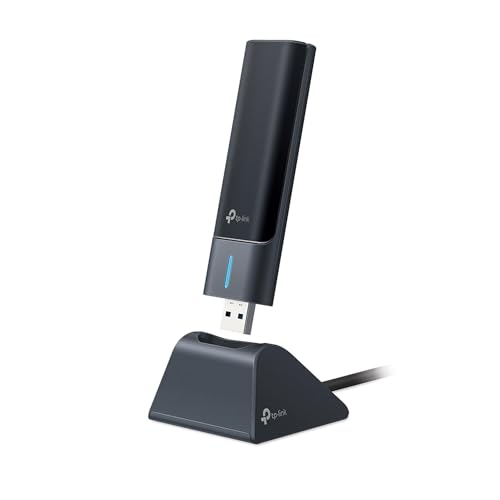
TP-Link Archer TX30U Plus AX1800 WiFi 6 USB Adapter ranks first overall in this specification-based comparison under the published weighted criteria.
Among the best dual band usb network adapters in this comparison, the TP-Link Archer TX30U Plus stands out as the first overall specification-based choice: it is a Wi-Fi 6 / AX1800 adapter over USB 3.0 with dual high-gain antennas, beamforming, MU-MIMO, OFDMA, and WPA3. For users who want a compact stick instead, the ASUS USB-AX57 Nano and MSI AX1800 Nano are the most specification-aligned nano options in the pool, while the TP-Link Archer T3U Plus remains a documented top dual band usb network adapters pick for desktops that benefit from an adjustable 5 dBi high-gain antenna. These three together represent the dual band usb network adapters covered by this guide.
Frequently Asked Questions
What is the practical difference between Wi-Fi 5 and Wi-Fi 6 dual-band USB adapters?
Wi-Fi 6 adapters such as the TP-Link Archer TX30U Plus, NETGEAR Nighthawk A7500, and ASUS USB-AX57 Nano list AX1800 speed classes and add efficiency features like OFDMA and BSS Coloring, while Wi-Fi 5 adapters like the TP-Link Archer T3U Plus and NETGEAR A6150 top out at AC1200 to AC1300 with MU-MIMO and beamforming only.
Are nano dual band usb network adapters good for desktop PCs?
Nano adapters such as the TP-Link Archer T2U Nano, TP-Link Archer T3U Nano, and NETGEAR A6150 work in desktop USB ports, but they rely on internal antennas and may not offer the same signal tuning as adapters with external antennas like the TP-Link Archer T3U Plus or TP-Link Archer TX30U Plus.
Do I need USB 3.0 for a dual band usb network adapter?
USB 3.0 is documented to remove the throughput bottleneck for AC1300 and AX1800 adapters such as the Blueshadow AC1300, TP-Link Archer T3U, and D-Link DWA-X1850. For AC600 and AC1200 classes like the NETGEAR A6150 and TP-Link Archer T2U Nano, USB 2.0 is typically sufficient because the wireless link itself is slower than the USB 2.0 ceiling.
Which operating systems are supported by the best dual band usb network adapters in 2026?
Most adapters in this list document Windows 10 and Windows 11 support. Several TP-Link models and Blueshadow also list macOS support, and Blueshadow additionally lists Linux kernel compatibility. The MSI AX1800 Nano, ASUS USB-AX57 Nano, NETGEAR Nighthawk A7500, and Nineplus N21CA are documented primarily for Windows 10 and 11.
Should I pick a dual band usb network adapter with an external antenna?
Adapters with documented external antennas, such as the TP-Link Archer T3U Plus with its 5 dBi high-gain antenna and the TP-Link Archer TX30U Plus with its dual high-gain antennas, give more flexibility to point the radio toward the router. Nano adapters like the ASUS USB-AX57 Nano and MSI AX1800 Nano are better when portability matters more than signal tuning.