Buying Guide
Choosing among the best wireless usb network adapters starts with matching the adapter’s wireless generation and listed bands to the rest of the network. A newer adapter cannot create a 6GHz network by itself, and a higher specification figure does not guarantee the same result in every room or setup. Treat the supplied specifications as a comparison framework rather than a hands-on performance test.
Match the wireless generation to the router
Wi-Fi 6E models are the NETGEAR Nighthawk A8000 WiFi 6E Adapter and TP-Link Archer TXE50UH Wi-Fi 6E Adapter. Both list tri-band operation with 6GHz support, but each requires compatible Wi-Fi 6E network equipment to use that band. The TP-Link Archer TXE50UH Wi-Fi 6E Adapter listing further specifies Windows 11 for 6GHz use. These models make the most sense when the router or mesh system already supports 6GHz.
Wi-Fi 6 dual-band choices include the TP-Link Archer TX20U Nano Wi-Fi 6 Adapter, TP-Link Archer TX23U AX1800 Adapter, MSI AX1800 Nano WiFi USB Adapter, Tenda U11 Pro AX900 Wi-Fi 6 Adapter, UGREEN CM762 AX900 Wi-Fi 6 Adapter, UGREEN AX900 Wi-Fi 6 and Bluetooth 5.4 Adapter, and Auscoumer WD-AX905 AX900 USB Wi-Fi 6 Adapter. Wi-Fi 6 is newer than Wi-Fi 5, while the actual connection still depends on the router, computer, environment, and configuration. The Tenda U11 Pro AX900 Wi-Fi 6 Adapter and the two UGREEN models use AX900-class specifications, while the TP-Link and MSI AX1800 models list higher dual-band throughput.
The TP-Link Archer T3U Plus AC1300 Adapter uses Wi-Fi 5 and is notable for its external 5dBi antenna and broad Windows and macOS support. It can fit an older computer or network where operating-system coverage and antenna positioning matter more than adopting the newest standard.
Compare bands and listed throughput
Dual-band adapters use 2.4GHz and 5GHz. The supplied listings generally show higher throughput on 5GHz and broader coverage characteristics on 2.4GHz. The AX1800 models list up to 1201 Mbps on 5GHz and 574 Mbps on 2.4GHz. The AX900 models list approximately 600 Mbps on 5GHz and 286 or 287 Mbps on 2.4GHz. The TP-Link Archer T3U Plus AC1300 Adapter lists 867 Mbps on 5GHz and 400 Mbps on 2.4GHz.
The NETGEAR Nighthawk A8000 WiFi 6E Adapter and TP-Link Archer TXE50UH Wi-Fi 6E Adapter add 6GHz to the two familiar bands. That extra band is documented for Wi-Fi 6E networks, but compatibility is essential. Before selecting a tri-band adapter, verify both the router standard and the computer’s operating-system requirements.
Decide between nano and external-antenna designs
Nano adapters are convenient when the computer will remain in one place or when a protruding antenna would be awkward. The TP-Link Archer TX20U Nano Wi-Fi 6 Adapter, MSI AX1800 Nano WiFi USB Adapter, and Auscoumer WD-AX905 AX900 USB Wi-Fi 6 Adapter emphasize compact designs. The TP-Link Archer TX23U AX1800 Adapter also describes a compact body intended not to block nearby ports.
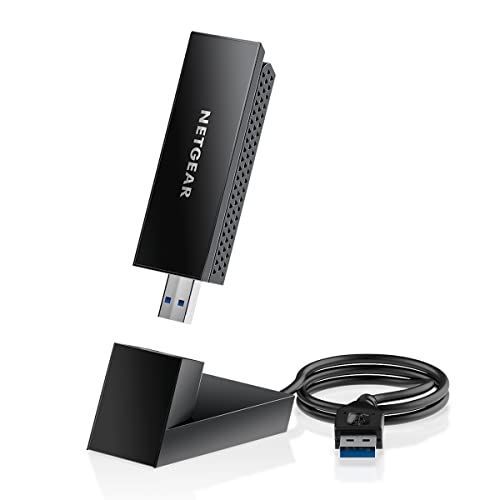
External antennas provide a different type of flexibility. The Tenda U11 Pro AX900 Wi-Fi 6 Adapter lists a rotatable 6dBi omnidirectional antenna, the UGREEN AX900 Wi-Fi 6 and Bluetooth 5.4 Adapter lists an adjustable 6dBi high-gain antenna, the TP-Link Archer T3U Plus AC1300 Adapter lists a 5dBi adjustable antenna, and the NETGEAR Nighthawk A8000 WiFi 6E Adapter uses a flippable antenna with a cradle. These designs may be preferable when the desktop sits under a desk, behind a display, or in another position where moving the antenna can help with placement.
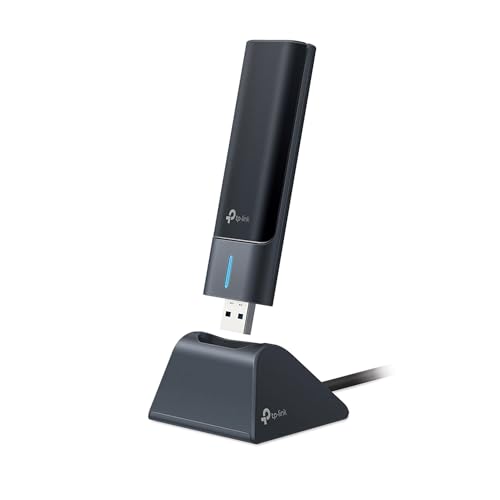
The TP-Link Archer TXE50UH Wi-Fi 6E Adapter takes another approach: its 1.2-meter USB 3.0 cable lets the adapter sit away from the computer. This can be useful when the USB port location is inconvenient, although it adds a separate cable to the setup.
Check USB connection and workspace fit
USB interface details matter because the adapter must fit the computer’s available port and leave enough room for nearby connectors. Nano bodies typically use the least physical space, while antenna-equipped models need more room around the antenna or cable.
A cradle or cable can make a desktop installation easier to position, but a nano adapter is simpler to leave connected to a laptop. Consider whether the computer travels, whether nearby USB ports are crowded, and whether an external antenna would be obstructed by the chassis. The TP-Link Archer TXE50UH Wi-Fi 6E Adapter specifically lists USB 3.0 and a 1.2-meter cable, while the TP-Link Archer TX23U AX1800 Adapter lists USB 3.0 and a compact body.
Review operating-system and setup requirements
Compatibility varies substantially. The TP-Link Archer TX20U Nano Wi-Fi 6 Adapter and TP-Link Archer TX23U AX1800 Adapter specify Windows 10 and 11. The UGREEN CM762 AX900 Wi-Fi 6 Adapter and UGREEN AX900 Wi-Fi 6 and Bluetooth 5.4 Adapter also limit their listings to Windows 10 and 11. Auscoumer’s WD-AX905 AX900 USB Wi-Fi 6 Adapter lists driver-free setup for Windows 10 and 11. The Tenda U11 Pro AX900 Wi-Fi 6 Adapter lists Windows 7, 10, and 11, while the TP-Link Archer T3U Plus AC1300 Adapter lists several Windows versions and macOS 10.9 through 10.15.
The NETGEAR Nighthawk A8000 WiFi 6E Adapter listing identifies Windows PC use, and the TP-Link Archer TXE50UH Wi-Fi 6E Adapter identifies Windows 11 for 6GHz operation. Confirm the exact computer operating system before choosing, especially if the system uses macOS, Linux, or an older Windows release not named in the listing. Built-in or preloaded drivers are documented for several models, but that feature does not remove the need to verify compatibility.
Consider security and extra functions
WPA3 is listed for the TP-Link Archer TXE50UH Wi-Fi 6E Adapter, TP-Link Archer TX20U Nano Wi-Fi 6 Adapter, TP-Link Archer TX23U AX1800 Adapter, and MSI AX1800 Nano WiFi USB Adapter. The UGREEN CM762 AX900 Wi-Fi 6 Adapter and UGREEN AX900 Wi-Fi 6 and Bluetooth 5.4 Adapter list WPA, WPA2, or mixed WPA/WPA2 modes. Security support should match the router’s configured network security.
Some adapters offer more than network reception. The UGREEN AX900 Wi-Fi 6 and Bluetooth 5.4 Adapter adds Bluetooth 5.4, while the Auscoumer WD-AX905 AX900 USB Wi-Fi 6 Adapter adds Bluetooth 5.3 and lists simultaneous support for seven Bluetooth devices. The Tenda U11 Pro AX900 Wi-Fi 6 Adapter, UGREEN AX900 Wi-Fi 6 and Bluetooth 5.4 Adapter, and Auscoumer WD-AX905 AX900 USB Wi-Fi 6 Adapter document hotspot or AP-related functions. These extras can matter when one USB connection needs to serve several roles, but they should not replace checking the primary Wi-Fi and operating-system requirements.
Final recommendation
TP-Link Archer TXE50UH Wi-Fi 6E Adapter ranks first overall in this specification-based comparison under the published weighted criteria.
TP-Link Archer TXE50UH Wi-Fi 6E Adapter is the highest-scoring returned product and the first overall specification-based choice.
TP-Link Archer TXE50UH Wi-Fi 6E Adapter is the first overall specification-based choice among these best wireless usb network adapters. Its Wi-Fi 6E tri-band design, AXE3000 specification, beamforming, WPA3, MU-MIMO, OFDMA, and cable-assisted placement give it the broadest high-end feature profile, provided the computer and router meet the stated requirements.
The NETGEAR Nighthawk A8000 WiFi 6E Adapter is a close fit for Windows users who want 6GHz access with a flippable antenna and cradle. For a small Wi-Fi 6 adapter, the TP-Link Archer TX20U Nano Wi-Fi 6 Adapter and TP-Link Archer TX23U AX1800 Adapter offer compact designs with AX1800 specifications and modern wireless features. The MSI AX1800 Nano WiFi USB Adapter provides a similar dual-band class with two listed antennas.
Choose the Tenda U11 Pro AX900 Wi-Fi 6 Adapter, UGREEN AX900 Wi-Fi 6 and Bluetooth 5.4 Adapter, or TP-Link Archer T3U Plus AC1300 Adapter when antenna positioning is more important than the smallest body. The UGREEN and Auscoumer options are distinctive when Bluetooth or hotspot functions are needed. In short, the top wireless usb network adapters here divide into three practical groups: Wi-Fi 6E for compatible 6GHz networks, Wi-Fi 6 for current dual-band upgrades, and Wi-Fi 5 with external antennas or broader legacy compatibility.
Frequently Asked Questions
What are the best wireless usb network adapters for a Wi-Fi 6E router?
The NETGEAR Nighthawk A8000 WiFi 6E Adapter and TP-Link Archer TXE50UH Wi-Fi 6E Adapter are the selected Wi-Fi 6E models. Both list tri-band access including 6GHz. The NETGEAR Nighthawk A8000 WiFi 6E Adapter requires a Wi-Fi 6E router or mesh system for 6GHz, and the TP-Link Archer TXE50UH Wi-Fi 6E Adapter listing specifies Windows 11 for 6GHz use. Confirm both requirements before selecting either adapter.
Should I choose a nano adapter or an external antenna?
Choose a nano design when keeping the adapter plugged in with minimal obstruction is the priority. The TP-Link Archer TX20U Nano Wi-Fi 6 Adapter, MSI AX1800 Nano WiFi USB Adapter, and Auscoumer WD-AX905 AX900 USB Wi-Fi 6 Adapter document compact designs. An external antenna can provide more positioning flexibility; the Tenda U11 Pro AX900 Wi-Fi 6 Adapter, UGREEN AX900 Wi-Fi 6 and Bluetooth 5.4 Adapter, TP-Link Archer T3U Plus AC1300 Adapter, and NETGEAR Nighthawk A8000 WiFi 6E Adapter document adjustable, high-gain, flippable, or cradle-based designs.
Which selected adapters support Bluetooth?
The UGREEN AX900 Wi-Fi 6 and Bluetooth 5.4 Adapter lists Bluetooth 5.4 and pairing with multiple device types. The Auscoumer WD-AX905 AX900 USB Wi-Fi 6 Adapter lists Bluetooth 5.3 and simultaneous connections for up to seven Bluetooth devices. The other selected models are presented in the supplied evidence primarily as Wi-Fi network adapters.
Do these adapters work with every operating system?
No. Compatibility is model-specific. Several models specify Windows 10 and 11, while the TP-Link Archer T3U Plus AC1300 Adapter lists Windows versions through XP and macOS 10.9 through 10.15. The UGREEN listings exclude macOS and Linux, and the Tenda U11 Pro AX900 Wi-Fi 6 Adapter listing names Windows 7, 10, and 11. Check the exact operating system and any 6GHz requirement before installation.
Does a higher listed speed guarantee faster wireless service?
No. The Mbps figures are product specifications, not test results or guarantees. Actual connectivity depends on the router, wireless band, computer, USB connection, distance, obstacles, and network conditions. Use the specifications to compare documented capabilities, then verify that the chosen model matches the rest of the network.