Buying Guide
Choosing among the best high-definition digital picture frames starts with the screen, but resolution is only one part of the decision. The supplied listings cover connected frames that receive photos from phones, large models intended for wall display, and offline frames that use memory cards or USB drives. A useful comparison therefore considers clarity, viewing flexibility, sharing methods, storage, and controls together.
Start with resolution and panel type
Resolution describes how much detail the frame can show. The KODAK provides 1920x1200 resolution, while Pexar by Lexar lists 2000x1200 2K resolution. Most of the selected 15.6-inch models use 1920x1080 Full HD panels, including BIGASUO, Humblestead, FANGOR, Euphro, and Pastigio. These specifications are a practical match for modern phone photos and video clips.
Panel type also matters. IPS appears in the specifications for BIGASUO, Humblestead, FANGOR, Euphro, Dragon Touch, KECAG, and other selected frames. IPS is documented as a display technology, while the listings specifically state wide-angle viewing for BIGASUO and Dragon Touch. Pexar by Lexar and Aura Walden additionally document anti-glare screens. If the frame will sit near a window or under overhead lighting, anti-glare is a useful listed feature to prioritize.
Match screen size to the room
A 10.1-inch frame is easier to place on a desk, shelf, or bedside table. KODAK and KECAG use this compact format, while Pexar by Lexar increases the size to 11 inches. Large 15- to 15.6-inch frames are better suited to a prominent console, sideboard, or wall. Aura Walden has a 15-inch screen, and BIGASUO, Humblestead, FANGOR, Euphro, and Pastigio use 15.6-inch displays.
Dragon Touch goes larger with a 16.7-inch screen. Its listing documents wall mounting and portrait or landscape use, making it a candidate for a room where the frame should be visible from farther away. Larger screens need more physical space, so check the listed dimensions and intended placement before choosing one.
Decide how photos will reach the frame
Wi-Fi frames are useful when family members need to send photos remotely. KODAK supports its app, email, Google Photos, PC link, USB, and SD card. Pexar by Lexar uses an app for photos and videos and also accepts SD cards and USB-A drives. BIGASUO, Humblestead, FANGOR, Euphro, Aura Walden, Dragon Touch, and Pastigio document app-based sharing as well.
The app ecosystem differs by model. The listings name Frameo for BIGASUO and Pastigio, Uhale for FANGOR and Euphro, AiMOR for Humblestead, Vphoto for Dragon Touch, and Aura for Aura Walden. This matters when several people will contribute, because invitations, upload methods, and supported devices are tied to the specified app.
If wireless setup is not wanted, KECAG is the most direct alternative. It works with SD cards and USB drives and does not require Wi-Fi or an app. Pastigio offers a middle ground by documenting both Frameo sharing and non-Wi-Fi transfer through an SD card, USB drive, or Windows computer.
Built-in storage is useful when a frame will hold a large rotating collection. BIGASUO and Humblestead list 64GB capacities. Pexar by Lexar, Euphro, FANGOR, KECAG, and Dragon Touch list 32GB capacities or supplied 32GB media. Aura Walden documents unlimited cloud storage, but its listing does not specify built-in storage or removable-media playback.
External media support adds flexibility for importing or backing up photos. Pexar by Lexar supports SD and USB-A, BIGASUO supports SD and USB flash drives, FANGOR supports SD and USB, and Dragon Touch supports TF cards and USB. Euphro specifies Micro SD expansion, while KECAG supports SD and USB drives up to 32GB. FANGOR and BIGASUO also document video playback with sound through built-in speakers.
Look for orientation and mounting features
Auto-rotation helps when photos arrive in both portrait and landscape formats. BIGASUO, Humblestead, FANGOR, Euphro, Dragon Touch, Pastigio, and KECAG document auto-rotation or orientation adjustment. Wall mounting is documented for BIGASUO, Humblestead, FANGOR, Dragon Touch, Aura Walden, and Pastigio. These features are especially relevant for large frames that will be viewed as room decor rather than handled like a small tabletop display.
For tabletop use, an adjustable angle can be more useful than wall hardware. KODAK lists an adjustable-angle stand, while Aura Walden includes a tabletop stand and wall-mounting kit. KECAG uses a remote and motion sensor, which may suit a bedside or entryway location where automatic activation is helpful.
Consider control and everyday extras
Touchscreens appear across many selected Wi-Fi frames, including KODAK, Pexar by Lexar, BIGASUO, Humblestead, FANGOR, Dragon Touch, and Pastigio. KECAG instead emphasizes a remote and physical local-media workflow. Slideshow controls vary: Euphro lists image scaling, order, hiding, and transition settings; KECAG lists a clock, calendar, alarm, timer, and music playback; KODAK lists weather, clock, auto-rotation, and sleep mode.
These extras should support the intended use rather than distract from it. Choose a connected touchscreen when remote sharing is central. Choose a non-Wi-Fi frame when simple local playback is the priority. Choose a large wall-mountable IPS model when visibility and room placement matter most.
Final recommendation
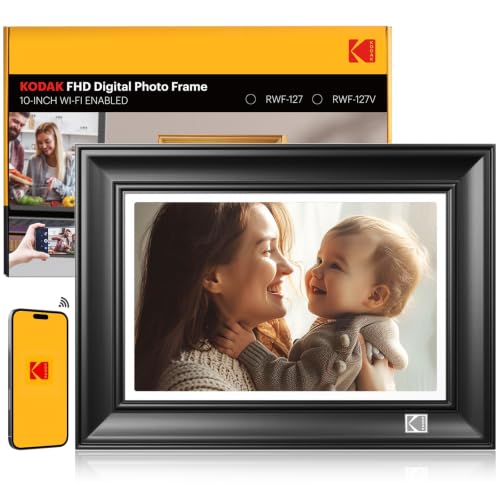
KODAK 10.1-Inch WiFi Digital Picture Frame ranks first overall in this specification-based comparison under the published weighted criteria.
KODAK 10.1-Inch WiFi Digital Picture Frame is the highest-scoring returned product and the first overall specification-based choice.
KODAK 10.1-Inch WiFi Digital Picture Frame is the first overall specification-based choice among the selected models. It combines 1920x1200 resolution, Wi-Fi 6, 32GB storage, natural wood construction, and a broad set of transfer methods. Pexar by Lexar is the better fit when 2K resolution and anti-glare viewing take priority.
For a large display, BIGASUO, Humblestead, FANGOR, Euphro, and Pastigio all document 15.6-inch formats, but their strengths differ. BIGASUO and Humblestead emphasize 64GB storage, FANGOR adds PC transfer and video sound, Euphro offers detailed slideshow customization, and Pastigio combines app sharing with offline transfer. Dragon Touch is the largest option, while Aura Walden brings anti-glare Full HD viewing and automatic brightness control.
Among the best high-definition digital picture frames for a simple setup, KECAG avoids Wi-Fi and app requirements while retaining a 1080P IPS display, remote control, motion sensing, and local media playback. The top high-definition digital picture frames are therefore not identical: the right choice depends on whether display detail, remote sharing, storage, large-scale placement, or offline operation matters most.
Frequently Asked Questions
What resolution should I look for in the best high-definition digital picture frames?
The selected listings include 1280x800 HD, 1280x960, 1920x1080 Full HD, 1920x1200, and 2000x1200 2K displays. Higher listed resolution can show more detail, but screen size and panel type also matter. Pexar by Lexar lists 2K resolution, while KODAK lists 1920x1200 and several large models list 1920x1080 IPS panels.
Are Wi-Fi digital picture frames better than offline frames?
Neither design is universally better. Wi-Fi models such as KODAK, Humblestead, and Aura Walden can receive photos through their specified apps or connected services. KECAG does not require Wi-Fi or an app and instead uses SD cards and USB drives. Pastigio documents both wireless and local transfer, making it a flexible option for mixed households.
Which selected frame is best for wall mounting?
The listings document wall mounting for BIGASUO, Humblestead, FANGOR, Dragon Touch, Aura Walden, and Pastigio. Dragon Touch offers the largest listed screen at 16.7 inches, while the 15- and 15.6-inch models may be easier to fit on a wall. Confirm the frame’s dimensions and mounting method for the intended location.
Do these digital frames play videos?
Several selected products document video support. KODAK supports photos and videos, BIGASUO and FANGOR specify video playback with sound, and Pexar by Lexar supports photo and video sharing. KECAG also lists photos, videos, and music playback. Check each model’s stated transfer method and any documented clip limitations before preparing media.
Which frame is easiest for local photo playback?
KECAG is a clear choice for offline playback because its listing specifically says no Wi-Fi or app is needed. It accepts SD cards and USB drives and includes a remote. Pastigio also supports SD and USB transfer, but it additionally offers wireless sharing through the Frameo app.