Buying Guide
The best intel celeron 2-in-1 laptops are defined by more than the processor name. A useful comparison should separate the convertible mechanism, touch display, memory and storage arrangement, operating system, and ports. The selected products include both 360-degree hinge designs and a detachable Windows hybrid, so the right choice depends on how you expect to use the device.
Choose the operating system first
Windows models provide the familiar desktop environment and support the Windows-specific features documented in listings. The ASUS VivoBook Go 14 Flip uses Windows 11 Home in S mode, while the Dell Latitude 3190 N5030, Lenovo IdeaPad D330, and TOSHIBA Dynabook K50 list Windows 11 Professional. The Dell Latitude 3190 N4100 listing also describes Windows-based education use.
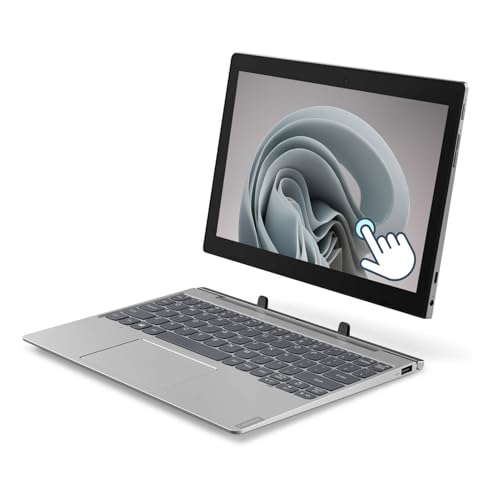
Windows 11 Pro is specifically identified on the Lenovo IdeaPad D330 and TOSHIBA Dynabook K50. The IdeaPad D330 is a detachable design, making it the clearest choice here for someone who wants to disconnect the keyboard and use a tablet. The Dynabook K50 is also tablet-oriented and lists HDMI on its dock, which may be useful for presentations.
ChromeOS appears on the Samsung Chromebook Plus V2 360, Lenovo Flex 5 Chromebook, Lenovo 300e Gen 2, HP Chromebook x360 14, and both selected Dell Chromebook 3100 models. ChromeOS is centered on browser-based work, cloud files, and web applications. The Lenovo Flex 5 listing specifically describes access to files stored in a Google account, while the HP Chromebook x360 14 identifies Google Play Store access.
Compare Celeron processor classes carefully
The processor names are not interchangeable. The Dell Latitude 3190 N5030 uses a quad-core Celeron N5030, and the ASUS VivoBook Go 14 Flip uses a Celeron N4500 with two cores. The Lenovo Flex 5 lists a Celeron N5205U, while the Samsung model lists a Celeron 3965Y. Other selected products use the Celeron N4000 or N4020.
Those processor details help establish the intended workload, but they do not amount to hands-on performance testing. For browser tabs, documents, touch navigation, streaming, and educational applications, memory and storage can matter alongside the CPU. The 8GB RAM and 256GB SSD listed for the Dell Latitude 3190 N5030 are notably different from the 4GB and 32GB or 64GB configurations common among the Chromebook models.
Match memory and storage to your workflow
Most selected products list 4GB of RAM. That is a common configuration in compact Celeron hybrids, but it leaves less room for extensive multitasking than the 8GB configuration documented for the Dell Latitude 3190 N5030. The Dell Latitude 3190 N4100 listing indicates 4GB and 8GB options, so the exact unit specification should be checked.
Storage types also vary. SSD storage is listed for the Dell Latitude 3190 N5030, Dell Latitude 3190 N4100, and Lenovo IdeaPad D330. eMMC storage appears on the ASUS VivoBook Go 14 Flip, Samsung Chromebook Plus V2 360, HP Chromebook x360 14, and Dell Chromebook 3100 models. The Lenovo 300e Gen 2 listing identifies 32GB solid-state storage, while the Samsung model combines 64GB eMMC with a 64GB SD card.
If you keep many files locally, the 256GB SSD Dell configuration offers the most capacity in this selection. For ChromeOS devices, cloud storage and microSD support can be more relevant. The Samsung, Lenovo Flex 5, Toshiba, and Dell models document card-reader or expansion options, but the exact slot type differs by product.
Decide between a 360-degree hinge and detachable keyboard
A 360-degree hinge keeps the display and keyboard connected while allowing laptop, tablet, tent, and stand positions. The ASUS VivoBook Go 14 Flip, Samsung Chromebook Plus V2 360, Lenovo Flex 5, Lenovo 300e Gen 2, HP Chromebook x360 14, and Dell Latitude 3190 N4100 document this general flexibility. This format works well when you alternate between typing and touch navigation.
A detachable design separates the screen from the keyboard. The Lenovo IdeaPad D330 is the selected example with this design. It is more tablet-like when detached, but the keyboard must be reattached for conventional typing. Pen support also varies: the Samsung model supports a stylus, the Lenovo Flex 5 supports an optional digital pen, and the Dell Latitude 3190 N4100 listing mentions an optional active pen. The Lenovo 500e candidate was not selected, and no unselected model is needed to make this comparison.
Consider screen size and resolution
The largest displays here are 14-inch models. The ASUS VivoBook Go 14 Flip has a 14-inch FHD touch display, while the HP Chromebook x360 14 uses a 14-inch HD multitouch panel. The Lenovo Flex 5 provides a 13.3-inch FHD touchscreen, and the Samsung Chromebook Plus V2 360 uses a 12.2-inch FHD+ 16:10 panel.
Compact options range from 10.1 inches on the Lenovo IdeaPad D330 and TOSHIBA Dynabook K50 to 11.6 inches on the Lenovo 300e Gen 2 and Dell Chromebook 3100. Smaller screens make tablet handling easier, while larger screens provide more room for documents and browser layouts. The ASUS and Lenovo Flex 5 have the clearest resolution advantage because both list FHD panels.
Check ports, wireless details, and cameras
Port selection can influence how easily a hybrid connects to accessories. The ASUS lists USB-C, two USB-A variants, HDMI, and a microSD reader. The Lenovo Flex 5 lists two USB-C ports, USB-A, an audio jack, and an SD card reader. The TOSHIBA Dynabook K50 lists USB-C, USB-A, audio, microSD, and HDMI on the dock.
The Samsung Chromebook Plus V2 360 includes two USB-C ports, USB 3.0 Type-A, and a microSD reader. It also has front and keyboard-deck cameras. The Dell Chromebook 3100 listing identifies USB and microSD connectivity, while the Lenovo 300e Gen 2 and HP Chromebook x360 14 document integrated cameras. Wi-Fi and Bluetooth versions are supplied for several models, but wireless specifications should be compared with the peripherals you intend to use.
Final recommendation
ASUS VivoBook Go 14 Flip J1400KA ranks first overall in this specification-based comparison under the published weighted criteria.
The final choice among the best intel celeron 2-in-1 laptops depends on the documented features that match your intended use.
ASUS VivoBook Go 14 Flip J1400KA is the highest-scoring returned product and the first overall specification-based choice. Its Celeron N4500, 14-inch FHD touch display, four viewing modes, fingerprint sensor, 128GB eMMC, and broad port selection give it the most balanced profile in this comparison.
The top intel celeron 2-in-1 laptops serve different needs. Choose the Samsung Chromebook Plus V2 360 for FHD+ ChromeOS touch use and stylus support. Choose the Dell Latitude 3190 N5030 when 8GB RAM and a 256GB SSD matter most. The Lenovo Flex 5 is a practical mid-size Chromebook with FHD resolution, while the Lenovo IdeaPad D330 is the clearest detachable Windows option.
For education-oriented construction, the Dell Latitude 3190 N4100 documents a spill-resistant keyboard, rubberized base, and Gorilla Glass touch protection. For a larger ChromeOS screen, the HP Chromebook x360 14 is the selected 14-inch alternative. The TOSHIBA Dynabook K50, Lenovo 300e Gen 2, and Dell Chromebook 3100 are compact choices with different Windows or ChromeOS configurations.
Frequently Asked Questions
What are the best intel celeron 2-in-1 laptops for Windows?
The ASUS VivoBook Go 14 Flip is the leading specification-based Windows choice because it combines a Celeron N4500 with a 14-inch FHD touchscreen and four modes. The Dell Latitude 3190 N5030 is another notable Windows option because its listing identifies 8GB RAM and a 256GB SSD. The Lenovo IdeaPad D330 and TOSHIBA Dynabook K50 use smaller tablet-style formats and list Windows 11 Pro.
Are these laptops suitable for tablet use?
Yes, the selected products document either 360-degree hinge modes or a detachable keyboard. The ASUS VivoBook Go 14 Flip, Samsung Chromebook Plus V2 360, Lenovo Flex 5, Lenovo 300e Gen 2, HP Chromebook x360 14, and Dell Latitude 3190 N4100 list convertible positions. The Lenovo IdeaPad D330 is detachable, so its display can be separated from the keyboard.
Which selected model has the most storage?
The Dell Latitude 3190 N5030 listing specifies a 256GB SSD. The Dell Latitude 3190 N4100 lists a 128GB SSD, while the ASUS VivoBook Go 14 Flip lists 128GB eMMC. The Lenovo IdeaPad D330 lists a 64GB SSD. Several ChromeOS models list 32GB or 64GB storage, with the Samsung Chromebook Plus V2 360 also documenting a 64GB SD card.
Which models have full-HD or higher-resolution displays?
The ASUS VivoBook Go 14 Flip and Lenovo Flex 5 list 14-inch FHD and 13.3-inch FHD touchscreens, respectively. The Samsung Chromebook Plus V2 360 lists a 12.2-inch FHD+ display at 1920 x 1200. Other selected products list HD panels, including the HP Chromebook x360 14, Lenovo 300e Gen 2, Dell Chromebook 3100, TOSHIBA Dynabook K50, and Lenovo IdeaPad D330.
Do all selected models include a stylus?
No. The Samsung Chromebook Plus V2 360 documents Samsung Stylus support, and the Lenovo Flex 5 supports an optional digital pen. The Dell Latitude 3190 N4100 listing mentions an optional active pen. The supplied evidence does not establish that a stylus is included with those products, so accessory contents should be verified separately.