Buying Guide
The best intel core m3 laptops require more than checking the processor name. Core M3 appears across several generations and device types, including small tablet PCs, school-oriented convertibles, traditional 15.6-inch notebooks, and an Intel-based MacBook. The most useful comparison points are the exact processor model, memory, storage type and capacity, display design, operating system, and physical connectivity.
Start with the processor listing
The clearest processor entries identify models such as the Core m3-8100Y, Core M3-6Y30, or Core M3-7Y30. These details are more useful than a listing that simply says “Core M3.” The HILLSUSU Core M3-6Y30, HP ProBook X360, Microsoft Surface Go 2, Apple MacBook, and EYY provide especially clear processor information. By contrast, the HILLSUSU 15.6-inch model gives a less specific Core M3 description, and the HYPERSTRIX listing contains an inconsistency that should be verified before purchase.
The supplied evidence supports these computers for ordinary tasks such as documents, web browsing, online learning, video calls, and light entertainment. It does not support claims about gaming performance, professional creative workloads, thermals under sustained load, or hands-on battery endurance. Treat the processor as an entry-level productivity component and match expectations to the rest of the configuration.
Match memory and storage to your workload
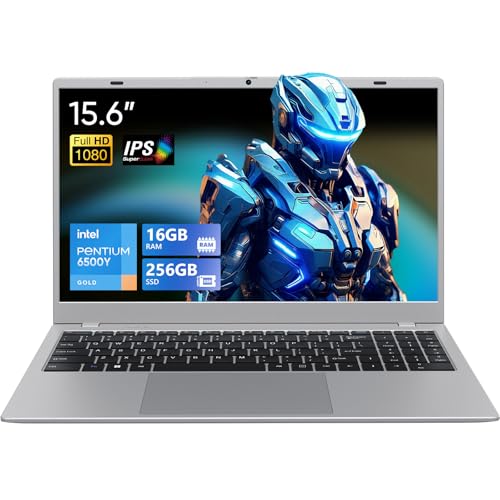
Memory affects how comfortably a laptop handles multiple browser tabs and open applications, while an SSD is a solid-state storage design. The most specification-aligned capacity combinations here are the HILLSUSU 15.6-inch and HYPERSTRIX models, each listing 16GB RAM and a 512GB SSD. They are suitable choices when you expect to keep larger files or more applications on the computer.
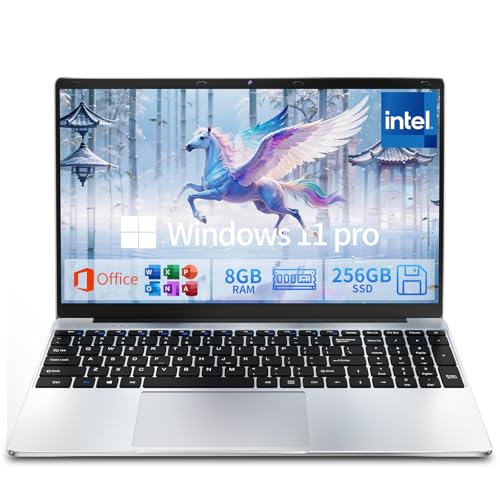
An 8GB RAM and 256GB SSD configuration, found in the EYY, AE86, Omnica, HILLSUSU Core M3-6Y30, and EKY, is a practical middle ground for schoolwork, office documents, browsing, and media. The Surface Go 2 uses 8GB RAM and a 128GB NVMe SSD, which keeps the device compact but leaves less storage headroom.
Choose the right screen and chassis
A 15.6-inch Full HD screen provides more working area for spreadsheets, documents, and split-screen browsing. The HILLSUSU, HYPERSTRIX, EYY, EKY, AE86, and Omnica models document this larger format, with IPS or anti-glare details supplied for several of them. The trade-off is weight: the selected 15.6-inch systems list weights from about 3.3 to the current price.
A convertible design is useful when you want to fold the screen for presentation, tent, stand, or tablet-style use. The EKY explicitly documents laptop, tablet, tent, and stand modes through its 360-degree hinge. The HYPERSTRIX and HP ProBook X360 also document 2-in-1 designs, while the AE86 and Omnica list 180-degree hinges rather than full tablet conversion. Do not assume that every touchscreen or hinged model includes a stylus or detachable keyboard; those accessories are not consistently documented.
For portability, the Surface Go 2 is a tablet PC with an integrated adjustable stand and a listed weight of 522 grams. Its 10.5-inch touchscreen is much smaller than the 15.6-inch notebooks, but the design is easier to carry. The Apple MacBook offers another compact option, though its listing does not establish the current macOS version or software support.
Check ports and wireless features
Port selection can determine whether a laptop fits your desk setup. The EYY lists three USB-A ports, USB-C, HDMI, and a headphone jack. The EKY also documents USB-A, HDMI, USB-C, headphone, and dedicated charging connections. The HYPERSTRIX adds USB 3.0 ports, HDMI, microSD, USB-C, and RJ45, making it useful for users who connect several peripherals.
The Surface Go 2 has USB-C, Surface Connect, and a headphone jack, with a microSD reader documented on the LTE listing. Review the exact listing for the selected configuration because ports can vary between related models.
Compare software and support details
Windows 11 Pro is listed on the Surface Go 2, HP ProBook X360, HILLSUSU models, AE86, Omnica, EYY, and EKY. Several traditional laptops also list Office or Microsoft 365 as included or preinstalled. Confirm activation and account requirements before relying on bundled software for work or school.
The Apple MacBook uses macOS, while the Windows models use Microsoft’s operating system. Warranty terms also vary across listings, from limited refurbished coverage to one- and two-year terms. Refurbished products deserve extra attention to the specific seller condition and included accessories.
Final Recommendation
Microsoft Surface Go 2 Core M3 Tablet PC ranks first overall in this specification-based comparison under the published weighted criteria.
The final choice among the best intel core m3 laptops depends on the documented features that match your intended use.
Microsoft Surface Go 2 Core M3 Tablet PC is the first overall specification-based choice among the top intel core m3 laptops in this comparison.
It combines an Intel Core M3-8100Y processor, 8GB RAM, a 128GB NVMe SSD, a 10.5-inch touchscreen, Windows 11 Pro, a built-in adjustable stand, and a listed 522-gram weight. Its smaller display and storage mean it is better suited to mobile everyday work than to a desktop replacement.
The HILLSUSU 15.6-inch Core M3 Laptop is the best fit for buyers prioritizing 16GB RAM, a 512GB SSD, a Full HD IPS anti-glare display, Windows 11 Pro, and included Office software. The HYPERSTRIX is an alternative for a convertible touchscreen and more extensive ports, although its processor description should be checked.
For a clearly identified Core m3-8100Y configuration, the EYY offers 8GB RAM, a 256GB SSD, a Full HD display, a webcam shutter, and wireless connectivity. The EKY is a better fit when 360-degree flexibility matters. Buyers prioritizing mobility should consider the Microsoft Surface Go 2, while the Apple MacBook is the distinct macOS option. These are specification-based recommendations, not hands-on test results.
Frequently Asked Questions
Are the best intel core m3 laptops suitable for school and office work?
The selected listings describe configurations intended for documents, browsing, online learning, video calls, and ordinary office use. Models with 8GB or 16GB RAM and an SSD are practical starting points. The processor is not evidence of suitability for every demanding application, so specialized software requirements should be checked separately.
Should I choose a 15.6-inch laptop or a compact Surface Go 2?
Choose a 15.6-inch model if you want more screen space for documents, spreadsheets, or multitasking. Choose the Surface Go 2 if low carry weight, touch input, and a built-in stand matter more. The Surface Go 2 has a 10.5-inch display and 128GB SSD, while the larger selected laptops generally offer 256GB or 512GB storage.
Are all Core M3 laptops convertible?
No. The list includes traditional notebooks, 2-in-1 convertibles, a tablet PC, and a MacBook. The EKY documents four modes through a 360-degree hinge; the HYPERSTRIX and HP ProBook X360 also document convertible designs. A standard notebook such as the Omnica or HILLSUSU Core M3-6Y30 should be considered a conventional laptop unless the listing says otherwise.
Is 8GB RAM enough for a Core M3 laptop?
The supplied configurations suggest that 8GB RAM is a reasonable baseline for browsing, documents, study, and everyday applications. If you expect heavier multitasking or want more storage alongside it, the 16GB and 512GB HILLSUSU and HYPERSTRIX configurations provide more capacity on paper. RAM upgradeability is not established for the selected products, so choose the needed configuration at purchase.
What should I verify before buying a refurbished model?
Check the exact processor, memory, storage, operating system, warranty, condition, and included accessories. The Surface Go 2 and HP ProBook X360 listings are refurbished, and the Surface listing specifically notes that a Type Cover may be sold separately. Confirm those details for the exact listing rather than assuming accessories shown in product photos are included.