Buying Guide
The best 11th gen intel core i7 laptops in this comparison are not one uniform type. The list includes business notebooks, a workstation, touchscreen laptops, and a convertible. Because this is a specification-based guide using public listing data, the rankings focus on documented hardware and practical configuration choices rather than hands-on results or customer opinions.
Start with the processor class
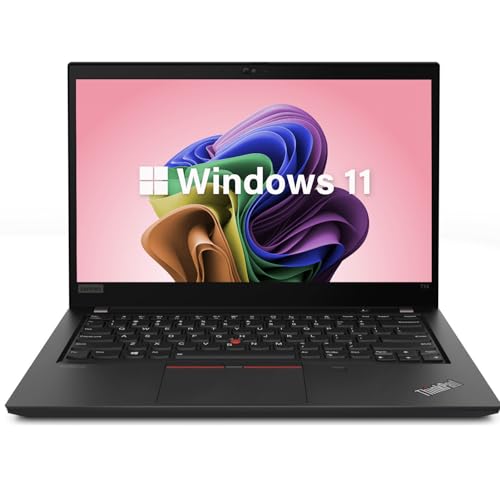
The selected processors fall into two useful groups. The Core i7-1165G7 and Core i7-1185G7 are four-core mobile chips suited to general productivity, office applications, multitasking, web work, meetings, and common professional software. Models such as the Lenovo ThinkPad T14 Gen 2, Lenovo ThinkPad X1 Carbon Gen 9, and Dell Latitude 7420 Touchscreen use this class.
The Core i7-11850H appears in the Dell Precision 5560 Workstation and Dell Latitude 5521. Both listings document eight cores, giving these laptops a processor configuration aimed at heavier workloads. The Precision adds NVIDIA RTX A2000 graphics, making it the more specialized choice when software can use discrete graphics. The Latitude 5521 instead emphasizes CPU, memory, and storage capacity.
Processor labels alone do not determine the best fit. A four-core chip in a lightweight business notebook may be more suitable for travel than an eight-core system in a larger chassis. Match the processor to the applications you expect to run, and weigh the complete configuration rather than focusing only on the Core i7 name.
Choose memory for your workload
Sixteen gigabytes is a practical starting point for the selected laptops. It appears in the Dell Latitude 7420 Touchscreen, Microsoft Surface Laptop 4, Lenovo ThinkPad T14 Gen 2, and Acer TravelMate Spin P4. This amount gives a specification-based buyer a sensible multitasking baseline for documents, browsers, meetings, and ordinary productivity software.
Thirty-two gigabytes is more attractive for heavier multitasking, larger projects, or users who want additional headroom. The Lenovo ThinkPad T14s Gen 2, Dell Precision 5560 Workstation, Dell Latitude 5520 with 32GB RAM, Dell Latitude 5521, and Dell Latitude 5420 with 32GB RAM all document that capacity. Memory type varies, including DDR4 and LPDDR4x, so check the exact listing when upgradeability matters.
Compare SSD capacity
A 512GB SSD is the most common configuration in this selection. It appears across compact business models and touchscreen options, including the Microsoft Surface Laptop 4 and Dell Latitude 7420 Touchscreen. That capacity is a reasonable middle ground for office files, applications, and a personal media collection.
The Dell Precision 5560 Workstation, Dell Latitude 5520 with 32GB RAM, and Dell Latitude 5521 list 1TB SSDs. These are suitable choices for larger local file collections. Buyers who store large projects locally should prioritize the 512GB or 1TB options.
Pick the right screen and design
Most selected models use Full HD displays. The 14-inch size is represented by several business laptops, including the Lenovo ThinkPad T14 Gen 2 and Dell Latitude 5420 with 32GB RAM. This size offers a useful compromise between workspace and portability. The 15.6-inch Dell Latitude 5520 with 32GB RAM and Dell Precision 5560 Workstation provide larger viewing areas, but their larger formats may be less convenient for frequent travel.
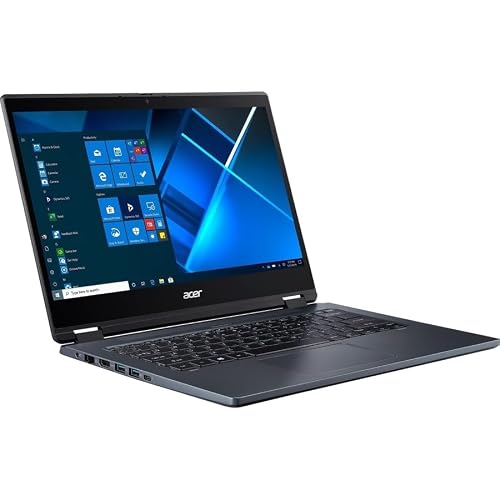
Resolution and screen type create meaningful differences. The Lenovo ThinkPad X1 Carbon Gen 9 lists a 1920x1200 IPS display, while the Microsoft Surface Laptop 4 lists a 2256x1504 touchscreen. Touch input is also documented on the Dell Latitude 7420 Touchscreen and Acer TravelMate Spin P4. The Acer provides the selected convertible format, making it a natural option for buyers who specifically want a 2-in-1 design.
The Dell Latitude 5521 lists a 1366x768 non-touch panel. Its processor, RAM, and SSD specifications are strong on paper, but its display specification is less detailed than the Full HD alternatives. Check resolution before choosing a laptop primarily for spreadsheets, creative applications, or side-by-side windows.
Review ports and office features
Thunderbolt 4 appears on several business configurations. The Lenovo ThinkPad T14 Gen 2, Dell Precision 5560 Workstation, Dell Latitude 5520 with 32GB RAM, Dell Latitude 7420 Touchscreen, and Dell Latitude 5420 with 32GB RAM document Thunderbolt connectivity. HDMI and USB ports are also common, helping connect monitors, storage, and presentation equipment.
The Dell Latitude 5520 with 32GB RAM stands out for its documented RJ45 Ethernet and SD card reader. The Precision 5560 Workstation also lists an SD card slot, while the ThinkPad T14 Gen 2 includes a microSD reader. If wired networking or removable media is important, compare the exact port list instead of assuming every thin laptop includes the same connections.
Business-oriented features are another recurring theme. Windows 11 Pro is listed on most selected systems, and several include fingerprint readers, webcams, backlit keyboards, or Wi-Fi 6. These features can help with office deployment and daily convenience, but their presence should still be verified against the specific seller listing.
Consider portability and condition
The Lenovo ThinkPad X1 Carbon Gen 9 has the lowest listed weight in this selection. The Microsoft Surface Laptop 4 and Lenovo ThinkPad T14s Gen 2 also list compact weights of 2.5 and the current price. These are travel-oriented specifications in the group. The Dell Precision 5560 Workstation is heavier according to its listing, despite its 15.6-inch format and professional hardware.
Many products here are renewed or refurbished listings. That can make older business hardware accessible, but condition, warranty terms, included accessories, and the exact configuration deserve careful review. The listings show warranty periods that vary by product, so compare those details before ordering. One Dell Latitude 5420 listing contains an inconsistent processor-generation reference in its feature text; the title and repeated processor details were used for eligibility, but buyers should confirm the final specification.
Final recommendation
Dell Precision 5560 Workstation ranks first overall in this specification-based comparison under the published weighted criteria.
The Dell Precision 5560 Workstation is the first overall specification-based choice among the best 11th gen intel core i7 laptops in this comparison. Its eight-core Core i7-11850H, 32GB memory, 1TB SSD, and RTX A2000 graphics give it a broad documented hardware package, though its listed weight makes it better suited to desk-based professional work than daily commuting.
For a more portable business setup, the Lenovo ThinkPad T14s Gen 2 and Lenovo ThinkPad X1 Carbon Gen 9 are useful alternatives. The T14s emphasizes 32GB RAM and business connectivity, while the X1 Carbon emphasizes low listed weight and a 1920x1200 IPS display. The Microsoft Surface Laptop 4 is a suitable match for a compact high-resolution touchscreen.
The top 11th gen intel core i7 laptops also include practical larger-screen and high-memory choices. Choose the Dell Latitude 5520 with 32GB RAM for 32GB memory, a 1TB SSD, and an extensive port selection. Choose the Dell Latitude 5521 when its eight-core processor is more important than display resolution. For touch flexibility, consider the Dell Latitude 7420 Touchscreen or Acer TravelMate Spin P4, with the Acer providing the documented convertible format.
Frequently Asked Questions
Which of the best 11th gen intel core i7 laptops is suitable for office and school work?
The selected configurations commonly document 16GB memory, SSD storage, Full HD displays, Wi-Fi, webcams, and Windows 11 Pro. Those specifications suit documents, browsers, meetings, presentations, and ordinary multitasking. The Lenovo ThinkPad T14 Gen 2, Dell Latitude 7420 Touchscreen, and Microsoft Surface Laptop 4 are balanced examples for these uses.
Which selected laptop has a discrete graphics specification?
The Dell Precision 5560 Workstation. Its listing documents NVIDIA RTX A2000 4GB GDDR6 discrete graphics alongside Intel UHD graphics. The other selected laptops document integrated Intel graphics or do not provide a discrete graphics specification, so the Precision is the clearest choice for workloads that require documented workstation graphics hardware.
Is 32GB RAM worth choosing over 16GB?
It depends on the workload. Sixteen gigabytes is a practical configuration for everyday productivity, while 32GB offers more headroom for heavier multitasking and larger projects. The Lenovo ThinkPad T14s Gen 2 and Dell Latitude 5420 with 32GB RAM provide that capacity in business-oriented formats. Buyers should also consider SSD capacity and display needs rather than treating memory as the only deciding factor.
Which laptop is easiest to carry?
The Lenovo ThinkPad X1 Carbon Gen 9 has the lowest listed weight in this selection. The Microsoft Surface Laptop 4 and Lenovo ThinkPad T14s Gen 2 also list compact weights of 2.5 and the current price. These figures come from public specifications, not independent weighing, so confirm the final seller listing before purchase.
Should I choose a touchscreen or a standard display?
Choose a touchscreen if direct interaction, presentation use, or flexible input matters. The Microsoft Surface Laptop 4 and Dell Latitude 7420 Touchscreen document touch displays, while the Acer TravelMate Spin P4 adds a convertible design. A standard display may be preferable when touch is unnecessary, especially if you prioritize a familiar business notebook format and a straightforward port selection.