Buying Guide
The best intel pentium dual-core laptops are generally aimed at everyday computing rather than demanding creative workloads. The supplied listings cover several processor generations and product formats, so comparing the complete configuration matters more than reading the Pentium label alone. Look first at the processor details, then check memory, storage, display, operating system, and physical design.
Start with the processor evidence
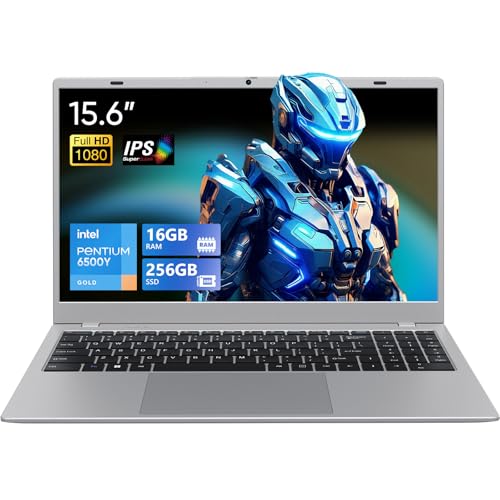
Pentium branding appears across Gold and Silver models, including dual-core and quad-core listings. The UOWAMOU and VIGSENUP use the Pentium Gold 6500Y and list two cores and four threads. The Microsoft Surface Go uses the dual-core Pentium Gold 4415Y. Other selected laptops use Pentium Silver N5000, N5030, N4500, or N6000 variants. The ASUS Vivobook Go and Acer Chromebook 315 document four-core N6000 processors, while the HP x360 lists the dual-core N5000.
Core count, thread count, base frequency, and boost frequency are useful clues, but they do not replace a hands-on performance test. This comparison therefore treats processor specifications as one part of the ranking rather than promising a particular speed in real applications. The HP business listing is a special case: its title says Intel dual-core processor series, but its detailed evidence identifies a Celeron N4500. It remains in the comparison only because the supplied category evidence places it alongside this low-power Intel dual-core class; buyers should verify the processor before ordering.
Choose memory and storage for your workload
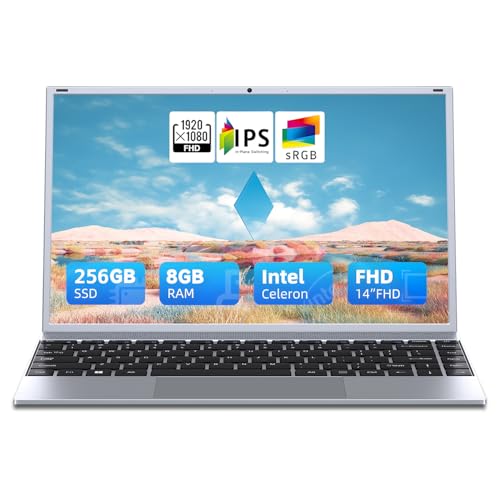
Memory affects how comfortably a laptop handles several open browser tabs and applications. The 16GB configurations in the UOWAMOU, VIGSENUP, and HP business models provide the most headroom in this group. The HP Daily, HP ProBook x360, BLUEING, and Microsoft Surface Go list 8GB, which is a more comfortable starting point than 4GB for documents and moderate multitasking.
Storage type also matters. SSD-equipped models such as the UOWAMOU, VIGSENUP, BLUEING, HP Daily, HP ProBook x360, and Surface Go are positioned differently from eMMC-based Chromebooks. SSD listings commonly emphasize faster boot and file access, while eMMC models can still suit cloud-first work. The ASUS Vivobook Go lists only 64GB eMMC, so its storage is best suited to users who keep more files online. The Acer Chromebook 315 and HP x360 Chromebook list 128GB eMMC.
Match the display to your workspace
For sharper text and more room for side-by-side content, consider an FHD model. The UOWAMOU and VIGSENUP list 15.6-inch 1920×1080 IPS screens, while BLUEING and ASUS provide 14-inch FHD displays. The HP business laptop also lists a 15.6-inch FHD IPS anti-glare panel. The Surface Go offers the highest stated resolution in a much smaller 10-inch touchscreen format.
HD screens remain practical for basic browsing and documents. Anti-glare descriptions may be useful in bright rooms, but the listing data does not establish identical viewing quality across brands. Screen size is a separate decision: 15.6 inches can be more comfortable at a desk, while 10- to 14-inch formats are easier to carry.
Decide between Windows and Chrome OS
Windows models offer the broadest compatibility with traditional PC applications in this selection. Windows 11 Pro appears on the HP ProBook x360, Microsoft Surface Go, and HP business laptop, while Windows 11 Home appears on the HP Daily. The UOWAMOU listing includes Office 2024, and Windows 11 S is listed on the ASUS Vivobook Go.
Chrome OS models such as the Acer Chromebook 315 and HP x360 Chromebook are oriented toward browser-based work, cloud storage, and Chrome OS applications. The Acer listing specifically mentions automatic updates, built-in virus protection, and cloud backups. That does not make Chrome OS a universal replacement for Windows: confirm application compatibility before choosing a Chromebook.
Consider portability and ports
The Microsoft Surface Go, HP ProBook x360, BLUEING, ASUS, and HP Daily are the easiest selected formats to consider for mobility based on their listed dimensions or weights. Larger 15.6-inch laptops such as the UOWAMOU, VIGSENUP, and HP business model provide more workspace but may be better suited to a desk or occasional travel.
Port selection varies considerably. The UOWAMOU includes USB-A, USB-C, HDMI, audio, and a TF card slot. The HP business model adds Ethernet and an SD reader. The ASUS includes USB-C and HDMI, while the Acer Chromebook 315 documents USB-A, USB-C, MicroSD, and Wi-Fi 6. If you rely on wired networking, external displays, or removable media, check the exact port list before purchase.
Final recommendation
UOWAMOU 15.6-inch Pentium Gold 6500Y Laptop ranks first overall in this specification-based comparison under the published weighted criteria.
UOWAMOU 15.6 FHD Laptop is the highest-scoring first overall specification-based choice among these best intel pentium dual-core laptops. Its documented Pentium Gold 6500Y, 16GB RAM, 256GB SSD, FHD IPS screen, Office 2024, and broad connectivity create the most complete configuration in this comparison.
The top intel pentium dual-core laptops are not interchangeable. Choose VIGSENUP for a similar large FHD setup, BLUEING for a lighter 14-inch design, HP Daily for Windows storage and memory balance, or ASUS for a lightweight FHD format with a stated long battery-life claim. Acer Chromebook 315 and HP x360 Chromebook make more sense when Chrome OS fits your applications. For a touchscreen, compare the HP ProBook x360 and Microsoft Surface Go, keeping their smaller displays in mind.
These rankings are specification-based. They do not represent hands-on testing, measured battery endurance, or customer sentiment. Listing details can change, especially for renewed products, so confirm processor, operating system, warranty, memory, and storage at checkout.
Frequently Asked Questions
What should I look for in the best intel pentium dual-core laptops?
Start with the exact processor model and whether the listing identifies two or four cores. Then compare RAM, storage type, screen resolution, operating system, ports, and weight. For general productivity, 8GB RAM and an SSD provide a more comfortable specification than 4GB and small eMMC storage, while Chromebook buyers should confirm that their required applications work with Chrome OS.
Are Pentium N6000 laptops suitable for schoolwork?
The ASUS Vivobook Go and Acer Chromebook 315 list Pentium N6000 processors, 4GB RAM, and everyday-oriented configurations. They can be considered for web browsing, documents, video playback, and cloud-based schoolwork based on the supplied specifications. The Acer uses Chrome OS, while the ASUS lists Windows 11 S, so software compatibility should guide the choice.
Is 16GB RAM necessary for a Pentium laptop?
Not necessarily. The HP Daily, HP ProBook x360, BLUEING, and Microsoft Surface Go list 8GB, which may be sufficient for ordinary documents, browsing, and light multitasking. The UOWAMOU and VIGSENUP list 16GB, giving them more memory capacity on paper for users who keep more applications or browser tabs open. Actual results depend on software and usage.
Should I choose a Chromebook or Windows laptop?
Choose Windows when you need traditional Windows applications, Windows Pro features, or the broader software compatibility represented by models such as the HP Daily and HP ProBook x360. Choose Chrome OS when your work is primarily browser-based and you prefer the Acer Chromebook 315 or HP x360 Chromebook approach. Check application requirements before deciding.
Which selected model is easiest to carry?
The Microsoft Surface Go lists a two-pound weight, the BLUEING lists the current price, and the ASUS Vivobook Go lists the current price. The HP ProBook x360 also lists a compact two-pound design. These figures come from product listings, not independent weighing, and the smaller screens may be less comfortable for prolonged desk work.