Buying Guide
The best intel core i3 11th gen laptops in this comparison are Windows notebooks that differ in memory, storage, screen resolution, size, and operating-system edition. The processor family alone does not determine the right fit. A dual-core i3-1115G4 configuration may include 16GB RAM and a 512GB SSD, while a four-core i3-1125G4 model may use 8GB RAM and 256GB storage. Compare the complete specification set before choosing.
This is a listing-based guide, not a hands-on test. The rankings use supplied technical details and do not represent measured speed, battery testing, display calibration, durability testing, or customer sentiment.
Start with the processor configuration
The selected products use either the Intel Core i3-1115G4 or the Intel Core i3-1125G4. The i3-1115G4 listings document two cores and four threads, with boost frequencies up to 4.1 GHz. The i3-1125G4 listings document four cores and eight threads, 8MB cache, and boost frequencies up to 3.7 GHz. These are specification differences, not a promise of a particular real-world result.
The i3-1115G4 appears in several configurations, including the ASUS VivoBook 14 and the Full HD Lenovo IdeaPad models. If the supplied specifications suggest a need for more documented cores and threads, the four-core HP 17 models deserve attention. The HP 17 Business Laptop with 16GB RAM and 1TB SSD ranks first because its processor is combined with substantial memory, storage, and Windows 11 Pro features.
Match memory to your routine
Memory capacity varies from 8GB to 16GB among the selected products. The HP 17 business and home configurations at the top of the list provide 16GB RAM. The ASUS VivoBook 14 also lists 16GB in a smaller 14-inch format. Lenovo’s two FHD touchscreen models list 12GB, as does the touchscreen IdeaPad with 512GB storage. Several other products list 8GB.
More memory can be useful when you keep multiple applications and browser tabs open, but the supplied evidence does not establish measured performance. Treat 8GB as a simpler configuration and consider 12GB or 16GB when you want more documented capacity. The 4GB models were not selected because their memory specifications provide less support for a useful 10-product comparison.
Choose storage for your files
The selected storage range runs from 128GB to 1TB. The HP 17 models with 16GB RAM and 1TB SSDs offer the most listed room for applications and local files. The HP 17 business model with 16GB RAM and 512GB SSD, the HP 17 with 8GB RAM and 512GB SSD, and the ASUS VivoBook 14 provide middle-capacity alternatives.
The Lenovo IdeaPad with 12GB RAM and 512GB storage also gives users more room than the 128GB and 256GB options. The listings describe solid-state storage, including PCIe NVMe SSDs on many models. That information can help compare configurations, but this article does not independently measure boot or file-transfer performance.
Compare screen size and resolution
Screen size divides the list into 14-inch, 15.6-inch, and 17.3-inch designs. The ASUS VivoBook 14 is the most compact selected option by its listed dimensions and weight. The 15.6-inch models provide a conventional middle ground. The HP 17 laptops suit users who prefer a larger display at a desk, but their size and listed weights make them less convenient for frequent travel.
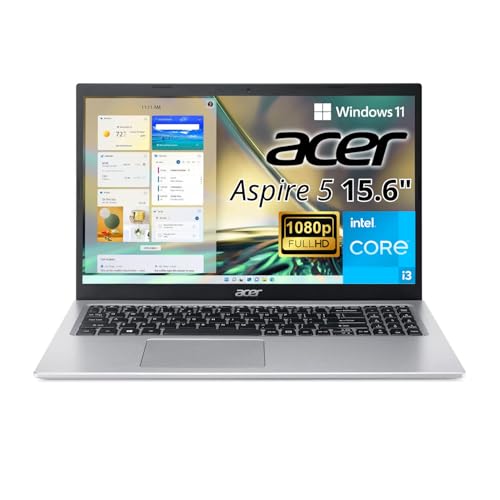
Resolution is also important. The Lenovo IdeaPad 3i touchscreen models and the Acer Aspire 5 document Full HD 1920 x 1080 panels. The Lenovo IdeaPad 3i with a fingerprint reader also lists Full HD resolution. The ASUS and most HP 17 configurations use HD or HD+ resolutions. The Lenovo 2023 IdeaPad 3i listings add IPS, anti-glare, 300-nit, and 60Hz details, making them useful choices for buyers comparing display specifications.
Check ports, wireless features, and operating system
Connectivity is practical across many selected products. HDMI, USB-A, Wi-Fi, Bluetooth, webcams, and headphone combinations appear repeatedly. USB-C is documented on the ASUS VivoBook 14, both 2023 Lenovo FHD touchscreen listings, and the HP 17 models. SD card readers are listed on selected Lenovo and HP configurations. A fingerprint reader is specifically listed for the Lenovo IdeaPad 3i with 128GB storage.
Windows 11 Home is common among the selected products. The HP business configurations use Windows 11 Pro and list features such as Group Policy, device management, and Active Directory or Azure AD support. Those documented additions may matter in an organization, but they do not automatically make Pro the right choice for every home user. The Acer listing does not provide a Windows edition in the supplied details, so verify the current listing before ordering.
Consider portability and desk use
The listed dimensions and weights vary considerably. The ASUS VivoBook 14 lists the current price, while the HP 17 models list weights from 4.6 to the current price depending on the configuration. The Acer Aspire 5 lists the current price, and the Lenovo 15.6-inch options list weights from approximately 3.64 to the current price. These figures suggest different use cases: the ASUS is easier to carry on paper, while the HP 17 models are more naturally suited to a fixed workspace.
Battery evidence is limited. The Acer listing states 11 hours of battery runtime, but this guide does not treat that statement as an independently verified measurement. Battery life can vary with settings and workload, so check current manufacturer or seller information for any model.
How the ranking was calculated
The editorial criteria are processor capability, memory capacity, storage capacity, display utility, connectivity and operating system, and portability. Scores reflect only the supplied product titles, feature points, and technical specifications. No score uses ratings, review totals, purchase activity, marketplace badges, or customer opinions. The weighted criteria favor documented hardware capacity and useful screen details while still recognizing ports, operating-system features, and listed weight.
Final recommendation
HP 17 Business Laptop, 16GB RAM, 1TB SSD ranks first overall as the specification-based choice in this comparison.
The HP 17 Business Laptop with 16GB RAM and 1TB SSD is the first overall specification-based choice among these best intel core i3 11th gen laptops. Its four-core i3-1125G4, 16GB RAM, 1TB PCIe NVMe SSD, and Windows 11 Pro make it a logical fit for users who prioritize capacity and documented business software features. Its large size and HD+ resolution are important trade-offs.
The HP 17 Laptop with 16GB RAM and 1TB SSD is an alternative for home users who want the same processor, memory, and storage combination with Windows 11 Home. For a sharper display, choose either Lenovo IdeaPad 3i FHD touchscreen model. The ASUS VivoBook 14 is a compact high-memory option. These models represent several of the top intel core i3 11th gen laptops when specifications are matched to the intended routine.
Before ordering, verify the current configuration, operating-system edition, warranty, and included accessories. Several listings use similar names and chassis descriptions with different memory or storage, so check the exact ASIN and configuration carefully.
Frequently Asked Questions
Are the best intel core i3 11th gen laptops suitable for everyday work?
The selected listings document configurations intended for everyday laptop use, including Windows, SSD storage, integrated graphics, webcams, Wi-Fi, and common ports. The ASUS VivoBook 14, Lenovo IdeaPad models, Acer Aspire 5, and HP 17 laptops cover different memory, storage, and display combinations. This guide does not claim a measured performance level, so demanding software should be checked against its own requirements.
Which selected laptop has the most storage?
The HP 17 Business Laptop with 16GB RAM and 1TB SSD and the HP 17 Laptop with 16GB RAM and 1TB SSD list the largest storage capacity. Both use the four-core Intel Core i3-1125G4 and a 17.3-inch HD+ display. The business version uses Windows 11 Pro, while the home version uses Windows 11 Home.
Which model has the best documented display specifications?
The Lenovo IdeaPad 3i FHD touchscreen listings provide detailed display information: 15.6 inches, 1920 x 1080 resolution, IPS, anti-glare treatment, 300 nits, and 60Hz. The Acer Aspire 5 and Lenovo IdeaPad 3i with fingerprint reader also list Full HD resolution, but fewer display details.
Is a 14-inch Intel Core i3 laptop easier to carry?
The ASUS VivoBook 14 lists a 2.96-pound weight and a 14-inch display, making it the most compact selected option by the supplied specifications. Its 16GB RAM and 512GB SSD are also substantial for its size. The trade-off is an HD 1366 x 768 display rather than Full HD.
What should business buyers check first?
Business buyers should first compare Windows edition, memory, storage, ports, and warranty information. The HP 17 Business Laptop configurations list Windows 11 Pro and features including device management, Group Policy, and Active Directory or Azure AD support. Those are documented software features, not a guarantee of organizational compatibility, so confirm requirements with the relevant administrator.