Buying Guide
The best ir receiver remote control extenders fall into two practical designs: wireless repeater kits and wired IR distribution systems. Wireless kits place the remote receiver away from the concealed equipment and relay commands between units. Wired systems use a receiver, emitter cable, or distribution box to carry the command directly to one or more components. The right design depends on whether the equipment is in the same cabinet, behind a wall, or in another room.
Confirm that the remote uses IR
Every selected product is intended for infrared control, but not every remote uses infrared. The Sewell SW-32988, Binken BIN-435, OrangeLight 2CH IRBlast, and Fourair listings specifically distinguish IR equipment from RF, Bluetooth, or Wi-Fi-controlled products. Check the remote and the target device before choosing an extender. A product may also require a dedicated IR input: the Herfair 3.5 mm receiver is specifically intended for compatible cable boxes and DVRs with an active IR IN port.
Frequency information can help narrow compatibility. Binken, OrangeLight, and Fourair document 20–60 kHz operation. Cable Matters lists compatibility with most A/V equipment using infrared sensors, while its receiver angle and placement instructions are more specific than its frequency description. The SPENFiLY wired model documents 36–56 kHz support. These figures are useful indicators, but the target device’s own IR requirements remain the final check.
Choose wireless or wired transmission
Wireless is useful when a cable route would be inconvenient. Sewell documents a 200 m wireless distance, while Binken lists an 800-foot distance between its units. OrangeLight lists a 500-foot wireless range and adds selectable channels. Fourair also describes a long-range wireless design, although its supplied listing gives different distance figures. Treat published range as a planning reference because walls, obstacles, and placement can affect the actual layout.
The SPENFiLY WL-E1 is aimed at multi-room or multi-floor arrangements, with a 433 MHz link, an external antenna, and a 130-degree reception angle. Its listing states more than 50 m indoors and more than 200 m outdoors. That model is a better fit when receiver and transmitter locations are separated, while a wired cable is often simpler for one nearby cabinet.
Match emitter capacity to the equipment count
A single concealed device can use a cable-style extender such as Cable Matters. The design has one receiver and one transmitter arrangement, making it suitable for a Blu-ray player, set-top box, receiver, or similar source. The selected SPENFiLY USB model offers versions for one, two, or four devices, so confirm the exact variant before planning the installation.
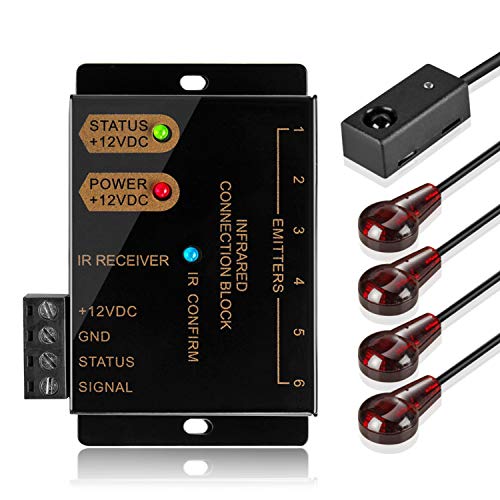
For several components, look at output count rather than wireless reach alone. TNP documents up to six emitter output connections. ICESPRING includes five dual emitters and states control of up to 10 devices, expandable to 12. Herfair includes five emitters and gives the same 10-device, expandable-to-12 description. Ensigear documents four emitter outputs and a stated capacity of up to 32 A/V components. These systems require routing each emitter to the correct equipment sensor.
OrangeLight’s two-channel arrangement addresses a different multi-device concern. Matching the receiver and emitter channels can help separate adjacent zones, such as two cable boxes or an audio unit beside a video source. This is a design feature for avoiding crossed commands, not a substitute for placing each emitter over its intended sensor.
Plan receiver and emitter placement
Receiver angle, cable length, and sensor alignment determine how easy the physical installation will be. Binken documents a 90-degree receiver angle and a 40-foot receiver distance. Fourair lists the same angle with a 30-foot receiver distance, while Sewell lists a 7 m receiver distance and describes its receiver as directional. OrangeLight lists a 45-degree angle. Cable Matters lists 30 degrees and advises keeping the blue LED facing forward.
Emitters generally need to sit close to the equipment’s IR window. Binken says within two inches, and Sewell recommends placing optional emitter cables directly over the device receiver. Keep the receiver where the handheld remote can reach it, then route each emitter without sharply bending or obscuring its adhesive head.
Check power and included accessories
Power arrangements vary. Sewell includes USB and AC power cables. OrangeLight includes dual AC and USB adapters. Cable Matters and the selected SPENFiLY wired extender use USB power, while Herfair’s multi-device kit includes a 12V adapter. A USB-powered unit can be convenient near a television or powered hub, but verify that the chosen USB source remains active when the equipment needs to receive commands.
Included accessories can change the installation plan. TNP includes emitter blasters and supports additional output connections. ICESPRING includes a distribution block, a five-foot receiver cable, and ten-foot emitter cables. OrangeLight includes two extension cables, adhesive stickers, adapters, and a manual. Prefer a package whose cable lengths and emitter count match the cabinet rather than assuming an extension will fit every layout.
Use signal indicators for setup
Signal feedback is helpful during installation because it shows whether the receiver is seeing the remote command. Binken, OrangeLight, Fourair, TNP, ICESPRING, Herfair, and Cable Matters document LED or light-based confirmation. ICESPRING and Herfair distinguish power and transmission indications, while OrangeLight states that its LED flashes when an IR signal is received.
Interference guidance also matters. ICESPRING advises separating the receiver from plasma displays, and Cable Matters suggests keeping its extender away from Wi-Fi routers or CFL bulbs. These notes do not establish a universal issue with every installation, but they identify locations worth avoiding when positioning the receiver.
Final Recommendation
ICESPRING Infrared Repeater System ranks first overall in this specification-based comparison under the published weighted criteria.
Sewell SW-32988 BlastIR Wireless Pro is the first overall specification-based choice among these best ir receiver remote control extenders because it combines long documented wireless reach, included power and mounting accessories, and flexible receiver and emitter cabling. For the top ir receiver remote control extenders with multi-device capacity, ICESPRING and Herfair are better suited to cabinets containing up to 10 documented devices, while Ensigear is the capacity-focused option with four outputs and a stated 32-component limit.
Choose Binken when 20–60 kHz coverage, a wide reception angle, and long stated wireless distance are priorities. OrangeLight is the more specialized pick for two separated zones because of its channel switches. Fourair offers a similar wireless layout with LED feedback, but its listing contains varying range figures. SPENFiLY WL-E1 is appropriate when a multi-room arrangement and wide reception angle matter more than a stated IR frequency range.
For a simpler wired installation, Cable Matters is the clearest single-source choice, especially where its 10-foot cable arrangement and USB power fit the furniture layout. TNP is the more expandable wired alternative because it documents up to six emitter outputs. Before selecting any model, confirm that the remote and equipment use IR, check for any required IR IN jack, and plan the emitter position over the device sensor.
Frequently Asked Questions
What are the best ir receiver remote control extenders for equipment inside a cabinet?
A wired multi-device kit is usually the most directly documented fit. ICESPRING and Herfair each list control for up to 10 devices with five emitters, while TNP documents up to six emitter output connections. For one source, Cable Matters provides a simpler receiver-and-transmitter cable arrangement.
Do these extenders work with Bluetooth or Wi-Fi remotes?
No selected listing establishes Bluetooth or Wi-Fi compatibility. Binken, OrangeLight, Fourair, and Sewell specifically describe IR equipment, and OrangeLight explicitly excludes Bluetooth, Wi-Fi, and app-controlled streaming boxes. Verify the remote signal type before choosing a kit.
How many devices can one IR repeater control?
Capacity depends on the model. TNP documents up to six emitter output connections. ICESPRING and Herfair state up to 10 devices with expansion to 12, while Ensigear states control of up to 32 A/V components through four emitter outputs. A single cable-style product is intended for a more limited arrangement.
Is a wireless IR extender better than a wired cable?
Neither design is inherently better. Wireless models such as Sewell, Binken, OrangeLight, Fourair, and SPENFiLY WL-E1 help when the receiver and concealed equipment are separated by distance or room layout. Wired models such as Cable Matters, TNP, ICESPRING, and Herfair are easier to plan when the equipment is in one cabinet and cable routing is practical.
Where should the IR receiver and emitter be placed?
Place the receiver where the handheld remote has a clear path to it, following the model’s documented angle and distance. Place each emitter close to, and preferably directly over, the target equipment’s IR sensor. Binken and Sewell provide especially specific close-placement guidance. Keep the receiver away from documented interference sources where the listing advises it.