Buying Guide
Choosing among the best pci express internal usb port cards starts with the connection you actually need inside the case. Others add a Type-E or A-Key header for a front-panel USB-C connection. A few combine those headers with external rear-facing ports. Matching the card to the case wiring is more important than simply counting every connector.
The YEELIYA 6-Port card, SINEFINE PCIe x1 USB 3.0 Card, RIITOP PCIe Type-E and 20-Pin Header Card, and YBBOTT PCIe 2-Port USB 3.0 Card all document this type of connection in their evidence. The RIITOP header-only card also adds a Type-E header, so it can serve a case with both front-panel USB-A and USB-C wiring.
Type-E is the relevant detail when the case has a front USB-C cable that terminates in an internal A-Key connector. The RIITOP PCIe USB 3.2 Gen2 Internal Header Card, the SINEFINE PCIe USB 3.2 Gen2 Card, and the YEELIYA 6-Port card document Type-E connections. Check the motherboard and case manuals before installation because a similarly shaped connector is not automatically interchangeable.
Compare USB generation and bandwidth
The selected cards fall mainly into the 5Gbps USB 3.0 or USB 3.2 Gen1 class and the 10Gbps USB 3.2 Gen2 class. The StarTech 5-Port USB 10Gbps PCIe Card, RIITOP PCIe USB 3.2 Gen2 Internal Header Card, and SINEFINE PCIe USB 3.2 Gen2 Card document 10Gbps-capable connections. The remaining designs generally list up to 5Gbps.
Published speed is a theoretical interface ceiling, not a promise that every attached drive or cable will reach it. Shared bandwidth also matters. The RIITOP x4 card lists multiple internal and external connections through a dual-controller design, while the StarTech 4-Port USB 5Gbps PCIe Card specifically lists four independent USB 3.0 channels. If several storage devices will operate at once, examine whether the listing describes independent channels or shared bandwidth.
Check the PCIe slot requirement
Physical fit and electrical requirements are separate checks. PCIe x1 cards such as the RIITOP PCE2E20P and YBBOTT PCIe 2-Port USB 3.0 Card can fit larger x4, x8, or x16 slots when the case and motherboard permit. The StarTech 5-Port USB 10Gbps PCIe Card and the two eight-port-style designs considered in the pool use a larger x4-class requirement, so a free x1 slot is not enough for those models.
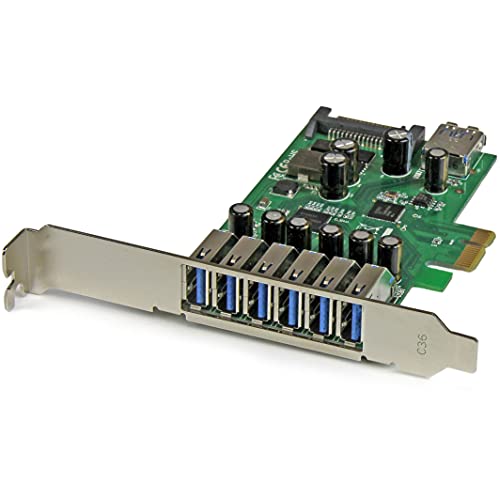
Before opening the PC, identify the slot length, clearance around the graphics card, and available rear bracket space. The StarTech 4-Port PCI Express USB 3.0 Card includes a low-profile bracket, while the StarTech 7-Port PCI Express USB 3.0 Card uses a dual-profile design. The RIITOP header-only card lists both full-size and half-size brackets. These details can determine whether the card fits a standard tower, compact desktop, or mini PC.
Review power arrangements
USB expansion cards can draw power from the PCIe slot, use an additional SATA or LP4 connection, or document an optional power input. The YEELIYA 6-Port card and RIITOP PCE2E20P card state that no additional power adapter is needed. The SINEFINE PCIe x1 USB 3.0 Card instructs the installer to connect SATA power. The StarTech 4-Port USB 5Gbps PCIe Card lists optional LP4 or SATA power, and the StarTech 7-Port card specifies a SATA power connector with up to 900mA per port.
Treat these statements as installation requirements and design information rather than performance guarantees. If the PC power supply has an accessible SATA lead, a card with supplemental power may be easier to match to a multi-device setup. If no internal power connector is available, choose a model whose listing explicitly says it draws power through the PCIe slot.
Verify operating-system support and drivers
Operating-system support varies considerably. The StarTech 5-Port USB 10Gbps PCIe Card lists Windows 8 and up, macOS, and Linux, while the SINEFINE PCIe USB 3.2 Gen2 Card lists Windows, macOS, and Linux. Several other cards list Windows versions and require drivers on older releases. The YBBOTT PCIe 2-Port USB 3.0 Card lists Windows XP through Windows 10, and the StarTech 4-Port PCI Express USB 3.0 Card lists Windows 7 through 8.1 and Linux kernel 2.6.31 or later.
Confirm the exact operating system before installation, especially for Windows XP, Vista, or Windows 7. A supplied CD does not necessarily mean a current driver is available for every system. Also check whether the card supports the operating system edition and architecture used by the computer.
Decide between header-only and mixed-port cards
A header-only design such as the RIITOP PCIe Type-E and 20-Pin Header Card is appropriate when the goal is to activate unused front-panel cables. It does not provide direct external USB ports, which keeps the purpose clear but limits use outside the case. Mixed designs such as the YEELIYA 6-Port card or YBBOTT PCIe 2-Port USB 3.0 Card provide internal connectivity plus rear-facing ports.
The StarTech 5-Port USB 10Gbps PCIe Card takes a different approach: four external USB-C ports are paired with one internal USB-A port. That layout suits a system where external USB-C access matters more than multiple front-panel headers. There is no universal best layout; select the connector arrangement that matches the cables and devices already in the computer.
Final Recommendation
StarTech 5-Port USB 10Gbps PCIe Card ranks first overall in this specification-based comparison under the published weighted criteria.
StarTech 5-Port USB 10Gbps PCIe Card is the highest-scoring returned product and the first overall specification-based choice among the best pci express internal usb port cards. It offers four external USB-C ports, one internal USB-A port, 10Gbps support, optional SATA power, and broad operating-system and hardware-platform coverage.
For a front-panel retrofit, the RIITOP PCIe USB 3.2 Gen2 Internal Header Card is the more targeted pick because it documents both Type-E and 19-pin headers. The RIITOP PCIe Type-E and 20-Pin Header Card is the focused alternative when no rear-facing ports are required. Buyers comparing the top pci express internal usb port cards should then choose between 5Gbps simplicity and 10Gbps Gen2 connectivity, while checking the required PCIe slot and power lead first.
The YEELIYA 6-Port card is a versatile mixed-connector option, and the SINEFINE PCIe USB 3.2 Gen2 Card is suited to a USB-C-heavy configuration. For small cases, the StarTech 4-Port PCI Express USB 3.0 Card offers a low-profile bracket. For a larger number of conventional USB connections, the StarTech 7-Port PCI Express USB 3.0 Card documents six external ports, one internal port, and SATA power. The YBBOTT PCIe 2-Port USB 3.0 Card remains a straightforward choice when two external ports and one front-panel header are enough.
Frequently Asked Questions
What should I check before buying the best pci express internal usb port cards?
Check the internal cable type first: 19-pin USB 3.0 for many front-panel USB-A connections, or Type-E for a documented front-panel USB-C connection. Then confirm the PCIe slot requirement, bracket size, operating-system support, and whether SATA or LP4 power is needed.
Does a PCIe x1 USB card fit a larger PCIe slot?
The listings for the RIITOP PCE2E20P, YEELIYA 6-Port card, and YBBOTT PCIe 2-Port USB 3.0 Card state compatibility with larger PCIe slot sizes. Physical clearance still matters, and the motherboard manual should be checked before installation. A larger x4-class card should not be assumed to work in a short x1 slot.
Are Type-E and 19-pin headers interchangeable?
No. They are different internal connector formats serving different front-panel cabling arrangements. The RIITOP PCIe USB 3.2 Gen2 Internal Header Card documents both, while the RIITOP PCIe Type-E and 20-Pin Header Card is also designed around both formats. Use the connector named for the case cable and do not force a mismatch.
Do these cards provide USB Power Delivery or video output?
Not necessarily. The StarTech 5-Port USB 10Gbps PCIe Card explicitly does not support DisplayPort Alt Mode or USB Power Delivery. The evidence for the other selected products describes data connectivity and, in some cases, power input, but does not establish video output or USB Power Delivery support.
Do internal USB PCIe cards need drivers?
Driver requirements depend on the card and operating system. Several listings state that newer Windows versions work without a driver while older Windows releases require one. The SINEFINE PCIe USB 3.2 Gen2 Card lists Windows, macOS, and Linux support, but always verify the specific driver instructions for the selected card before installation.