Buying Guide
Choosing the best studio internal sound cards starts with identifying what the desktop actually needs. An internal PCIe card can be a sensible route when you want to replace basic motherboard audio, add a headphone amplifier, gain digital outputs, or separate audio processing from the main CPU. It is not automatically a replacement for a dedicated external recording interface: the selected cards vary considerably in input types, driver information, headphone power, and channel layout.
This comparison uses public listing data only. It is not a hands-on test, and it does not interpret customer opinions. The ranking emphasizes documented specifications and features that can affect a desktop audio workflow.
Check the slot and case fit
Most selected products use a PCIe internal format, but physical compatibility still matters. The Creative Sound Blaster Audigy Fx Pro includes a half-height bracket and is 10.5 cm long, while the Creative Sound Blaster Audigy Fx V2 is described as half-height with interchangeable mounting brackets. These details are useful for small cases and compact workstations. A card that cannot fit the available slot or bracket arrangement is not a practical studio upgrade, regardless of its audio specifications.
The older Creative Labs SB0880 X-Fi Titanium is also identified as PCI Express, but its listing provides little current platform information. Before choosing an older card, confirm the motherboard slot, case clearance, and operating-system support from current manufacturer documentation.
Compare conversion and resolution claims
Conversion specifications provide a useful starting point, but they are not a complete description of sound quality. The Creative Sound Blaster AE-X lists an ESS ES9039Q2M DAC, up to 130 dB SNR, and 32-bit/384 kHz playback. The Creative Sound Blaster AE-7 lists an ESS SABRE-class 9018 DAC, 127 dB DNR, 32-bit/384 kHz playback, and DSD64. The Creative Sound BlasterX AE-5 Plus lists a SABRE32-class DAC, up to 122 dB DNR, and the same maximum playback resolution.
Other cards take a more moderate approach. The Creative Sound Blaster Z SE lists 24-bit/192 kHz playback and 116 dB SNR. The GLOTRENDS ST113 is limited by its UAC1.0 design to up to 24-bit/96 kHz and does not support DSD. That limit may be adequate for many playback setups, but it is important if your library or workflow specifically requires higher-rate material.
Do not treat a larger number as proof of a better result in every system. Use the published figures to establish format compatibility and compare the rest of the signal path, including headphones, speakers, software, and connections.
Match the headphone amplifier to your headphones
Headphone support is one of the clearest differences among the best studio internal sound cards. The AE-7 and AE-5 Plus both list support for studio-grade headphones up to 600 ohms, and the Audigy Fx V2 makes the same type of 600-ohm support claim. The AE-X specifies an amplifier output of up to 350 mW at 32 ohms, although that number is not directly interchangeable with an impedance limit.
The Sound Blaster Z SE also lists a 600-ohm headphone amplifier. These specifications can help when using harder-to-drive headphones, but they do not tell you whether a particular headphone will sound ideal. Check the headphone manufacturer’s impedance and sensitivity figures, then confirm the card’s connector and available gain controls. A card with a powerful headphone stage may be unnecessary if you monitor through powered speakers or an external amplifier.
Prioritize the connections you will actually use
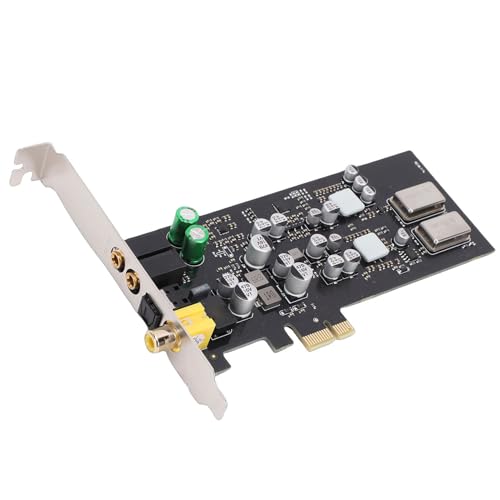
Connection layout can matter more than headline resolution. The GLOTRENDS ST113 lists a microphone input, headphone output, speaker output, optical SPDIF, coaxial digital output, and a 9-pin front-audio header. The Audigy Fx Pro also lists mic-in, line-in, headset outputs, SPDIF, and multi-channel analog output. These are useful choices for a desktop that switches between recording, headphones, and speakers.
The AE-X listing emphasizes coaxial output and optical input, making it better suited to a focused digital setup than to a system requiring many analog inputs. The PUSOKEI and Diyeeni cards also list optical and coaxial digital connections, along with multi-channel output support. Review the rear-panel layout before buying; a technically capable card may still be inconvenient if it lacks the connector your monitors, receiver, or microphone requires.
Look for workflow features, not just playback labels
For recording-oriented work, software and driver support deserve attention. The AE-X lists ASIO 2.3 and low-latency performance, while the Creative Labs SB0880 X-Fi Titanium specifically mentions low-latency ASIO drivers for music recording. The Sound Blaster Z SE also lists ASIO. Those are more directly relevant to computer recording than surround effects alone.
The AE-7 includes a dedicated quad-core audio processor and an Audio Control Module. The AE-5 Plus and other Creative cards list software-based sound customization. These features may be useful for routing or personal monitoring, but the supplied evidence does not establish how any card performs with a particular DAW. Confirm the driver and application requirements for your operating system and recording software.
Consider channel requirements and expansion
If your setup is stereo, a card with a clean headphone path and the right digital output may be sufficient. If you use multiple speakers, the AE-7, AE-5 Plus, Audigy Fx Pro, and Sound Blaster Z SE document discrete or virtual surround options. The GLOTRENDS ST113, PUSOKEI PCIe HiFi Sound Card, and Diyeeni CM108AH PCIe Sound Card also describe multi-channel outputs.
Expansion can be useful but should be planned as part of the system. The Audigy Fx V2 has an optional daughterboard for additional capabilities, including DSD256 playback and more channels. Because that board is sold separately, evaluate the standard card on its own rather than assuming the expanded configuration is included.
Final Recommendation
Creative Sound Blaster AE-7 ranks first overall in this specification-based comparison under the published weighted criteria.
The Creative Sound Blaster AE-7 is the best studio internal sound cards first overall specification-based choice in this comparison, combining high-resolution playback, DSD64, a discrete Xamp headphone amplifier for headphones up to 600 ohms, an Audio Control Module, and digital surround encoding. It is a strong fit for a high-resolution, headphone-centered desktop workflow with speaker-system support.
The Creative Sound Blaster AE-X is a close alternative for users who prioritize its listed ESS ES9039Q2M DAC, up to 130 dB SNR, DSD256, ASIO 2.3, and specified headphone output. The Creative Sound BlasterX AE-5 Plus is a strong multi-channel option with high-resolution playback, Xamp amplification, and Dolby Digital Live and DTS encoding.
For compact builds, the Creative Sound Blaster Audigy Fx Pro and Creative Sound Blaster Audigy Fx V2 offer low-profile or interchangeable-bracket designs. The Audigy Fx Pro has especially broad listed analog and digital connections, while the Audigy Fx V2 provides a documented expansion route. The Creative Sound Blaster Z SE remains a balanced option for ASIO, headphone, and speaker use.
The GLOTRENDS ST113, PUSOKEI PCIe HiFi Sound Card, and Diyeeni CM108AH PCIe Sound Card are worth considering when digital outputs and multi-channel routing are more important than advanced headphone specifications. The Creative Labs SB0880 X-Fi Titanium is a narrower legacy choice for systems where its low-latency ASIO recording support is confirmed.
Among the top studio internal sound cards, the right selection depends on slot fit, operating-system support, headphone requirements, and the connections on your monitors or receiver. Treat the published specifications as a compatibility checklist rather than a guarantee of results in every studio.
Frequently Asked Questions
Are the best studio internal sound cards a replacement for an external recording interface?
Not necessarily. The selected internal cards document playback, headphone, surround, and some recording-related features, but the evidence does not show the same input and preamp arrangement across the category. The GLOTRENDS ST113 lists a microphone input, and several Creative cards list ASIO support, but you should verify the number and type of inputs required by your microphones and instruments. An external interface may still be more suitable when you need dedicated mic preamps, instrument inputs, or convenient front-panel control.
Which selected card is most suitable for high-impedance headphones?
The Creative Sound Blaster AE-7, Creative Sound BlasterX AE-5 Plus, Creative Sound Blaster Audigy Fx V2, and Creative Sound Blaster Z SE each list support for headphones up to 600 ohms. The AE-X instead provides a headphone amplifier rating of up to 350 mW at 32 ohms. These are different specifications, so compare them with your headphones’ impedance and sensitivity rather than assuming one number applies to every model.
Does every internal card support 32-bit/384 kHz audio?
No. The Creative Sound Blaster AE-X, Creative Sound Blaster AE-7, and Creative Sound BlasterX AE-5 Plus list 32-bit/384 kHz playback. The Creative Sound Blaster Z SE and Creative Sound Blaster Audigy Fx V2 list up to 24-bit/192 kHz. The GLOTRENDS ST113 lists up to 24-bit/96 kHz through its UAC1.0 interface and does not support DSD. Check the source formats you actually use before focusing on maximum figures.
What should I verify before installing a PCIe sound card?
Confirm that your desktop has a compatible PCIe slot, enough physical clearance, and the correct bracket for the case. Compact systems should receive extra attention: the Creative Sound Blaster Audigy Fx Pro includes a half-height bracket, and the Creative Sound Blaster Audigy Fx V2 lists interchangeable brackets. Also verify current operating-system and driver support, especially for the Creative Labs SB0880 X-Fi Titanium, whose supplied listing does not provide modern platform details.
Is digital output better than analog output for a studio PC?
Neither is universally better. Digital output can suit a setup that already uses an external DAC, receiver, or digital monitor chain. Analog outputs are more direct when connecting powered speakers or headphones to the card. The GLOTRENDS ST113, PUSOKEI PCIe HiFi Sound Card, and Diyeeni CM108AH PCIe Sound Card list optical and coaxial outputs, while the Creative Sound Blaster Audigy Fx Pro lists both digital and several analog connections. Choose according to the rest of your signal chain and the inputs it provides.