Buying Guide
Choosing among the best atx motherboards starts with the processor socket, not the brand name. ATX describes the board size and mounting layout, while the socket and chipset determine processor compatibility, memory type, expansion standards, and many I/O features. The selected models split mainly between AMD AM5 boards and Intel LGA 1700 boards, so confirm the CPU family before comparing secondary specifications.
Match the socket to the processor
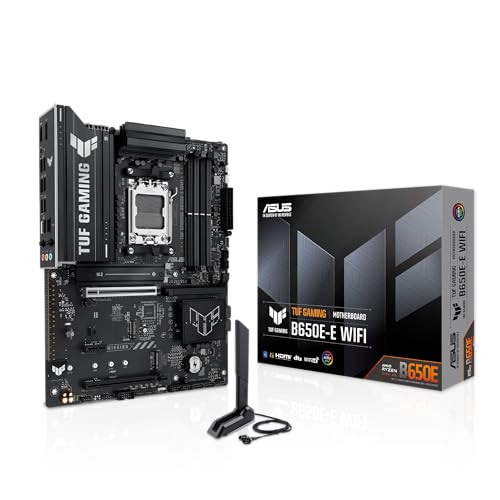
AMD AM5 appears on the ASUS ROG Strix X870-A Gaming WiFi, MSI MAG X870 Tomahawk WiFi, GIGABYTE X870 Eagle WIFI7, MSI MAG B850 Tomahawk MAX WiFi, ASUS TUF Gaming B850-PLUS WiFi, ASUS ROG Strix B850-A Gaming WiFi, GIGABYTE B850 AORUS Elite WIFI7, and ASUS TUF Gaming B650E-E WiFi. Their listings identify support for Ryzen 7000, 8000, and 9000 series processors. That makes them suitable for an AMD desktop only when the rest of the system is planned around AM5.
Intel LGA 1700 is represented by the MSI Z790 Gaming Plus WiFi and MSI PRO B760-P WiFi DDR4. Both list support for Intel 12th, 13th, and 14th Gen processors. They use different memory standards: the Z790 Gaming Plus WiFi is a DDR5 board, while the PRO B760-P WiFi DDR4 is designed for DDR4. Memory cannot be selected independently of the motherboard, so this distinction should be settled early.
Compare PCIe and M.2 expansion
Storage needs can separate otherwise similar top atx motherboards. The MSI MAG B850 Tomahawk MAX WiFi lists four M.2 connectors, including two Gen5 x4 slots, while the ASUS ROG Strix B850-A Gaming WiFi and ASUS ROG Strix X870-A Gaming WiFi each list four M.2 slots. The GIGABYTE X870 Eagle WIFI7 also identifies four M.2 slots in its title and size data, although its feature list says three; treat that listing inconsistency as something to verify before finalizing a build.
Three-slot designs remain well equipped for many systems. The ASUS TUF Gaming B850-PLUS WiFi, GIGABYTE B850 AORUS Elite WIFI7, and ASUS TUF Gaming B650E-E WiFi each document three M.2 slots. The TUF B850-PLUS specifies one PCIe 5.0 M.2 slot and two PCIe 4.0 slots, while the B650E-E lists the same combination. The MSI Z790 Gaming Plus WiFi identifies PCIe 5.0 and an M.2 Shield Frozr, and the MSI PRO B760-P WiFi DDR4 lists PCIe 4.0 and M.2 support.
PCIe 5.0 is documented on the current AMD B850 and X870 selections, the ASUS B650E-E, and the MSI Z790 board. If a planned graphics card or storage device requires that interface, check which slot carries the standard and whether other installed devices affect lane availability. The supplied listings do not provide complete lane-sharing tables, so do not infer them.
Evaluate networking and rear I/O
Wireless and wired networking vary by model. Wi-Fi 7 is listed on the ASUS ROG Strix X870-A, MSI MAG X870 Tomahawk WiFi, GIGABYTE X870 Eagle WIFI7, MSI MAG B850 Tomahawk MAX WiFi, ASUS TUF Gaming B850-PLUS WiFi, ASUS ROG Strix B850-A Gaming WiFi, and GIGABYTE B850 AORUS Elite WIFI7. Wired options include 5Gbps LAN on the MSI X870 and B850 Tomahawk models, 2.5Gb or 2.5Gbps LAN on several other boards, and 2.5Gbps LAN on the MSI Z790 and B760 choices.
USB capabilities also differ substantially. The MSI MAG X870 Tomahawk WiFi lists USB 40Gbps, the GIGABYTE X870 Eagle WIFI7 lists dual USB4, and the ASUS ROG Strix X870-A lists USB4. The MSI B850 Tomahawk MAX WiFi and ASUS B850-PLUS list USB 20Gbps Type-C connectivity. These ports matter when connecting fast external storage or other high-bandwidth peripherals, but the listing data does not establish performance for any particular accessory.
Review power and cooling documentation
Power specifications are useful indicators of how each listing is positioned, but they are not hands-on performance results. The ASUS ROG Strix X870-A lists 16+2+2 power stages rated for 90A per stage. The MSI B850 Tomahawk MAX uses a 14 Duet Rail system with 80A SPS VRM, and the ASUS ROG Strix B850-A lists 14+2+2 stages rated for 80A per stage. The ASUS TUF Gaming B850-PLUS lists 14+2+1 80A DrMOS stages.
The GIGABYTE B850 AORUS Elite WIFI7 and GIGABYTE X870 Eagle WIFI7 each list a 14+2+2 power design, while the ASUS TUF Gaming B650E-E lists 8+2+1 80A DrMOS stages. Intel choices also document substantial power hardware: the MSI Z790 Gaming Plus WiFi lists 14+1+1 DrMOS, and the MSI PRO B760-P WiFi DDR4 lists a 12+1 Duet Rail design. Look for matching heatsinks, thermal pads, or extended heatsink language when selecting a board for a processor with demanding power requirements.
Check setup features and physical fit
Build-focused features can reduce friction during assembly, though they do not guarantee a particular experience. ASUS lists BIOS FlashBack on the TUF B850-PLUS and TUF B650E-E, along with Q-Release or Q-Latch features on the latter boards. GIGABYTE lists EZ-Latch on the B850 AORUS Elite and X870 Eagle. MSI documents EZ M.2 Shield Frozr II and EZ M.2 Clip II on the B850 Tomahawk MAX.
Confirm that the case supports a full ATX board and that its front-panel connectors match the selected model. Also check memory type, CPU power connectors, storage count, display outputs, and wireless requirements together. The listing data identifies ATX for every selected product, but it does not replace a case manufacturer’s clearance information.
Final recommendation
MSI MAG B850 Tomahawk MAX WiFi ranks first overall in this specification-based comparison under the published weighted criteria.
Among the top atx motherboards, the ranked products differ under documented socket and platform support, expansion and storage capability, networking and I/O connectivity, power and thermal design, and build and setup features.
ASUS ROG Strix X870-A Gaming WiFi is the first overall specification-based choice among these best atx motherboards. Its documented Ryzen 7000, 8000, and 9000 support, 16+2+2 90A power solution, four M.2 slots, PCIe 5.0, Wi-Fi 7, USB4, and advanced tuning features give it the broadest specification profile in this comparison.
MSI MAG B850 Tomahawk MAX WiFi follows closely, with four M.2 connectors, 80A SPS VRM, PCIe 5.0, Wi-Fi 7, and 5Gbps LAN. The MSI MAG X870 Tomahawk WiFi is a notable alternative when USB 40Gbps and 5Gbps LAN are priorities. For four-drive AM5 layouts, the MSI MAG B850 Tomahawk MAX WiFi and ASUS ROG Strix B850-A Gaming WiFi stand out. The ASUS TUF Gaming B850-PLUS WiFi and GIGABYTE B850 AORUS Elite WIFI7 offer three-slot current-platform configurations, while the ASUS TUF Gaming B650E-E WiFi documents a useful PCIe 5.0 path on the B650E platform.
Intel builders should focus on the MSI Z790 Gaming Plus WiFi for DDR5 and PCIe 5.0, or the MSI PRO B760-P WiFi DDR4 when compatible DDR4 memory is central to the build. In every case, verify processor generation, memory type, case clearance, and the exact number of required M.2 slots before ordering.
Frequently Asked Questions
What should I check first when choosing the best atx motherboards?
Check the CPU socket and supported processor generations first. Then confirm DDR4 or DDR5 memory compatibility, followed by the PCIe version, M.2 count, networking, rear I/O, and case support. A board with extensive features is unsuitable if its socket or memory standard does not match the rest of the system.
Are all the selected boards compatible with the same processors?
No. The AMD models use AM5, including the ASUS TUF Gaming B650E-E WiFi with the B650E chipset. The Intel models use LGA 1700. The AMD listings identify Ryzen 7000, 8000, and 9000 support, while the Intel listings identify 12th, 13th, and 14th Gen support.
How many M.2 slots do I need?
That depends on the number of NVMe drives planned. Three slots provide room for several drives, while four-slot models such as the MSI MAG B850 Tomahawk MAX WiFi and ASUS ROG Strix B850-A Gaming WiFi offer more documented storage expansion. Check the individual listing because the GIGABYTE X870 Eagle WIFI7 data has conflicting M.2 counts.
Is Wi-Fi 7 necessary on an ATX motherboard?
It is not universally necessary. Wi-Fi 7 is documented on several selected AMD boards, while the ASUS TUF Gaming B650E-E WiFi, MSI Z790 Gaming Plus WiFi, and MSI PRO B760-P WiFi DDR4 list Wi-Fi 6E. Choose based on the wireless equipment and network standard you intend to use, and consider wired LAN speed as a separate specification.
What does PCIe 5.0 identify in these listings?
PCIe 5.0 identifies a newer expansion interface documented on selected graphics or storage connections. It does not mean every slot or M.2 connector runs at that standard. Review the product’s slot descriptions, especially when planning multiple expansion cards or storage devices.