Buying Guide
Choosing among the best monitors with built-in speakers starts with deciding whether integrated audio is a convenience feature or a central part of the setup. Built-in speakers can reduce cable clutter for calls, streaming, and ordinary desktop use, but the supplied listings do not provide enough consistent audio specifications to compare loudness or sound quality directly. For that reason, this guide treats documented speaker presence and wattage as evidence, without making listening claims.
Match resolution to screen size
Resolution determines how much workspace and detail a monitor can show. The selected 24-inch models use Full HD, which is a practical fit for general documents, web browsing, video, and compact desks. At 27 inches, Full HD remains common in gaming-focused models, while QHD gives a denser desktop and sharper image detail. The Dell S2725DSM, MSI PRO MP275Q, and ASUS TUF VG27AQL5A all document 2560x1440 resolution.
The LG 32UR500K-B goes further with 3840x2160 4K UHD on a 32-inch screen. It is a suitable choice when detailed content, large spreadsheets, or a broad single-screen workspace matter. The Sceptre C345B-QUT168 uses 3440x1440 in a 21:9 ultrawide format, making it a different kind of workspace: wider rather than taller. Consider the applications you use before choosing between 16:9 4K and 21:9 ultrawide.
Prioritize refresh rate for motion
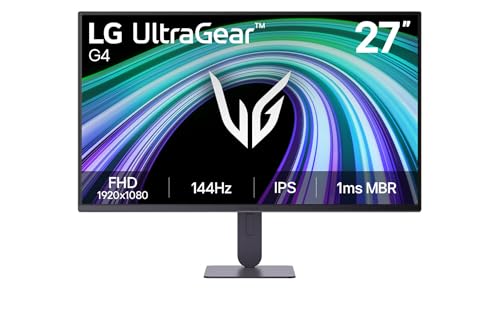
Refresh rate is especially important for gaming and for smoother scrolling. The selected displays range from 100Hz to 210Hz, rather than stopping at the basic 60Hz class. The Dell 27 Plus and Dell 24 Plus list 144Hz and 1ms MPRT. The ASUS TUF VG27AQL5A lists 210Hz overclocked and 0.3ms GTG, while the LG UltraGear 27G414B-B lists 144Hz and 1ms MBR.
A higher refresh rate does not by itself establish image quality or gaming performance. It does, however, identify the monitor’s stated motion capability. Variable-refresh features can also matter: AMD FreeSync appears on selected Dell and LG models, FreeSync Premium appears on the ASUS TUF, and Adaptive-Sync appears on the ASUS VA279QG and VA249QG. Match these features with the graphics hardware and connection you plan to use.
Check speaker evidence carefully
Every selected product documents integrated speakers, but the level of detail differs. Dell provides the clearest speaker specification with dual 3W units on both Plus models. MSI lists built-in 2W speakers and positions them for conference calls. LG describes built-in stereo speakers with Waves MaxxAudio, while several other listings confirm speakers without stating wattage.
This distinction matters when setting expectations. If you mainly need notification sounds, calls, or occasional video audio, any documented built-in option may reduce the need for external speakers. If audio is a major entertainment priority, the supplied evidence is not enough to select on sound quality alone. Also check whether the monitor includes a headphone output: the MSI listing explicitly does, while the BenQ listing specifies built-in speakers but does not list a headphone jack in the supplied evidence.
Evaluate the stand and mounting options
Ergonomics can determine whether a monitor is comfortable over a full workday. The Dell S2725DSM and S2425HSM document height, tilt, pivot, and swivel adjustment, making them particularly flexible stand choices here. The ASUS TUF VG27AQL5A and LG 27G414B-B document height adjustment, while the MSI PRO MP275Q specifies tilt adjustment and 100mm VESA brackets.
Other selected monitors document VESA mounting without describing the included stand’s range. VESA compatibility is useful if you plan to use an arm or wall mount, but it does not guarantee that a particular mount is included. Check the mount pattern and the arm’s weight capacity separately before buying.
Review ports and device compatibility
Port selection affects how easily a monitor fits into an existing desk. HDMI is common across the selected range. DisplayPort is documented on the Dell 27 Plus, ASUS TUF, MSI, ASUS VA279QG, ASUS VA249QG, and BenQ GW2490. The ASUS VA models and some other displays also list VGA, which can help with older computers. The LG 32UR500K-B lists two HDMI ports and DisplayPort, while the Sceptre ultrawide lists two DisplayPort inputs.
USB connectivity is less common in the selected evidence. Before purchasing, list the computer, console, and legacy devices you need to connect and compare them with the monitor’s documented ports.
Consider eye-care features and placement
Eye-care claims vary, but several selected products document useful features. Dell lists TÜV certification and reduced blue-light emissions. MSI lists TÜV Rheinland Eye Comfort certification, less-blue-light and anti-flicker technology, plus an anti-glare surface. ASUS models document TÜV-certified low-blue-light and flicker-free technology. BenQ lists low-blue-light technology, anti-glare treatment, and adaptive brightness.
These features do not replace good placement and breaks. Position the screen to reduce glare, use a comfortable viewing distance, and choose a stand or mount that lets you set an appropriate height. A larger panel may need more distance and desk depth, while a compact 24-inch model can be easier to place in a small room.
Final Recommendation
Dell 27 Plus QHD Monitor S2725DSM ranks first overall in this specification-based comparison under the published weighted criteria.
The final choice among the best monitors with built-in speakers depends on the documented features that match your intended use.
The Dell 27 Plus Monitor S2725DSM is the highest-scoring returned product and the first overall specification-based choice. It brings together QHD detail, 144Hz motion, dual 3W speakers, AMD FreeSync, TÜV-listed comfort features, and four-way stand adjustment. That combination gives it broad documented usefulness across office work, streaming, and casual gaming.
For a large, detailed screen, choose the LG 32UR500K-B because its 4K resolution, HDR10, 32-inch size, and MaxxAudio stereo speakers are an unusual combination in this group. Gamers should look closely at the ASUS TUF VG27AQL5A for its 210Hz overclocked refresh rate and 0.3ms GTG specification. The MSI PRO MP275Q is an office alternative with WQHD, 100% sRGB, eye-care certification, VESA support, and 2W speakers.
Among the top monitors with built-in speakers, the Dell 24 Plus is the compact option with particularly broad documented stand adjustment, while the ASUS VA249QG suits a smaller desk or dual-screen layout. The Sceptre ultrawide is a specialist pick for broad horizontal workspace. These recommendations use listing specifications only; confirm the current connection requirements, included accessories, and seller-provided details before ordering.
Frequently Asked Questions
Are built-in monitor speakers suitable for everyday calls?
They can be convenient for everyday calls, streaming, and system audio because they avoid a separate speaker set. The MSI PRO MP275Q explicitly describes its 2W speakers as convenient for conference calls, and the Dell Plus models document dual 3W speakers. The other listings confirm integrated speakers without consistently stating their power, so the supplied evidence cannot establish comparable volume or audio quality.
Is QHD better than Full HD for a monitor with speakers?
QHD provides more pixels than Full HD and can offer a sharper, roomier desktop at the same general screen size. The Dell S2725DSM, MSI PRO MP275Q, ASUS TUF VG27AQL5A, and Sceptre ultrawide document QHD-class resolutions. Full HD may still be appropriate for a compact desk, ordinary office use, or a gaming setup where the chosen hardware targets 1080p. Screen size, viewing distance, and graphics capability should guide the decision.
What refresh rate should I look for in these monitors?
The selected range covers 100Hz, 120Hz, 144Hz, 165Hz, 180Hz, and 210Hz overclocked, depending on the model. A 100Hz or 120Hz display can be suitable for smoother scrolling and casual gaming, while the ASUS TUF VG27AQL5A and Sceptre C345B-QUT168 target higher-refresh gaming use. Check which input supports the desired resolution and refresh rate, since the supplied listings do not specify every connection mode.
Do these monitors support wall or arm mounting?
Several do. The MSI PRO MP275Q, ASUS VA279QG, ASUS VA249QG, and BenQ GW2490 explicitly document VESA support or brackets. VESA compatibility does not mean a mount is included, and the supplied information does not provide a universal pattern across every selected model. Confirm the monitor’s mounting specification and the arm’s supported weight before installation.
Which of the best monitors with built-in speakers is easiest to adjust?
The Dell S2725DSM and Dell S2425HSM document height, tilt, pivot, and swivel adjustment, giving them a documented ergonomic advantage in the supplied evidence. The ASUS TUF VG27AQL5A and LG 27G414B-B document height adjustment, while the MSI PRO MP275Q specifies tilt adjustment. Models listing only VESA support may still work well with a separate arm, but their included stand flexibility is less established.