Buying Guide
Choosing among the best video monitors with built-in speakers starts with deciding what the monitor must do beyond showing an image. A display for conference calls has different priorities from a portable console screen or a CCTV monitor. The products above are ranked from supplied specifications, not from hands-on testing, so treat the scores as an evidence-based comparison rather than a measured performance result.
Match the monitor type to the setup
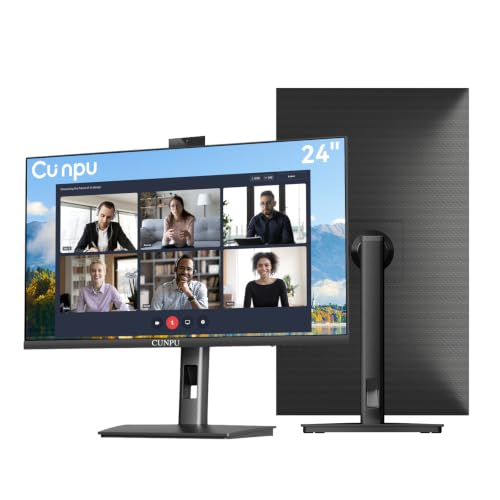
For a desk-based office, an all-in-one conference monitor can reduce the number of separate devices. The Philips 34E1C5600HE and LG 34U650A-B provide wide 34-inch workspaces, while the ASUS BE279QSK, CUNPU S270ES, SKitphrati HD-270, and CUNPU T245FG use more conventional desktop sizes. The Philips, ASUS, SKitphrati, and both CUNPU models list built-in webcams and microphones, which makes them more complete choices for video calls than speaker-only displays.
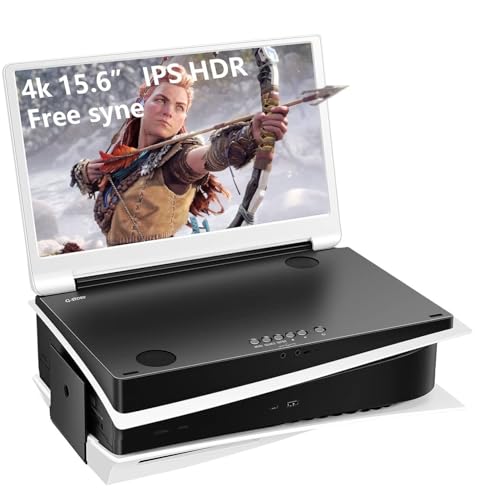
A portable monitor is more appropriate when the screen must move between rooms, offices, or travel destinations. The G-STORY GS156PU, InnoView INVPM406, and Yodoit PTM14 each document a compact format and built-in audio. The G-STORY emphasizes 4K console use, the InnoView focuses on USB-C and HDMI second-screen operation, and the Yodoit uses a 16:10 1920 x 1200 panel. Those differences matter more than a generic portable label.
Prioritize resolution and screen space
Resolution affects how much detail and workspace the display can show. The Philips and LG offer 3440 x 1440 UltraWide resolution, giving them the most documented horizontal workspace in this group. The CUNPU S270ES offers QHD 2560 x 1440 on a 27-inch screen, while the ASUS, SKitphrati, and CUNPU T245FG use 1920 x 1080. Full HD remains a practical fit for ordinary office work, calls, and compact gaming, but QHD or UltraWide resolution can better suit side-by-side windows.
The G-STORY lists 4K resolution on its 15.6-inch screen, making it the high-detail portable option. The InnoView uses Full HD, and the Yodoit lists 1920 x 1200. A taller 16:10 format can be useful for documents, but the supplied listing does not provide direct productivity measurements. Choose based on the applications and devices you already use rather than assuming a higher resolution is always the best match.
Check the speaker and conferencing hardware
Built-in speakers are useful for calls, presentations, video, and casual gaming without adding separate desk hardware. The LG specifically lists DepthSound, while the Philips lists stereo speakers and the portable G-STORY lists dual built-in stereo speakers. The other selected models also document integrated speakers, but the listings do not provide standardized wattage, frequency response, loudness, or listening measurements. For that reason, this guide compares the presence and stated design of the audio system rather than claiming a sound-quality winner from testing.
If you need two-way calls, check for a webcam and microphone rather than speakers alone. The Philips includes a 5MP Windows Hello webcam and noise-canceling microphone; the CUNPU models list 5MP cameras and stereo microphones; ASUS lists an adjustable 2MP webcam and microphone array; and SKitphrati lists an adjustable 3MP webcam with microphone array. The Sceptre, G-STORY, InnoView, LG, and Yodoit listings do not identify integrated webcams, so they may require a separate camera for video calls.
Compare connection options carefully
Connection choice affects whether the monitor works smoothly with a laptop, desktop, game console, or older computer. USB-C docking is particularly useful for laptop setups: Philips documents video, data, and up to 65W power delivery, while LG documents video, data, and up to 96W charging. These are different power figures, so match the monitor to your laptop’s charging needs.
DisplayPort and HDMI are useful for current computers and consoles. ASUS and SKitphrati add VGA to HDMI and DisplayPort, giving them broader support for mixed equipment. The CUNPU S270ES lists HDMI 2.0 and DisplayPort 1.4, while the smaller CUNPU lists HDMI 1.4 and VGA. Portable models vary more: InnoView lists two full-function USB-C ports and HDMI, while Yodoit uses USB-C and mini-HDMI. Confirm whether your device supports video over USB-C before relying on a single-cable setup.
Consider placement and adjustment
Stand flexibility can change daily comfort. The ASUS lists tilt, swivel, pivot, and 150mm height adjustment. Both CUNPU monitors list height adjustment, swivel, pivot, and tilt, and the LG provides tilt, height, and swivel adjustment. VESA support is also documented for the CUNPU models and ASUS, which can help with wall or arm mounting when the supplied stand is not ideal.
Portable screens trade full-size stand flexibility for mobility. InnoView and Yodoit include covers that double as stands, while the G-STORY uses a folding design. These approaches are convenient but offer a different range of positions from an adjustable desktop stand. Consider where the screen will be used most often and whether a stable external stand is available.
Review the practical trade-offs
The best video monitors with built-in speakers are not identical: a wide display can improve multitasking but needs more room; a webcam-equipped model simplifies calls but may cost more desk depth; and a portable screen travels easily but may need careful power planning. Check refresh rate when motion matters. The Philips and LG list 100Hz, the CUNPU S270ES and SKitphrati list 120Hz, the CUNPU T245FG lists 120Hz through HDMI, the Sceptre lists up to 144Hz, and the G-STORY lists 60Hz.
Also check warranty terms and included accessories in the current listing. The supplied evidence shows different coverage periods, and portable products may depend on the included cover or specific cables. These details can influence setup convenience without being a substitute for verified compatibility.
Final Recommendation
Philips 34E1C5600HE 34-inch UltraWide QHD Monitor ranks first overall in this specification-based comparison under the published weighted criteria.
The final choice among the best video monitors with built-in speakers depends on the documented features that match your intended use.
The Philips 34E1C5600HE is the highest-scoring returned product and the first overall specification-based choice. Its 34-inch UltraWide QHD panel, 5MP Windows Hello webcam, noise-canceling microphone, stereo speakers, USB-C docking, and 65W power delivery create the most complete documented workstation package.
For a speaker-focused display without a listed webcam, the LG 34U650A-B is the stronger alternative because it combines UltraWide QHD IPS resolution, built-in DepthSound speakers, HDR10, and up to 96W USB-C charging. The CUNPU S270ES is a better fit when a 27-inch QHD webcam monitor with a highly adjustable stand is more useful than an UltraWide chassis. For smaller desks, the ASUS BE279QSK and CUNPU T245FG provide integrated conferencing hardware in more manageable formats.
Among the top video monitors with built-in speakers for travel, the G-STORY is the clearest 4K console-oriented choice, while the InnoView and Yodoit are more practical second-screen options. The Sceptre is the compact gaming pick when a webcam is unnecessary. Always confirm ports, USB-C video support, available desk space, and the intended call or console connections before ordering.
Frequently Asked Questions
What should I look for in the best video monitors with built-in speakers?
Start with the screen size and resolution that fit your desk and workload, then verify whether you need a webcam and microphone or only speakers. Next, check HDMI, DisplayPort, VGA, USB-C, refresh rate, stand adjustment, VESA support, and warranty information. For laptops, USB-C power delivery and video support deserve special attention because not every USB-C port carries a display signal.
Are built-in speakers enough for video calls?
They can provide a convenient audio output for calls, presentations, and everyday media, but the supplied listings do not provide standardized loudness or sound-quality measurements. A monitor with speakers is not automatically a complete conference system. If two-way calling is important, select a model that also lists a webcam and microphone, such as the Philips, ASUS, CUNPU, or SKitphrati options.
Is an UltraWide monitor better than a 27-inch monitor?
It depends on the workspace and software. The Philips and LG offer 34-inch 21:9 displays for showing more horizontal content, while the CUNPU S270ES and other 27-inch models occupy a more conventional footprint. UltraWide designs can suit side-by-side windows, but a 27-inch monitor may be easier to place, mount, or pair with another screen.
Which selected monitor is most suitable for travel?
The InnoView, Yodoit, and G-STORY are the most clearly portable designs in this selection. InnoView offers USB-C and HDMI connections with a protective cover stand, Yodoit combines a 14-inch 1920 x 1200 display with a folding cover, and G-STORY uses a folding 15.6-inch 4K design for console-oriented use. Check cable and power requirements for the specific device.
Do higher refresh rates matter on a monitor with speakers?
Refresh rate concerns image motion rather than the speakers. The selected listings range from 60Hz on the G-STORY to up to 144Hz on the Sceptre, with several office-oriented models listing 100Hz or 120Hz. A higher rate may be more relevant for gaming or smooth scrolling, while conferencing and ordinary office work should also be judged by resolution, camera hardware, ports, and adjustability.