Buying Guide
Choosing the best dual monitors starts with deciding whether you need two separate desktop displays or a portable attachment that adds screens to a laptop. The products in this comparison cover both designs. Kado supplies a larger curved pair.
This is a specification-based comparison using the supplied public listing information. It is not a hands-on test, and it does not summarize customer opinions. The ranking considers only documented product features and specifications.
Choose the setup type first
A conventional pair is generally the straightforward choice for a permanent desk. These products make sense when you already have a desk, separate monitor placement, and a computer with enough outputs.
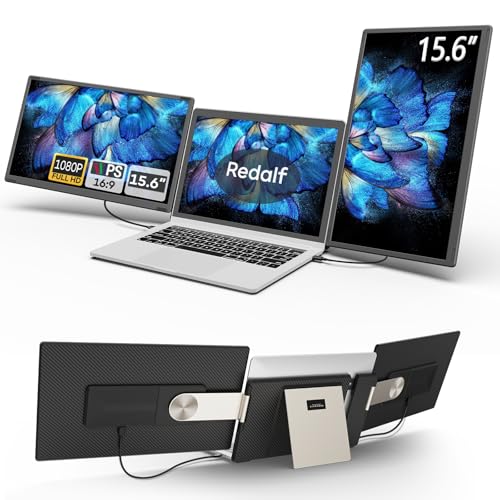
A portable extender is better suited to laptop users who move between rooms, offices, or trips. InnoView combines two 15.6-inch screens in a foldable unit. Vixtan, ZUMWALT, and Redalf add two screens to a laptop and can create a triple-screen workspace. APILDELLA, KEFEYA, and Orfibz use smaller panels for a more compact travel profile.
Match screen size to desk space
Screen size affects both usable workspace and physical footprint. The Kado pair uses two 27-inch curved monitors, which may be appropriate for a broad desk and an immersive side-by-side arrangement.
Portable models measure between 14 and 15.6 inches per added screen in the supplied evidence. Larger portable panels, such as those in InnoView, ZUMWALT, and Redalf, can provide more workspace but may require a larger laptop bag and a stronger support surface. APILDELLA, KEFEYA, and Orfibz are more compact choices.
Check resolution and panel details
Full HD resolution is common across the selected products. IPS panels are specifically listed for ViewSonic, InnoView, ZUMWALT, Redalf, APILDELLA, KEFEYA, and Orfibz. IPS can be a useful specification for users who view screens from different positions, while VA is documented for the Philips models that were not selected for this top 10.
Refresh rate also varies. The portable extenders otherwise emphasize screen expansion and flexibility more than high-refresh gaming. If smooth motion is important, compare the documented refresh rate with the needs of your computer and applications.
Review connection requirements
Connectivity is especially important with laptop extenders. ViewSonic documents HDMI, DisplayPort, and VGA, giving it a broad range of computer connections. Portable models may use USB-C, USB-A, HDMI, or combinations of those ports.
A full-featured USB-C port may be needed for one-cable video and power operation. InnoView notes that one Type-C cable carries signal while another supplies power, and recommends a 30W or higher power source. ZUMWALT notes that some laptops need an additional cable. APILDELLA also explains that brightness can be affected by insufficient power. Check your laptop’s port capabilities before choosing a portable design.
Consider operating-system support
Compatibility claims differ by product. InnoView supports Windows and Mac but notes a driver requirement for Mac extended mode. Vixtan lists Windows, macOS, ChromeOS, Android, Linux, and gaming consoles. KEFEYA lists Windows, Mac, Android, Chrome, Linux, PS4, Xbox, and Switch. APILDELLA lists Mac, Windows, and Chrome, while Orfibz lists Windows, macOS, ChromeOS, and Android.
These claims come from the supplied listings and should be checked against your exact laptop model. Redalf’s listing includes specific Mac limitations, and ZUMWALT notes additional cable requirements for some devices. Compatibility is not determined solely by the operating system; available ports, power delivery, and graphics support also matter.
Look for useful positioning features
Portable displays offer the most documented positioning flexibility. InnoView supports 315-degree screen adjustment, Redalf supports landscape, portrait, and stacked arrangements, and Orfibz provides a 226-degree adjustable view. APILDELLA folds through 225 degrees, while KEFEYA supports 180-degree rotation. These features can help when reading long documents, coding, presenting, or arranging screens around a laptop.
Kado’s curved 1500R design is intended to create a more immersive viewing arrangement, but curved screens may not suit every desk layout.
Weigh comfort and extras
Long sessions may benefit from documented eye-comfort features. ViewSonic includes flicker-free technology and a blue-light filter. InnoView lists eye-comfort support, and Redalf lists a low-blue-light design. Several other products document eye-care or low-blue-light features, but buyers should distinguish those claims from independent testing.
Built-in speakers can reduce desk clutter. The presence of speakers does not establish sound quality, so choose based on convenience rather than an unsupported performance assumption.
Final Recommendation
Vixtan S10 PRO Triple Laptop Screen Extender ranks first overall in this specification-based comparison under the published weighted criteria.
The final choice among the best dual monitors depends on the documented features that match your intended use.
ViewSonic VA2456A-MHD_H2 is the highest-scoring returned product and the first overall specification-based choice. It offers two matching 24-inch IPS Full HD monitors, 120Hz refresh, three input types, thin bezels, and documented eye-comfort features. For a portable workstation, InnoView is the most specification-aligned alternative because it combines two 15.6-inch IPS screens with foldability and extensive adjustment. Vixtan is a compelling option for users who want three screens from a laptop, while Kado is better suited to a spacious desk and a curved dual-display layout. Among the top dual monitors here, the right choice depends most on whether your priority is a fixed desk, laptop mobility, screen size, or connection flexibility.
Frequently Asked Questions
What are the best dual monitors for a permanent desk?
ViewSonic adds IPS panels, 120Hz refresh, HDMI, DisplayPort, VGA, flicker-free technology, and a blue-light filter.
Are portable dual monitors compatible with every laptop?
No. Compatibility depends on laptop size, operating system, available ports, video output, and power delivery. APILDELLA documents a 13- to 16-inch laptop range, while Vixtan documents 13- to 17.3-inch compatibility. USB-C operation may require a full-featured port, and some listings describe HDMI or extra-power requirements. Check the exact connection notes before buying.
Do portable dual monitors need drivers?
Several selected products advertise plug-and-play operation without drivers, including ZUMWALT, Redalf, KEFEYA, APILDELLA, and Vixtan. InnoView states that Windows setup does not require a driver but notes that Mac extended mode does. Driver requirements can vary by operating system and connection method, so the product’s compatibility notes should be treated as the controlling evidence.
Is a curved dual-monitor setup better for work?
A curved setup is a design preference rather than a universal advantage. Kado documents two 27-inch 1500R curved monitors and describes them for immersive viewing. That format may appeal to users who want a broad, enveloping arrangement, but it also takes more desk space.
What refresh rate should I look for?
Choose based on your use. Higher documented refresh rates may be more relevant for gaming or fast motion, while office work, documents, and general multitasking may place greater emphasis on screen count, resolution, connectivity, and positioning. Verify that your computer can supply the desired refresh rate.