Buying Guide
The best capless usb flash drives replace a loose removable cap with a connector-protection method built into the body. The supplied products use three main approaches: retractable connectors, rotating or swivel covers, and plug-and-stay bodies. A fourth practical format uses two connectors in one enclosure, but only models with clear evidence of cap-free or integrated protection belong in this comparison.
This is a specification-based comparison using public listing data. It is not a hands-on test, and it does not summarize customer opinions. Scores reflect only the documented features supplied for each product.
Choose the connector design first
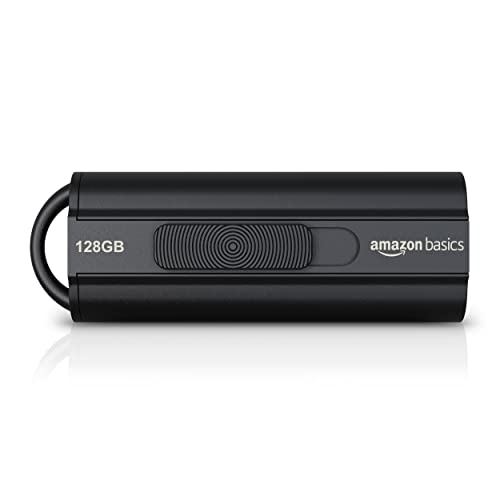
A retractable drive, such as the SanDisk Ultra Fit 128GB, Amazon Basics Ultra Fast 128GB, KOOTION 64GB, or SanDisk Glide bundle, lets the USB connector slide into the housing. This removes the need to keep track of a separate cap. It also makes the connector position adjustable, although the listing evidence does not establish how much protection each mechanism provides against every type of dust, impact, or moisture.
A swivel design uses a metal or integrated cover that rotates around the drive. The SIMMAX and RAOYI models document 360-degree covers, while MOSDART documents a rotating clip. These designs keep the connector covered when the drive is being carried and generally include a ring for attachment. The trade-off is that the rotating cover remains part of the drive and may require more clearance around the connector during use.
Plug-and-stay models take a different approach. The SanDisk Ultra Fit 128GB is described as a compact plug-and-stay drive, and the Verbatim Store ’n’ Stay Nano is designed to remain in a laptop or car stereo without getting in the way. These are especially relevant when a drive will stay connected for an extended period. Their short bodies reduce snagging, but a low-profile drive can be harder to remove from a recessed port, so check the space around your device before selecting one.
Match USB generation to the host
USB 3.0, USB 3.1 Gen 1, and USB 3.2 Gen 1 products appear throughout the upper half of this list. The SanDisk Ultra Fit 128GB lists up to 400MB/s read speed, while the Amazon Basics model lists up to 130MB/s read and 30MB/s write. KOOTION lists minimum read and write figures of 60MB/s and 15MB/s, and Lexar lists transfer speeds up to 100MB/s. These figures come from product listings and may vary with the host device, interface, file type, and operating conditions.
USB 2.0 models remain useful when the host is older or when transfers are limited to documents, music, and occasional photos. Gigastone, SIMMAX, RAOYI, and MOSDART provide explicit USB 2.0 specifications. They can also work with some newer ports, but the host and drive communicate according to the applicable interface capability. Do not select a USB 2.0 drive expecting the transfer characteristics listed for a USB 3.x product.
Check device and operating-system compatibility
Compatibility language varies considerably. Gigastone lists Windows, Mac, Linux, televisions, gaming consoles, and car audio systems. KOOTION lists computers, printers, projectors, car audio, game consoles, and smart TVs, along with Windows, Mac, and Linux. The swivel models also list broad support, but older systems and devices may use different file-system requirements.
The stated default format matters as well. KOOTION identifies exFAT, while SIMMAX and RAOYI document FAT32. FAT32 is widely recognized but has file-size limitations that can matter for large video files. exFAT is commonly used for larger files, but the receiving device still needs to support it. The listings do not establish compatibility with every television, phone, console, or car stereo, so verify the host manufacturer’s requirements when the drive will be used outside a standard computer.
Select capacity based on the files
Capacity should follow the type and quantity of data you plan to carry. The 16GB SanDisk drives are suited to smaller transfers, while the 32GB Verbatim, Gigastone, SIMMAX, and RAOYI models provide more room for documents, photos, and music. The 64GB KOOTION and MOSDART options provide additional space for larger collections. The 128GB SanDisk and Amazon Basics products are the largest capacities in this selected group.
Advertised capacity is not always identical to the capacity shown by an operating system. The Amazon Basics and SanDisk listings specifically note that actual usable storage can be lower than the labeled figure. Leave working space rather than filling a drive to its stated limit, particularly when using it for repeated transfers.
Consider portability and security features
A lanyard hole or keychain ring helps prevent a small drive from becoming separated from other equipment. KOOTION, RAOYI, SIMMAX, MOSDART, and the SanDisk Glide bundle document carrying features. The Verbatim Nano and SanDisk Ultra Fit emphasize a low-profile body instead, which is useful when a drive must remain in place.
Several models include downloadable security software. SanDisk lists 128-bit AES password protection for the Ultra Fit, Amazon Basics references personal-data protection, and Lexar lists advanced security software with 256-bit AES encryption. These are software-based features with stated operating-system requirements; they should not be treated as a substitute for a separate backup. Keep another copy of important files before moving them to removable storage.
Final recommendation
SanDisk Ultra Fit 128GB USB 3.2 Gen 1 ranks first overall in this specification-based comparison under the published weighted criteria.
The SanDisk Ultra Fit 128GB is the first overall specification-based choice among these best capless usb flash drives because it combines a plug-and-stay body, USB 3.2 Gen 1, 128GB capacity, and a listed read speed up to 400MB/s. The Amazon Basics Ultra Fast 128GB is an alternative when a retractable connector is preferred. For mixed USB-C and USB-A equipment, the Lexar D40E 64GB is the most directly documented fit.
The KOOTION 64GB is a balanced retractable option with an LED and lanyard hole. Choose the Verbatim Store ’n’ Stay Nano when a drive needs to remain unobtrusive in a laptop or car stereo. The SanDisk Glide bundle makes sense when two separate drives are useful. Gigastone, SIMMAX, RAOYI, and MOSDART are appropriate for simpler USB 2.0 needs, with swivel or integrated protection documented in their listings. Together, these top capless usb flash drives cover compact storage, legacy ports, retractable connectors, swivel covers, and multi-drive use without relying on unsupported performance assumptions.
Frequently Asked Questions
Among the best capless usb flash drives, what makes a USB flash drive capless?
A capless drive uses an integrated method to protect or cover its USB connector instead of relying on a separate removable cap. Retractable models slide the connector into the body. Swivel models rotate a cover around the connector, and plug-and-stay models use a short body intended to remain connected. The best capless usb flash drives in this guide document one of those integrated designs.
Are USB 3.x capless drives compatible with USB 2.0 ports?
Many are. The Amazon Basics, KOOTION, SanDisk Ultra Fit, SanDisk Glide, and Verbatim Nano listings describe backward compatibility or use of USB 2.0 hosts. The drive will generally operate according to the host connection, so a USB 2.0 port will not provide the same interface capability listed for USB 3.x. Confirm compatibility for unusual equipment such as older televisions, consoles, or car stereos.
Should I choose a retractable or swivel design?
Choose retractable when you want the connector to move into the housing and prefer a slide mechanism. Choose swivel when you want an integrated cover that rotates around the body and may also provide a keychain attachment point. KOOTION and the SanDisk models document retractable formats; SIMMAX, RAOYI, and MOSDART document swivel protection. The supplied evidence does not establish that one mechanism is universally more durable.
Do USB-C and USB-A flash drives work with phones?
A dual-connector model can support both USB-C and USB-A equipment, but the phone must support the relevant USB-C storage or OTG function. The Lexar D40E listing explicitly identifies USB-C smartphones and tablets as compatible devices. Check the phone or tablet specifications before transferring files, and remember that connector compatibility alone does not establish support for every file system.
Is a 128GB drive necessary for ordinary documents?
Not usually. Smaller capacities can cover documents and modest photo collections, while 64GB or 128GB provides more room for large media files and repeated transfers. Capacity should be based on your file sizes and the amount of working space you want to keep available. Also check the usable capacity shown by the operating system, since it can be lower than the labeled figure.