Buying Guide
Selecting the best copper heat sinks starts with identifying the component, not simply choosing the largest copper block. The products in this comparison fall into four practical groups: server CPU coolers, M.2 SSD coolers, single-board-computer kits, and small passive chip or memory heatsinks. Each group has different clearance, attachment, and coverage requirements.
Match the heatsink to the component
For a server processor, socket and chassis compatibility are decisive. The Dynatron A28 is explicitly designed for AMD EPYC processors using Socket SP3 and for 1U servers. Its 120 x 82 x 27 mm dimensions and stated 180-watt CPU-power target make it a specialized choice rather than a general electronics heatsink. Check the socket, chassis height, and mounting arrangement before considering any server cooler.
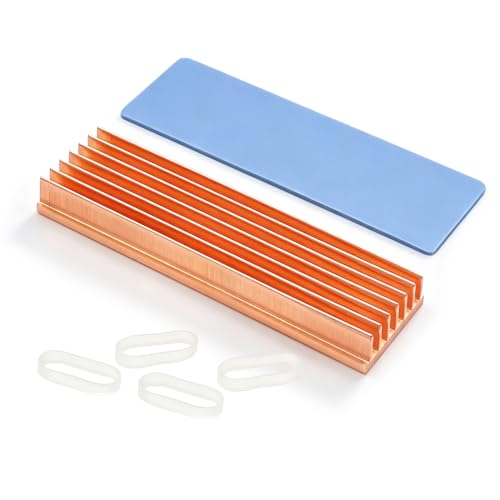
M.2 SSDs usually require a 2280-length cooler, but the available vertical space can vary substantially. The Awxlumv model is 70 x 20 x 8 mm and calls for at least 12 mm of installation height. That is a reasonable desktop-oriented profile, but it may not suit a tightly enclosed laptop. By contrast, the SGTKJSJS kit lists a 1.5 mm minimum installation height, while the Haojiaho slim model is 2 mm thick. Those specifications are more relevant than a general claim that a cooler is compact.
The Thermalright HR10 2280 follows a different design. Its two copper heat pipes transfer heat to a larger fin assembly, but the complete cooler is 43.8 mm high. That makes it better suited to a desktop layout with generous clearance than to a laptop or narrow console compartment. The ELUTENG kit is flatter and uses grooves across the copper surface, with metal clips and rubber bands supplied for retention.
Consider copper construction and fin design
Copper provides a conductive base material, but the shape determines how much surface is exposed to surrounding air. The Jeteokar 30 x 30 x 7 mm units use skiving fins, while the Awxlumv listing describes seven copper fins. The ELUTENG and Haojiaho M.2 products use grooved surfaces. These are distinct passive designs, so compare the available footprint and airflow around the target component rather than assuming that every copper heatsink behaves identically.
The Dynatron A28 adds a vapor chamber and stacked fins, a much more specialized arrangement than the flat plates used on small chips. The Thermalright unit adds copper heat pipes to an aluminum fin group. Both demonstrate that a product can include copper as part of a broader cooling assembly. If your requirement is specifically a pure-copper contact plate, the Awxlumv, SGTKJSJS, Haojiaho, iUniker, Jeteokar, Easycargo, and Alphacool listings provide clearer copper-construction descriptions.
Check the thermal interface
A heatsink cannot transfer heat effectively without a suitable interface between its base and the component. The iUniker kit includes thermal conductive adhesive tape, while the Easycargo kit specifies pre-applied 3M 8810 tape. These designs are convenient for small chips and board components, but adhesive placement is generally a one-time decision.
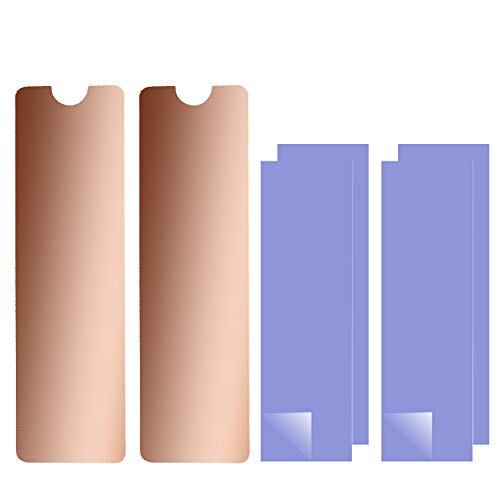
M.2 products commonly use removable silicone pads and separate retention hardware. Awxlumv includes a silicone thermal pad and rubber bands. ELUTENG adds thermal pads, rubber bands, and metal clips. The SGTKJSJS package includes two pad thicknesses plus rubber-ring and insulation-sticker mounting methods. These details matter when the SSD surface is uneven or when the cooler must fit beneath a cover.
The Thermalright HR10 includes double-sided thermal pads, while the Haojiaho slim M.2 model includes one silicone-based pad and rubber rings. Confirm whether the pad, clip, or adhesive arrangement matches your drive and enclosure before installation. A thermal interface that is too thick can create clearance problems; one that is too thin may not contact the component evenly.
Measure the component area, nearby connectors, enclosure, and any cover before selecting among the best copper heat sinks. Small 10 x 10 mm units such as Easycargo are intended for compact contact areas. Alphacool’s 14 x 14 mm units provide a larger GPU RAM or MOSFET footprint, while Jeteokar’s 30 x 30 mm format is intended for broader chip and board applications.
Raspberry Pi kits need a different kind of fit. The iUniker set lists five sizes, including 17 x 17 x 5 mm, 15 x 10 x 5 mm, and several smaller pieces for the CPU, RAM, RP1, Ethernet, and power chips on Raspberry Pi 5. That range is more useful for a board with several differently sized targets than a single generic block. The listing also states that the Raspberry Pi board is not included.
Choose the right quantity
Quantity can affect how flexible an installation is, but it should not replace fit analysis. The iUniker kit has ten pieces, the ELUTENG package has four M.2 heatsinks, Easycargo supplies ten small units, and Alphacool provides ten 14 x 14 mm pieces. Multi-piece kits are useful when several chips need coverage or when a replacement piece may be needed later. Single-unit M.2 kits such as Awxlumv and the slim Haojiaho model are more focused on one 2280 drive.
Final recommendation
ELUTENG M.2 SSD Copper Heatsink 4-Pack ranks first overall in this specification-based comparison under the published weighted criteria.
The final choice among the best copper heat sinks depends on the documented features that match your intended use.
Dynatron A28 is the highest-scoring returned product and the first overall specification-based choice for its clearly documented AMD EPYC SP3 and 1U server design. For M.2 SSDs, the Thermalright HR10 2280 offers the most elaborate heat-pipe architecture, while Awxlumv provides a more compact pure-copper fin format. Laptop users should prioritize the low-clearance SGTKJSJS kit or the 2 mm Haojiaho model. ELUTENG is a practical multi-piece M.2 option because it documents both clip and rubber-band retention.
For boards and chips, iUniker is the most specifically tailored Raspberry Pi 5 kit. Jeteokar supplies a larger skived-fin footprint for general components, Easycargo targets small VRM and IC areas, and Alphacool focuses on GPU RAM and MOSFET modules. These top copper heat sinks should be selected by measured clearance, contact area, and attachment method rather than by copper content alone. The available evidence supports specifications and intended applications, not independent performance testing.
Frequently Asked Questions
What are the best copper heat sinks for an M.2 2280 SSD?
The best copper heat sinks for an M.2 2280 SSD depend on clearance. Awxlumv documents a 70 x 20 x 8 mm pure-copper body, SGTKJSJS lists a 1.5 mm minimum installation height for laptops, and Haojiaho offers a 2 mm model. Thermalright HR10 2280 is a taller desktop option with two copper heat pipes and an aluminum fin assembly.
Do copper heatsinks need thermal pads or adhesive?
They need a suitable thermal interface to bridge small gaps between the component and heatsink. Products in this selection use several approaches: iUniker and Easycargo use adhesive tape, while Awxlumv, ELUTENG, Thermalright, and Haojiaho include silicone-based thermal pads with separate retention pieces or clips. Always follow the product’s supplied mounting method and check thickness before closing the enclosure.
Which copper heatsink fits Raspberry Pi 5 components?
The iUniker kit is specifically shaped for Raspberry Pi 5 CPU, RAM, RP1, Ethernet, and power-chip locations, with five listed heatsink sizes. The board itself is not included with the iUniker listing.
Are larger copper heatsinks always better?
No. A larger heatsink can provide more exposed area, but it must fit the component and surrounding enclosure. Jeteokar’s 30 x 30 x 7 mm design suits broader electronic targets, whereas Easycargo’s 10 x 10 x 4 mm units target small VRM or IC areas. For M.2 installations, a tall cooler such as Thermalright HR10 may be unsuitable where a 2 mm or 1.5 mm profile is required.
What should I measure before installing a passive heatsink?
Measure the component’s length and width, the available height, nearby connectors, enclosure walls, and the gap under any cover. Also check whether the product uses adhesive, a silicone pad, rubber rings, or metal clips. These details determine whether the heatsink can make proper contact without interfering with adjacent hardware.