Buying Guide
Picking from the best engineering scientific calculators is easier when you separate marketing language from the specifications that actually affect daily work. Below is a practical walkthrough of the engineering-relevant features documented in this category, using only the products selected above as evidence.
Display Capability and Screen Layout
Display quality is the single biggest productivity factor on a non-graphing scientific calculator. A multi-line screen lets you confirm an entry before executing it, which matters for long expressions where one mistyped character can produce a wrong answer.
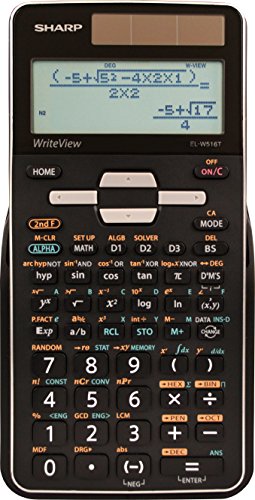
The Sharp EL-W516TBSL uses a 16-digit, four-line WriteView LCD that renders expressions as written. The Texas Instruments TI-36X Pro and its EAI 560439 TI-36X Pro variant rely on a four-line MultiView display plus the MathPrint feature for textbook-style rendering. The Sharp EL-506TSBBW drops to a two-line LCD but keeps the 12-digit width useful for engineering notation. At the entry level, the TI-30Xa shows only a single 10-digit line, while the TI-30XIIS adds a second line so entry and result appear together. Graphing units such as the TI-84 Plus CE add a backlit color screen, and the TI-Nspire CX II CAS uses a 320x240 pixel 16-bit color display for higher-resolution work.
Scientific Function Coverage
Scientific function coverage defines how broadly a calculator can serve across math and science. Look beyond the headline count and check whether the modes you actually use are present: statistics, base-N, complex numbers, and matrix calculations each unlock different workflows.
The Sharp EL-W516TBSL leads non-graphing picks with 640 functions across seven modes (Normal, Stat, Drill, Complex, Matrix, List, Equation). The Sharp EL-506TSBBW offers 470 functions and six modes including Equation, Complex Number, and Matrix. The Casio fx-115ES Plus 2nd Ed emphasizes fraction handling, multi-replay editing, and table generation for function exploration. The Texas Instruments TI-36X Pro and EAI 560439 TI-36X Pro variant deliver one- and two-variable statistics with mode options for degrees/radians and number format. The TI-30XIIS focuses on fractions, conversions, and basic scientific/trig functions for general high school math, while the TI-30Xa provides the baseline of trig, logs, roots, and polar/rectangular conversions.
Engineering Solver Features
When coursework or work shifts toward algebra-heavy engineering tasks, the embedded solvers and modes become decisive. A calculator that can solve a quadratic, a system of equations, or a polynomial on-device saves significant time compared with manual manipulation.
The Sharp EL-506TSBBW includes quadratic and cubic equation solvers, substitute-algebra with simulation, matrix, complex, and N-Base calculations. The Texas Instruments TI-36X Pro and EAI 560439 TI-36X Pro variant offer three solvers: numeric equation, polynomial, and system of linear equations. The Sharp EL-W516TBSL provides drill, complex, matrix, list, and equation modes plus 8 temporary and 3 definable memory buttons for retaining intermediate results. The TI-Nspire CX II CAS extends this further with CAS symbolic manipulation for college-level calculus and engineering.
Exam and Curriculum Eligibility
Any handheld intended for use during proctored exams must be cleared for those exams. The Texas Instruments TI-84 Plus CE, TI-84 Plus, TI-30XIIS, and TI-34 MultiView family are widely approved for SAT, ACT, and AP testing, while CAS graphing handhelds like the TI-Nspire CX II CAS are restricted in many standardized settings. Always confirm the specific exam policy before relying on a graphing or CAS unit in a test room.
For curriculum breadth, the Texas Instruments TI-36X Pro is documented for Algebra 1 and 2, Geometry, Trigonometry, Statistics, and Calculus, while the Sharp EL-531TGBBW is documented for general math, pre-algebra, algebra, geometry, trigonometry, statistics, biology, and chemistry. The Sharp EL-W516TBSL’s equation mode further supports pre-calculus and linear algebra workflows.
Build Quality and Portability
Engineering students often carry their calculator for years. Build features such as protective cases, battery type, and weight directly influence long-term durability.
The Texas Instruments TI-30Xa and TI-30XIIS are the lightest picks in this group, with slide cases included. The Sharp EL-W516TBSL is solar and battery powered with a durable gloss black finish. The Sharp EL-506TSBBW and Sharp EL-531TGBBW add acrylic display protection and a 3D light-reflecting cover to resist scratches. The Texas Instruments TI-84 Plus CE uses a rechargeable battery that can last up to one month on a single charge, while the TI-Nspire CX II CAS can last up to two weeks per charge with its bundled handheld-software bundle.
Smooth input and reliable navigation matter when working through multi-step problems. Look for replay or previous-entry keys, dedicated memory buttons, and alpha entry for variable names.
The Casio fx-115ES Plus 2nd Ed features a multi-replay function for editing prior entries without retyping. The Texas Instruments TI-34 MultiView provides Previous Entry and pull-down menus similar to a graphing calculator. The Sharp EL-W516TBSL adds 8 temporary and 3 definable memory buttons plus a Home key for resetting from any screen. The TI-Nspire CX II CAS combines a thin design with an easy touchpad navigation system and quick alpha keys for variable entry.
Final Recommendation
Sharp EL-W516TBSL Advanced Scientific Calculator ranks first overall in this specification-based comparison under the published weighted criteria.
The final choice among the best engineering scientific calculators depends on the documented features that match your intended use.
If you need a graphing, Computer Algebra System (CAS) unit for college engineering and calculus, the Texas Instruments TI-Nspire CX II CAS stands out as the first overall specification-based choice, thanks to its 16-bit color screen, CAS engine, and bundled PC/Mac student software. For an exam-permitted non-graphing handheld with serious engineering solvers, the Texas Instruments TI-36X Pro is the most specification-aligned all-around pick with its three built-in solvers and MathPrint display. Among the top engineering scientific calculators, the Sharp EL-W516TBSL remains the deepest non-graphing option with 640 functions and a four-line WriteView screen, while the Casio fx-115ES Plus 2nd Ed offers a versatile natural-display alternative. For exam-bound high schoolers, the TI-30XIIS and TI-84 Plus CE are the most documented choices in this lineup.
Frequently Asked Questions
What makes the best engineering scientific calculators different from standard scientific calculators?
The best engineering scientific calculators typically include multi-line displays for verifying entries, solvers for equations and systems, and broader mode coverage such as matrix, complex, and N-Base calculations. Models like the Texas Instruments TI-36X Pro and the Sharp EL-506TSBBW document dedicated quadratic, polynomial, and system-of-equations solvers that go beyond basic trigonometry and logarithms.
Do I need a graphing calculator for engineering coursework?
It depends on the program. Many engineering courses accept a non-graphing scientific calculator like the Sharp EL-W516TBSL or the Texas Instruments TI-36X Pro with built-in solvers. Programs that require Computer Algebra System (CAS) work, such as symbolic calculus or advanced algebra, may require a CAS graphing handheld like the TI-Nspire CX II CAS. Always confirm the syllabus or exam policy before choosing.
Which screen layout is most helpful for long engineering problems?
A four-line display with textbook-style rendering is the most helpful layout for long engineering problems. The Sharp EL-W516TBSL with WriteView and the Texas Instruments TI-36X Pro with MathPrint both show multiple lines and render stacked fractions and exponents as they appear in textbooks, reducing the chance of misreading an entry.
Are engineering scientific calculators approved for standardized exams?
Many non-graphing scientific calculators, including the TI-30XIIS and TI-84 Plus CE, are approved for SAT, ACT, and AP exams. Graphing calculators without CAS are generally accepted, but CAS handhelds such as the TI-Nspire CX II CAS may be restricted in some standardized testing rooms. Check the specific exam rules before test day.
How important is function count when choosing among the top engineering scientific calculators?
Function count is useful as a rough proxy for capability, but mode coverage matters more for engineering work. A calculator with fewer functions but dedicated equation, matrix, and complex-number modes (such as the Sharp EL-506TSBBW) may serve engineering tasks more directly than a unit with a larger function list but limited modes. Match the documented modes to the coursework or workflow you actually need to support.