10 Best Student Graphing Calculators for Exams and Learning

Choosing among the best student graphing calculators comes down to matching display quality, exam approval, software depth, and keyboard ergonomics to the courses a student is taking. This specification-led comparison walks through ten options across the major Texas Instruments, Casio, and NumWorks lines, highlighting who each model fits best so buyers can narrow the field without overcommitting on features they will never touch.

We prioritize display and graphing clarity (18%) because readable graphs support accurate problem-solving, followed by exam approval coverage (16%) for classroom and test-day suitability. Built-in software and programming (16%), build quality and portability (14%), power system and memory (14%), learning curve and keypad design (12%), and connectivity and expansion (10%) round out the evaluation. Together, these criteria help students balance mathematical capability, ease of use, reliability, portability, and long-term usefulness when choosing a graphing calculator.

Advertising Disclosure Revactic participates in affiliate programs, including the Amazon Associates Program. We may earn a commission when you buy through links on this site, at no extra cost to you.

The Revactic ranking

Top 10 picks

2
Texas Instruments TI-84 Plus CE Color Graphing Calculator
Color-Class Standard

Texas Instruments TI-84 Plus CE Color Graphing Calculator

A slim TI-84 Plus CE in black pairs a high-resolution full-color backlit display with built-in MathPrint, a rechargeable battery rated for up to one month on a charge, and a lightweight, classroom-durable shell, and it ships with a 4-year online calculator subscription.

  • High-resolution, full-color backlit display with MathPrint input
  • TI rechargeable battery rated up to one month per charge
  • Lightweight, classroom-tough design
9.7
Check price View offer at Amazon
3
Texas Instruments TI-Nspire CX II Color Graphing Calculator
Computer-Like Math Workflow

Texas Instruments TI-Nspire CX II Color Graphing Calculator

The TI-Nspire CX II pairs a high-resolution full-color backlit display with computer-like document handling, a long-life rechargeable battery, and approval for PSAT/NMSQT, SAT, ACT, AP, and IB Diploma Programme exams.

  • High-resolution full-color display
  • Computer-like document workflow
  • Rechargeable battery designed to last up to two weeks per charge
9.6
Check price View offer at Amazon
4
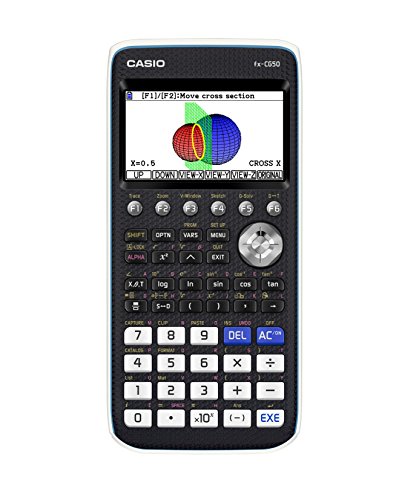
Casio fx-CG50 PRIZM Color Graphing Calculator
3D Graphing Specialist

Casio fx-CG50 PRIZM Color Graphing Calculator

The Casio fx-CG50 PRIZM delivers a high-resolution color LCD with over 65,000 colors, up to three simultaneous 3D graph functions, MicroPython programming, and a Natural Textbook Display for textbook-style input.

  • Over 65,000-color high-resolution LCD
  • Plots up to three 3D functions at once
  • Natural Textbook Display for textbook-style fractions and expressions
9.4
Check price View offer at Amazon
5
Texas Instruments TI-Nspire CX II CAS Color Graphing Calculator
CAS Power for Upper Math

Texas Instruments TI-Nspire CX II CAS Color Graphing Calculator

The CAS-equipped Nspire CX II adds computer algebra system functionality to the CX II platform, with the same 320 x 240 pixel 16-bit color screen, rechargeable battery rated up to two weeks, and touchpad navigation.

  • 320 x 240 pixel 16-bit color display
  • Rechargeable battery rated up to two weeks per charge
  • Bundled TI-Nspire CX Student Software for PC and Mac
9.3
Check price View offer at Amazon
6
Casio fx-9750GIII Graphing Calculator
Entry-Exam Pick

Casio fx-9750GIII Graphing Calculator

The fx-9750GIII adds MicroPython programming to Casio's Natural Textbook Display workflow, supports graph plotting, vectors, probability distributions, spreadsheets, and integrals, and ships with USB connectivity for PC file transfer.

  • Natural Textbook Display for textbook-style input
  • MicroPython programmable with PC transfer of programs
  • Exam-approved for AP, SAT, ACT, and IB
9.3
Check price View offer at Amazon
7
NumWorks Graphing Calculator
Modern Multilingual Design

NumWorks Graphing Calculator

NumWorks offers a high-resolution 320 x 240 color screen, a slim shell weighing under half a pound, USB-C charging, and support for English, French, Dutch, Portuguese, Italian, German, and Spanish menus.

  • 320 x 240 pixel high-resolution color screen
  • Slim form factor weighing about 0.48 pounds
  • USB-C charging cable included
9.1
Check price View offer at Amazon
8
Texas Instruments TI-84 Plus Silver Edition Graphing Calculator
High-App TI-84 Option

Texas Instruments TI-84 Plus Silver Edition Graphing Calculator

The Silver Edition layers USB on-the-go file sharing and 21 preloaded apps onto the 84 Plus platform, with split-screen graph and table views for tracing values across representations.

  • 21 preloaded apps on top of the 84 Plus platform
  • USB on-the-go file sharing with other calculators and PCs
  • Split-screen graph and table for value tracing
9.0
Check price View offer at Amazon
9
Texas Instruments TI-84 Plus Graphics Calculator
Proven 84-Plus Workhorse

Texas Instruments TI-84 Plus Graphics Calculator

The TI-84 Plus stays in the conversation with preloaded Cabri Jr. geometry software, up to ten simultaneously defined graphing functions, pull-down menu access to advanced functions, and a vibrant backlit color screen.

  • Preloaded Cabri Jr. interactive geometry software
  • Up to ten graphing functions defined, saved, and analyzed at once
  • Pull-down display menus for advanced functions
8.8
Check price View offer at Amazon
10
Texas Instruments TI-83 Plus Graphing Calculator
Entry-Level Exam Performer

Texas Instruments TI-83 Plus Graphing Calculator

The TI-83 Plus covers SAT, PSAT/NMSQT, ACT, AP, IB, and Praxis exams with an 8 x 16-character display, 24KB of RAM, and 160KB of Flash ROM, plus 3 recursively-defined sequence graphs and time-value-of-money functions.

  • Approved for SAT, PSAT/NMSQT, ACT, AP, IB, and Praxis exams
  • 24KB RAM with 160KB Flash ROM
  • Graphs three recursively-defined sequences simultaneously
8.3
Check price View offer at Amazon

Buying Guide

Finding the right graphing calculator for a student is less about raw spec sheets and more about how the device will be used day to day. These practical sections walk through the features that matter most for coursework and exam day among the best student graphing calculators.

Display type and graphing canvas

A high-resolution, full-color backlit display makes it much easier to spot intersections, shading, and parametric behavior, and the TI-84 Evo extends that idea by adding roughly 50 percent more graphing space on the same familiar interface. Models like the Casio fx-CG50 PRIZM go further with thousands of colors and even 3D graphing, which can be useful when visual differentiation matters. If the work stays in algebra and precalculus, a simpler single-line display may be perfectly adequate.

Exam approval and coursework fit

Check the exact exam list before buying, because restrictions change. The TI-Nspire CX II lists approval across PSAT/NMSQT, SAT, ACT, AP, and IB Diploma Programme exams, while CAS-equipped Nspire models like the TI-Nspire CX II CAS may face limits on some non-IB assessments. Color-screen CE and TI-84 Evo units cover essentially the same exam slate for most U.S. high schoolers.

Built-in software and programming

Python has quietly become a differentiator. The Casio fx-CG50 PRIZM and fx-9750GIII both run MicroPython directly on the handheld, and the NumWorks keeps a modern, frequently updated app environment. The TI-Nspire family pairs handhelds with desktop Student Software for PC and Mac, which is valuable for students who want to draft problem sets on a computer and then transfer work.

Power system, memory, and battery

TI’s rechargeable CE and Nspire handhelds are rated for weeks of typical use between charges, which reduces reliance on coin-cell or AAA spares. The TI-84 Plus line still relies on replaceable batteries, while older 83 and 84 Plus models have lower Flash ROM ceilings than current CE units. Memory matters mainly once students begin saving scripts, images, or large data sets for statistics labs.

Build quality and portability

Most 84-series handhelds hover around 0.4 to 0.55 pounds and slip easily into a backpack. The Casio fx-CG50 PRIZM is a touch heavier, while the NumWorks is the slimmest option in the roundup. A hard slide cover is the norm across the category and offers meaningful drop protection during backpack commutes.

Keypad, learning curve, and software updates

Students moving from a scientific calculator to a graphing calculator benefit from clear, labeled keys and shallow menu trees. The TI-84 Evo’s icon-based home screen and simplified keypad are explicitly designed for that transition. NumWorks leans on a touchscreen-like interface that many younger students pick up quickly, while Casio models keep deeper menus but reward the time invested.

Connectivity, USB, and ecosystem

USB file transfer is standard on Casio fx-9750GIII and on TI Nspire models, and the TI-84 Plus Silver Edition adds USB on-the-go for sharing files calculator-to-calculator. None of the units selected include active Wi-Fi or Bluetooth, which keeps exam compliance straightforward for students who want a distraction-free study tool. Buying guide-wise, this also means choosing a model with a healthy ecosystem of teacher resources and training material rather than chasing extra radios.

Final recommendation

Texas Instruments TI-84 Evo Graphing Calculator (White) ranks first overall in this specification-based comparison under the published weighted criteria.

Among the best student graphing calculators in this comparison, the Texas Instruments TI-84 Evo Graphing Calculator stands out as the first overall specification-based choice, pairing the newest TI-84 platform with the largest graphing area and a noticeably faster processor for everyday classroom work. Students who prefer a slimmer color shell with rechargeable power should weigh the TI-84 Plus CE, while those entering 3D calculus and pre-calculus visuals may prefer the Casio fx-CG50 PRIZM. For top student graphing calculators that also support modern Python programming, the Casio fx-9750GIII and fx-CG50 PRIZM are the standout options, and the NumWorks remains a clean, modern alternative for multilingual classrooms. IB and AP track students who need CAS support will get the most from the TI-Nspire CX II CAS, paired with TI-Nspire Student Software for PC and Mac.

Frequently Asked Questions

Which of the best student graphing calculators is approved for the SAT and ACT?

Most TI-84 series, TI-Nspire CX II, Casio fx-CG50 PRIZM, and Casio fx-9750GIII models list approval for SAT, ACT, and AP exams. Always re-check the current testing agency list before test day in case policy changes are issued mid-school-year.

Are CAS graphing calculators allowed on U.S. exams?

CAS-equipped models are typically restricted on SAT, ACT, and AP Calculus, while some IB Diploma Programme assessments accept them. The TI-Nspire CX II CAS is a strong CAS pick for IB and engineering-track students, but non-IB exam takers should default to a non-CAS 84 Plus CE or TI-84 Evo instead.

Do I need a color screen to graph well?

Color is helpful when overlaying multiple functions, shading inequalities, or interpreting 3D plots on the Casio fx-CG50 PRIZM, but it is not required for algebraic graphing. A monochrome display on the TI-83 Plus or a basic 84 Plus is perfectly capable for most algebra and precalculus coursework.

Why choose a TI-84 Evo over an older 84 Plus?

The TI-84 Evo offers roughly 3x faster processing, about 50 percent more graphing area, an icon-based home screen, and a simplified keypad. Students who want the most current 84-series platform without switching brands will find it the most direct upgrade path.

What is the difference between the TI-84 Plus CE and the TI-84 Plus Silver Edition?

The 84 Plus CE uses a high-resolution full-color backlit display with a rechargeable battery and the slimmest shell in the family. The 84 Plus Silver Edition ships 21 preloaded apps and adds USB on-the-go file sharing, but its screen and battery system are from an older generation compared to the CE.