Buying Guide
The best female sata cables are not one universal format. The word “female” describes one side of a connection, while the cable’s job depends on whether it carries SATA data, SATA power, or both. Before comparing length or construction, identify the port on the device and the connector available from the motherboard or power supply.
Start with the connector type
A 7-pin SATA cable is normally used for internal drive data. The Coolgear, StarTech.com, and SG Store extensions use a 7-pin male-to-female format. These are the relevant choices when the problem is distance between a drive and a motherboard or another SATA data cable. They should not be treated as substitutes for a 15-pin power extension.
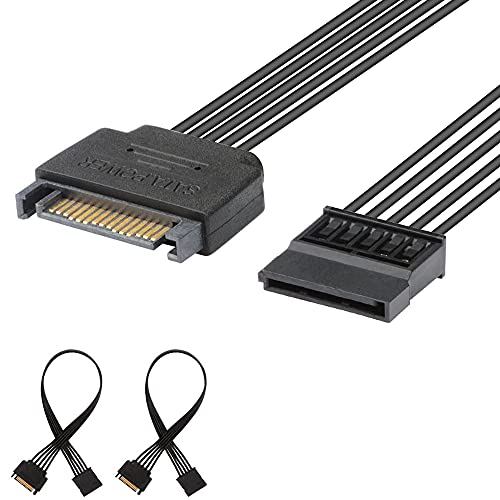
A 15-pin SATA cable is used for drive power. The Cable Matters 3-Pack, J&D, COMeap, and YiKaiEn selections are power extensions. They connect a power-supply lead to a SATA-powered drive, optical drive, or another documented compatible device. Their female ends do not make them data cables.
A 22-pin cable combines the 7-pin data section and 15-pin power section. The MEIRIYFA and ChenYang options are intended for devices with a combined SATA interface. This can simplify a connection when the source and device both use the matching 22-pin arrangement, but it is not the right choice for a setup with separate data and power ports.
Match the cable to the installation
Measure the likely route before choosing length. The StarTech.com cable is approximately 30cm, while the ChenYang cable is also 30cm and the YiKaiEn power extension is 32cm. These lengths may be easier to manage in a compact desktop. The 50cm SG Store and MEIRIYFA cables provide more reach, while the 60cm COMeap cable is intended for a longer internal run.
Longer is not automatically better. Extra slack can make routing less orderly, especially around drive cages or side panels. Shorter cables can be preferable when the connectors are already close together. For a service kit or several systems, the SG Store four-pack, Cable Matters three-packs, and J&D two-pack provide more than one cable for separate installations.
Consider construction details
Construction evidence varies substantially. Coolgear documents a 26AWG solid tinned-copper conductor, hot-melt aluminum mylar shielding, gold-plated contacts, and an 80C PVC jacket. That makes it the most technically detailed data-extension option in this comparison. MEIRIYFA identifies an oxygen-free copper core plus foil and multilayer shielding, while ChenYang provides voltage, wire, and transfer details for its 22-pin design.
For power extensions, J&D lists 18AWG oxygen-free copper and bare copper braided shielding. COMeap lists 18AWG tinned-copper wire and a braided exterior. These details help distinguish a documented cable construction from a listing that only states general compatibility. They do not replace checking the connector and power-source specifications for the specific computer.
Check whether you need an extension or splitter
A straight extension adds distance while preserving the same basic connection path. That is the role of the data and power extensions in this guide. The Cable Matters 15-pin Y-splitter is different: it changes one SATA power connection into two female outputs. It can support two SATA-powered devices from one source connection, but it does not add SATA data connectivity.
A splitter also requires attention to the power supply and the connected devices. Confirm that the source connection and the devices are compatible before using a two-output design. If you only need another few inches, a straight extension is a simpler match.
Read pack contents carefully
Pack size affects installation planning. The SG Store listing includes four 50cm data extensions. Cable Matters offers three-cable packs for both straight 15-pin power extensions and 15-pin Y-splitters. J&D supplies two 10-inch power extensions, while MEIRIYFA provides two 22-pin combo extensions. StarTech.com, ChenYang, COMeap, and YiKaiEn are single-cable listings.
A multi-pack is useful when several drives or systems need the same connector type. A single cable may be preferable when you want to avoid unused internal wiring. Compare the pack contents only after confirming that the connector format matches the intended port.
Verify the device before installation
Do not rely on the word “SATA” alone. Check whether the device needs 7-pin data, 15-pin power, or a combined 22-pin connection. Also check the direction and shape of the connectors, especially for a right-angle or flat cable route. The evidence for the selected products documents different applications, so the correct choice depends on the hardware layout rather than the label alone.
Final Recommendation
J&D 10-Inch 15-Pin SATA Power Extension, 2-Pack ranks first overall in this specification-based comparison under the published weighted criteria.
The final choice among the best female sata cables depends on the documented features that match your intended use.
Coolgear 12-Inch SATA Male-to-Female Extension is the first overall specification-based choice among these products. Its 7-pin format, shielding, tinned-copper conductor, gold-plated contacts, and defined 12-inch length give it the most complete data-extension specification in the group. It is not the right cable for SATA power, however.
For a power-only installation, the Cable Matters 3-Pack 15-Pin SATA Power Extension is the more appropriate selection, particularly when several drives need extensions. COMeap is the practical alternative for a long internal route, while J&D is a good fit when the documented locking mechanism matters. For combined data and power, MEIRIYFA and ChenYang are the top female sata cables to consider, provided the equipment uses a matching 22-pin interface.
Frequently Asked Questions
What should I check before buying the best female sata cables?
Identify the connector required by the device: 7-pin for SATA data, 15-pin for SATA power, or 22-pin for combined data and power. Then compare length, pack quantity, and any documented shielding or conductor details.
Are SATA data and SATA power extensions interchangeable?
No. A 7-pin data extension and a 15-pin power extension serve different connections. The selected Cable Matters, J&D, COMeap, and YiKaiEn power products should not be used as replacements for the 7-pin data cables from Coolgear, StarTech.com, or SG Store.
When is a 22-pin SATA extension appropriate?
Use a 22-pin extension when the source and device each have a combined 7+15 SATA interface. The MEIRIYFA and ChenYang listings document this arrangement. If your system has separate data and power ports, choose separate cables instead.
Is a SATA Y-splitter the same as an extension?
No. The Cable Matters Y-splitter provides two female 15-pin power outputs from one male SATA power connector. It expands power connections but does not extend SATA data. A straight extension is the better match when you only need additional cable distance.
Does a longer SATA cable always improve a build?
No. A longer cable can help reach a distant drive bay, but unused length may complicate routing. Choose the shortest documented length that reaches the intended connection, unless the installation specifically requires the extra reach of a 50cm or 60cm cable.