Buying Guide
The best intel uhd graphics all-in-one computers are easiest to compare by separating the processor from the graphics label. Intel UHD Graphics is integrated rather than a separate graphics card, so the processor, memory, and storage still shape the system’s documented capabilities. The models selected here range from Core i7 and Core i5 systems to compact Intel N100 configurations. That spread makes it possible to choose based on workload instead of treating every UHD-equipped computer as interchangeable.
Start with the processor
For heavier office multitasking, the processor is the first specification to examine. The Lenovo IdeaCentre 27-inch model uses a 10-core Core i7-13620H, while the Lenovo ThinkCentre neo 50a 27 Gen 5 lists an 8-core Core i5-13420H. These H-series chips provide the highest documented core counts in the selection. Dell’s Pro 24 uses a 14-core Core i5-14500T, giving it a particularly high specification profile even though it is a T-series desktop processor.
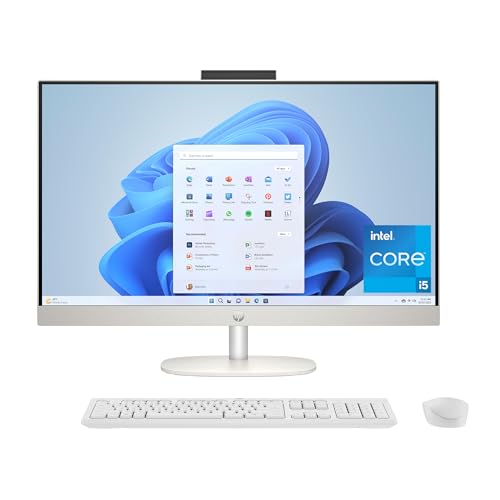
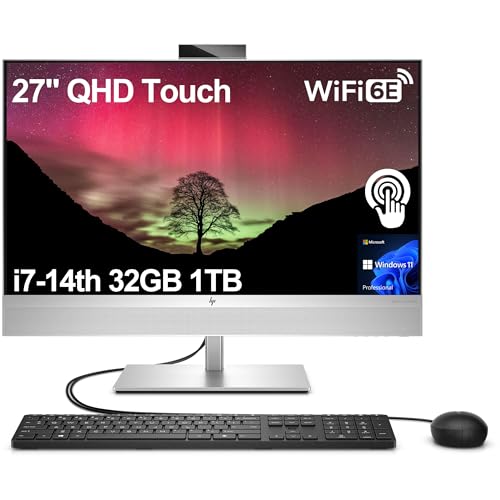
The HP 27-inch Touch, HP 23.8-inch Core i5, ASUS touchscreen, and HP 23.8-inch Core i5 models use mobile Core i5 processors. Their listings identify them as suitable for everyday productivity, but the supplied specifications do not establish hands-on performance. Treat them as appropriate candidates for office applications, web work, streaming, documents, and video calls rather than as tested gaming or professional-rendering systems.
The Intel N100 models are more compactly configured. Lenovo’s 32GB N100 system, Lenovo A100, and Lenovo V100 pair that processor with generous memory or storage. This can make the systems convenient for routine work, but the processor specifications still place them below the selected Core i5 and Core i7 systems for processor headroom.
Match RAM and storage to the workload
Memory affects how many applications and browser tabs can remain active at once, while storage determines the space available for documents, media, and installed software. Sixteen gigabytes is a useful middle ground in this selection. It appears in the Dell Pro 24, HP 27-inch Touch, ASUS, HP 23.8-inch Core i5, Lenovo ThinkCentre M70a, Lenovo A100, and Lenovo V100.
The Lenovo 24-inch N100 system stands out with 32GB DDR4 and a 1TB PCIe SSD. That combination is a clear fit for users who keep many work items open or store a larger local file collection. The Lenovo ThinkCentre M70a also lists a 1TB NVMe SSD, while the remaining selected systems generally provide 512GB of solid-state storage.
When comparing similar all-in-ones, favor the configuration that gives you enough RAM and SSD capacity at the outset, because the supplied listings do not consistently document upgrade paths.
Screen size changes how comfortably you can arrange documents and windows. The Lenovo IdeaCentre and Lenovo ThinkCentre neo 50a provide 27-inch FHD IPS displays, making them the largest choices here. Both list 100Hz refresh rates, while the IdeaCentre also lists 99% sRGB and the ThinkCentre lists 99% sRGB, 300 nits, anti-glare, low-blue-light, and flicker-free features.
The Dell Pro 24, HP 23.8-inch Core i5, ASUS, Lenovo A100, Lenovo V100, and Lenovo 24-inch N100 systems use approximately 23.8-inch displays. IPS panels are documented for Dell, ASUS, Lenovo A100, Lenovo V100, and the Lenovo 24-inch N100 model. The HP 27-inch Touch uses an FHD touchscreen and a three-sided micro-edge design. Choose touch when direct on-screen interaction matters; choose a larger non-touch panel when workspace is the priority.
Several HP listings document flicker-free or DC-dimming features, and the Dell and Lenovo business models document anti-glare or low-blue-light elements. These are specification features, not proof of comfort for every user, so consider your lighting and viewing habits separately.
Check ports, wireless, and privacy hardware
Connectivity varies more than the Intel UHD label suggests. Dell lists DisplayPort, USB-C, multiple USB-A ports, Gigabit Ethernet, and a pop-up FHD HDR camera. The Lenovo ThinkCentre neo 50a includes USB-C, HDMI input and output, Ethernet, and a headphone/microphone combination jack. The older Lenovo ThinkCentre M70a adds DisplayPort, USB-C, several USB-A ports, Ethernet, and a VESA mount.
The ASUS system lists Wi-Fi 6, Bluetooth 5.1, HDMI output, multiple USB ports, and a 720p camera. The Lenovo N100 models list Wi-Fi 6, Bluetooth 5.2, HDMI output, and wired accessories. If you plan to add another screen, verify that the listing includes the needed HDMI or DisplayPort connection. If video calls are important, compare the documented camera resolution and privacy hardware rather than assuming the camera is the same across models.
Consider the integrated workspace
An all-in-one keeps the computer and display together, reducing the number of separate desktop components. Every selected model uses that integrated format, but the practical details differ. Dell, ASUS, Lenovo A100, Lenovo V100, and several other models include a keyboard and mouse. The Dell configuration also lists a TPM 2.0 security chip, while the Lenovo ThinkCentre M70a documents VESA mounting.
Windows 11 Pro appears on the Dell, both selected 27-inch Lenovo business models, Lenovo A100, and Lenovo V100. Windows 11 Home appears on the HP and ASUS selections. Choose the documented edition that fits your environment, especially when business administration or security features are part of the setup.
Final Recommendation
Lenovo IdeaCentre 27-inch i7 All-in-One ranks first overall in this specification-based comparison under the published weighted criteria.
Lenovo IdeaCentre 27-inch i7 All-in-One is the first overall specification-based choice among these best intel uhd graphics all-in-one computers. Its 10-core Core i7-13620H, 16GB DDR5, 512GB SSD, 27-inch IPS display, 100Hz refresh rate, Wi-Fi 6, and HDMI input and output create the most complete large-screen profile in the comparison. The Lenovo ThinkCentre neo 50a 27 Gen 5 is a close alternative for a Windows 11 Pro office setup, while the Dell Pro 24 is especially well documented for touch, camera privacy, TPM 2.0, and port selection.
For touch interaction, consider the HP 27-inch Touch or ASUS touchscreen. For a compact system with substantial memory, the Lenovo 24-inch N100 provides 32GB RAM and a 1TB SSD. The Lenovo A100 and Lenovo V100 offer similar 23.8-inch everyday layouts with 16GB RAM and 512GB storage, while the Lenovo ThinkCentre M70a favors business connectivity, VESA mounting, an optical drive, and a 1TB NVMe SSD. These are the top intel uhd graphics all-in-one computers here based on supplied specifications, not hands-on testing.
Frequently Asked Questions
Are the best intel uhd graphics all-in-one computers suitable for gaming?
The supplied listings document Intel UHD Graphics on all selected systems, and some HP descriptions mention streaming 4K content and playing games in 720p. They do not provide independent frame-rate testing or game-specific results. For that reason, treat these systems as general-purpose computers with integrated graphics rather than assuming dedicated-gaming performance.
Which selected model has the largest display?
The Lenovo IdeaCentre 27-inch i7 All-in-One, Lenovo ThinkCentre neo 50a 27 Gen 5, and HP 27-inch Core i5 Touch all list 27-inch displays. The two Lenovo models document IPS panels and 100Hz refresh rates; the HP model documents an FHD touchscreen and three-sided micro-edge design.
Is 16GB RAM enough for everyday work?
The selected Dell, HP 27-inch Touch, ASUS, HP 23.8-inch Core i5, Lenovo ThinkCentre M70a, Lenovo A100, and Lenovo V100 configurations all list 16GB. That is a higher documented memory configuration than the 8GB systems in the candidate pool. The Lenovo 24-inch N100 goes further with 32GB, which may suit users who keep more applications open.
Which all-in-one offers touch control?
The Dell Pro 24, HP 27-inch Core i5 Touch, and ASUS 23.8-inch Touch All-in-One explicitly list touchscreens. The Dell and ASUS models use 23.8-inch displays, while the HP provides a 27-inch FHD touchscreen. The remaining selected displays are described as non-touch or do not document touch support.
What should I check before choosing one of these systems?
Confirm the processor generation and core count, RAM and SSD capacity, screen size and panel type, camera and privacy features, wireless standard, and available video outputs. Also check the listed Windows edition and warranty terms. Those details distinguish the top intel uhd graphics all-in-one computers more reliably than the shared graphics branding alone.