Buying Guide
Choosing among the best rugged laptops starts with the environment rather than the processor name. A laptop used inside service vehicles has different needs from one used in rain, dust, construction zones, or hazardous locations. The listings in this comparison document several levels of protection, from IP51 and IP53 semi-rugged designs to IP65 systems with military-standard testing. Treat those claims as specifications to verify against your work conditions, not as a substitute for a formal site assessment.
Match protection to the worksite
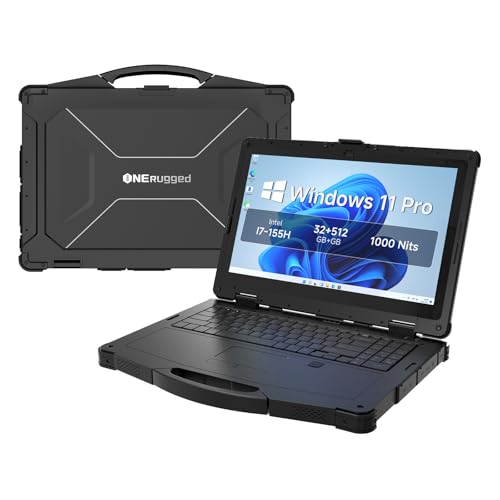
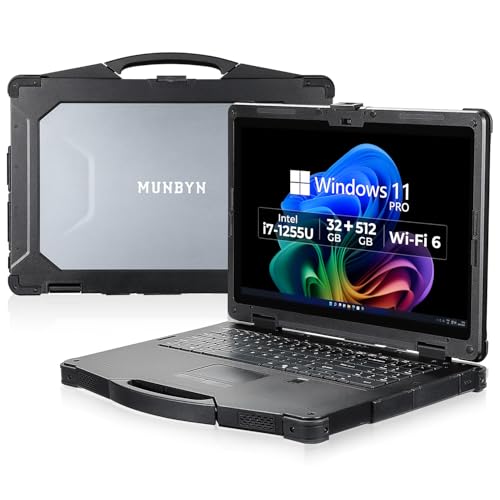
IP ratings describe resistance to solids and water under the applicable test conditions. The ONERugged N15M, MUNBYN IRX17, MUNBYN IRX18, and Panasonic Toughbook CF-33 list IP65 protection. That makes them the clearest choices in this group when dust and water exposure are central concerns. The Panasonic Toughbook CF-31 MK6 also lists IP65, along with MIL-STD-810G and MIL-STD-461F.
Dell’s Latitude Rugged 5430 configurations list IP53 and MIL-STD-810H testing. One configuration also lists Class 1 Division 2 certification, which is a particularly important documented feature for certain hazardous-location applications. Do not assume that an IP rating or military-standard reference automatically covers every workplace requirement; confirm the exact certification and operating conditions with your organization.
Prioritize screen brightness outdoors
Outdoor readability is one of the most useful distinctions between ordinary business laptops and field machines. The Dell Latitude Rugged 5430 configurations list 1,100-nit screens. The Panasonic Toughbook CF-31 MK6 lists 1,200 nits, while the Toughbook FZ-55 MK1, MUNBYN IRX17, MUNBYN IRX18, ONERugged N15M, and Panasonic Toughbook CF-33 list brightness around 1,000 nits or higher. These specifications are more relevant to direct-sunlight work than resolution alone.
Touch input can help when users wear gloves or need quick field interaction. The CF-33 specifically lists glove multi-touch and digitizer support. The Getac K120 and Dell Latitude Rugged 5430 also provide touch-based designs. Conversely, a non-touch anti-glare panel may be preferable when reflections, accidental touches, or keyboard-heavy work are the main concerns.
Decide whether hot-swappable batteries matter
Battery continuity is valuable when a technician cannot stop to shut down. The ONERugged N15M, MUNBYN IRX17, and MUNBYN IRX18 list removable or dual-battery designs with hot-swapping support. The Panasonic Toughbook CF-31 MK6 also lists a hot-swappable battery. These features can support longer shifts, but the supplied listings do not establish actual runtime. Battery capacity, application load, screen brightness, temperature, and battery age will affect real use.
If battery swapping is not essential, focus on the included battery specification and charging setup, then confirm replacement-battery availability. A removable battery is only useful if compatible spares and a practical charging process are available to your team.
Check ports before buying
Rugged work often involves equipment that newer thin laptops omit. Serial ports, Ethernet, HDMI, microSD, SIM slots, and docking connectors appear repeatedly in this group. The Dell Latitude Rugged 5430 is especially well documented for mixed modern and legacy connectivity, including Thunderbolt 4, serial, Ethernet, HDMI, microSD, and nano-SIM. The Getac K120 also lists serial, Ethernet, HDMI, docking connectors, and separate tablet and keyboard ports.
For older equipment, the Panasonic Toughbook CF-31 MK6 and CF-33 are worth examining because their listings include serial connectivity. The CF-31 also lists GPS and LTE. Make a port checklist before purchase, including connector placement and whether the port is available on the tablet, base, or main laptop body.
Balance memory, storage, and software
The selected models range from 16GB to 32GB of memory and from 256GB to 1TB of storage. For ordinary diagnostics, browser work, and business applications, 16GB may be adequate based on the configuration, but the listing alone cannot establish application performance. The MUNBYN IRX17 and Dell Latitude Rugged 5430 32GB/1TB provide more generous documented memory and storage. The Dell Latitude Rugged 5430 C1D2 configuration has 32GB RAM but a 256GB SSD, so it may need more careful file-management planning.
Windows 11 Pro appears across the selected products and can be useful for organizations that need professional management features, but licensing does not guarantee compatibility with specialized software. If your workflow uses AutoCAD, SolidWorks, ArcGIS, diagnostic utilities, or legacy peripherals, check the software and driver requirements directly.
Ruggedization usually adds bulk. The MUNBYN IRX17 lists nearly the current price, and the Panasonic Toughbook CF-31 MK6 lists the current price. Those models may suit a vehicle-based or fixed field station better than constant walking. The Dell Latitude Rugged 5430 configurations, Panasonic Toughbook FZ-55 MK1, and Getac K120 offer more manageable listed weights or detachable formats, although the Getac’s keyboard and tablet should be considered as a complete working system.
A detachable design can be useful for inspections, signatures, and tablet-first tasks. The Panasonic Toughbook CF-33 and Getac K120 document this approach. For typing-heavy work, a conventional 14-inch laptop such as the Dell Latitude Rugged 5430 may be simpler.
Final Recommendation
Panasonic Toughbook CF-31 MK6 ranks first overall in this specification-based comparison under the published weighted criteria.
The ONERugged N15M is the highest-scoring returned product and the first overall specification-based choice among the best rugged laptops. Its combination of IP65 protection, MIL-STD-810H certification, 1,000-nit display, 32GB memory, and hot-swappable dual batteries is unusually complete for extended outdoor work. The MUNBYN IRX18 is a more compact alternative with similar display and protection priorities, while the Dell Latitude Rugged 5430 C1D2 configuration is the better documented fit for hazardous-location requirements. For tablet-first workflows, the Panasonic Toughbook CF-33 and Getac K120 are the top rugged laptops to consider. Buyers should still verify warranty terms, replacement batteries, certification details, and software compatibility before ordering.
Frequently Asked Questions
What are the best rugged laptops for direct sunlight?
Look for a documented brightness rating rather than relying on marketing language. The Panasonic Toughbook CF-31 MK6 lists 1,200 nits, Dell Latitude Rugged 5430 configurations list 1,100 nits, and several others list 1,000 nits. Anti-glare or anti-reflective treatment can also help, but the supplied data does not establish real-world readability in every lighting condition.
Which rugged laptops support hot-swappable batteries?
The ONERugged N15M, MUNBYN IRX17, MUNBYN IRX18, and Panasonic Toughbook CF-31 MK6 list hot-swappable or removable-battery capabilities. Confirm whether a spare battery is included, sold separately, or supported by the current configuration before purchase.
Is IP65 better than IP53 for a rugged laptop?
IP65 indicates a higher documented level of dust and water protection than IP53 under the relevant rating system. The MUNBYN IRX18 and Panasonic Toughbook CF-33 are examples of selected IP65 models, while the Dell Latitude Rugged 5430 lists IP53. Choose based on the actual exposure and verify the complete certification requirements for your workplace.
Are rugged 2-in-1 laptops useful for field inspections?
They can be useful when tablet handling, touch input, or a detachable keyboard fits the workflow. The Panasonic Toughbook CF-33 lists glove touch and digitizer support, while the Getac K120 lists a detachable keyboard and carrying handles. These designs may be less convenient for users who primarily type at a desk.
How much memory and storage should a rugged laptop have?
The selected products document 16GB or 32GB of RAM and 256GB to 1TB of storage. Choose based on your software, local files, mapping data, and diagnostic packages. A larger SSD gives more room, but the listing alone does not prove application performance or upgrade compatibility.