Buying Guide
The best photo sticks are small local-storage devices designed to move photos, videos, and other files from a phone or computer onto removable memory. The listings in this comparison show both app-guided backup drives and conventional plug-and-play USB designs. Before choosing one, check the connector on every device you intend to use, the operating-system requirements, and whether the advertised capacity meets your archive needs.
Match the connectors to your devices
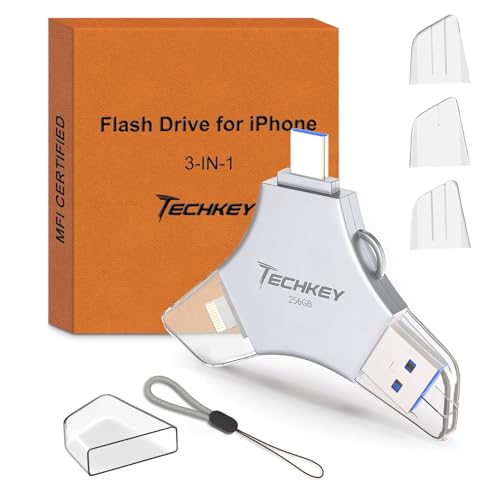
Connector coverage is often the first practical decision. A drive with Lightning, USB-C, and USB-A can connect an older iPhone, a newer USB-C phone or tablet, and a conventional computer without carrying several adapters. ThePhotoStick Omni 256GB documents all four connection types, including microUSB, while Qemoa, BLANBOK+, Cixepz, LESOGE, JSL JDTDC, ROSPE, and USB-based Techkey list combinations of Lightning, USB-C, and USB.
A dual USB-C and USB-A device such as SSK is a different design choice. It is appropriate for USB-C phones, USB-C iPads, and computers, but it does not list a Lightning connector. That makes it a more focused option for newer equipment. Android compatibility may also depend on OTG support, as specifically noted for Qemoa, Cixepz, LESOGE, JSL JDTDC, and SSK.
Decide how much storage you need
The selected products range from 256GB to 512GB. A 256GB drive can suit periodic phone offloading or a smaller working archive. The 512GB models are better suited to larger video libraries, long-term local storage, or households consolidating media from several devices. Qemoa, Cixepz, BLANBOK+, and LONGWIND document 512GB capacity.
Capacity claims use decimal measurement, so usable space may appear lower on a computer. Qemoa and Cixepz explicitly state approximately 484GB of available space for their 512GB versions. This is a normal capacity-display difference, but it is useful to understand before estimating how many files will fit. ThePhotoStick Omni 256GB provides a lower-capacity alternative while retaining broad platform coverage.
Compare app-guided backup with plug-and-play use
App support can make phone backup easier by providing one-click copying, file browsing, or automatic discovery. ThePhotoStick Omni models describe an app that finds and saves photos, videos, and other files. Cixepz, BLANBOK+, LESOGE, JSL JDTDC, ROSPE, and Techkey also document app-based backup functions. These workflows may require an App Store download on iPhone or iPad, so confirm the stated operating-system requirement before purchase.
Plug-and-play designs reduce software dependence on compatible computers and Android devices. SSK specifically describes plug-and-play operation without software installation, while the other multi-port drives generally combine direct USB access with an app for iOS. LONGWIND documents app use for iOS and direct local storage, but supplies less detail about its connector arrangement. The right fit depends on whether you value guided phone backup or a straightforward removable-drive workflow.
Look at transfer-speed evidence carefully
Only some listings provide numerical transfer claims. Qemoa lists up to 80MB/s read and 40MB/s write, while LESOGE and JSL JDTDC also provide speed figures. SSK lists up to 550MB/s read and 500MB/s write using USB 3.2 Gen 2. These are listing claims rather than independent test results, and actual results can vary with the phone, computer, port, file size, and operating system.
For occasional photo backups, connector compatibility and workflow may matter more than a headline speed. For large video files or frequent computer transfers, a model with a documented speed profile may be more useful. Do not assume that two drives with the same capacity will transfer at the same rate when their interfaces and specifications differ.
Consider privacy and physical design
Several selected drives document encryption, password protection, Touch ID, or passcode controls. BLANBOK+ says users can encrypt the entire drive or selected folders, while Qemoa, Cixepz, LESOGE, JSL JDTDC, ROSPE, and Techkey list app-based privacy features. These controls can be useful for personal photos and work files, but the supplied evidence does not establish identical security implementations across brands.
Physical features also vary. Cixepz lists a metal body, protective caps, and a lanyard. ROSPE uses a retractable design, SSK uses a zinc-alloy shell with protective covers, and ThePhotoStick Omni X lists a metal-alloy keychain-ready design. These details affect portability and connector protection, but they should not be treated as proof that a drive is indestructible or waterproof unless the listing explicitly provides that rating.
Check the file types and operating systems
If your library includes Live Photos, LONGWIND specifically documents preservation of motion and sound. ThePhotoStick Omni 256GB lists JPEG, PNG, HEIC, GIF, MOV, and MPEG4 support, making its file-format coverage unusually clear. ThePhotoStick models also state requirements including Android 8.0+, iOS/iPadOS 13.0+, Windows 7 SP1+, and macOS 10.13+.
Before buying, verify the exact phone model, iOS or Android version, OTG support, and available computer port. Also check whether the companion app is required for the function you need. A drive can have enough storage and the right physical connector but still be inconvenient if its app requirements do not match your device.
Final Recommendation
Qemoa 512GB MFi Photo Stick ranks first overall in this specification-based comparison under the published weighted criteria.
Qemoa 512GB MFi Photo Stick is the first overall specification-based choice in this comparison.
The final choice among the best photo sticks depends on the documented features that match your intended use.
ThePhotoStick Omni 256GB is a balanced choice among the top photo sticks because it combines broad device support, automatic backup, common file-format coverage, and four listed connector types. It is well suited to a household using iPhone, Android, Mac, and Windows devices.
Choose Qemoa 512GB if documented transfer figures and large capacity are priorities, or Cixepz 512GB if you want a three-connector design with app-based backup. BLANBOK+ is a strong privacy-oriented alternative, while SSK suits USB-C and USB-A users who prioritize its stated speed figures. For an iPhone-focused setup, LESOGE and JSL JDTDC provide MFi certification, multi-port layouts, backup apps, and encryption features.
Frequently Asked Questions
Are the best photo sticks compatible with both iPhone and Android?
Several selected models are listed for both platforms, including ThePhotoStick Omni 256GB, Qemoa 512GB, Cixepz 512GB, BLANBOK+, LESOGE, JSL JDTDC, ROSPE, and Techkey. Android compatibility may require OTG support, and iPhone use may require a companion app. Check the listing requirements against your specific device before ordering.
Do photo sticks need Wi-Fi to back up files?
The supplied listings describe local transfer rather than cloud-only storage. LONGWIND specifically states that photos and videos can be saved directly to the drive without Wi-Fi, and ThePhotoStick Omni X describes offline storage without an ongoing subscription. App installation may still be necessary for some iOS workflows.
Is a 256GB or 512GB photo stick better?
A 512GB model is more suitable for a larger archive or frequent video storage, while 256GB can be sufficient for routine phone offloading. Remember that decimal capacity is displayed differently by many computers; Qemoa and Cixepz state that their 512GB versions show approximately 484GB of available space.
Which selected drive has the highest stated transfer speed?
SSK lists up to 550MB/s read and 500MB/s write through its USB 3.2 Gen 2 interface. Qemoa, LESOGE, and JSL JDTDC also provide numerical speed claims. These figures come from product listings, not independent testing, so device and file conditions can affect transfer results.
Can these drives protect private photos?
Several listings document encryption or password controls. Qemoa, BLANBOK+, Cixepz, LESOGE, JSL JDTDC, ROSPE, and Techkey describe privacy features through their apps. The specific implementation varies, so review the app and device requirements if privacy controls are a deciding factor.