Buying Guide
The best tuf laptops in this comparison span compact 14-inch systems, mainstream 15.6-inch and 16-inch machines, and large 17.3-inch or 18-inch designs. The right specification depends less on the TUF name alone and more on the graphics processor, display, memory, storage, and the connections you need.
Start with the graphics processor
For gaming, the graphics processor is the most important dividing line. The selected A16 and F16 configurations with NVIDIA GeForce RTX 5060 graphics sit near the top of this list, while the ASUS TUF F16 with RTX 5050 provides a slightly lower graphics tier. The ASUS TUF Gaming A16 with Radeon RX 7700S is the main AMD discrete-graphics alternative and includes 8GB of listed graphics memory.
The RTX 4050 systems are more mainstream choices. The ASUS TUF Gaming F16 Core 5 RTX 4050 configurations are suitable for shoppers who want dedicated NVIDIA graphics without moving to the newer GPU tiers. The ASUS TUF Gaming A15 RTX 3050 is a simpler entry point, but its graphics hardware is older within this group. GPU comparisons here are based on the supplied component listings, not on measured frame rates or hands-on testing.
Choose the screen size and panel features
A 14-inch display makes the A14 models the compact choices. The Ryzen AI 9 HX 370 version documents a WQXGA 165Hz panel, while the Ryzen AI Max+ 392 version lists a 2.5K 165Hz display with a stated 3ms response time. These models suit users who want a smaller footprint without giving up a high-refresh screen.
The 16-inch category offers the broadest selection. The selected A16 and F16 models list 144Hz or 165Hz refresh rates, 16:10 aspect ratios, and IPS or IPS-level panels. Several configurations specifically document 100% sRGB coverage, which is useful when color coverage matters for general creative work. G-SYNC, Adaptive-Sync, or FreeSync Premium appears on selected models, depending on the configuration.
The A15 provides a 15.6-inch FHD 144Hz display, while the A17 and A18 families show that TUF also includes larger screens. Those larger models are not needed in the final 10, but their presence in the supplied listings confirms that shoppers who prefer a broad viewing area can consider an 18-inch design. Larger displays generally mean a larger chassis, so check dimensions and weight before choosing one for frequent travel.
Match memory and storage to your workload
The selected configurations range from 16GB to 32GB of RAM and from 512GB to 1TB of SSD storage. For ordinary gaming, schoolwork, and everyday multitasking, 16GB is the lower-capacity option represented here. The 32GB models provide more headroom for large applications, many browser tabs, streaming, or creative workloads, based on capacity rather than an unverified performance claim.
A 1TB SSD is more flexible for a large software or game collection than a 512GB drive. The A14 with Ryzen AI 9 HX 370 also documents an additional SSD slot, giving it a useful expansion advantage. The A14 Ryzen AI Max+ 392 uses 32GB of unified LPDDR5X memory, and its listing explains that the memory can be dynamically allocated between system and graphics workloads. That is a different design from the DDR5 configurations, so compare the memory architecture as well as the capacity.
Check ports and network options
Port selection varies considerably. The ASUS TUF Gaming F16 RTX 5060 and the ASUS TUF F16 RTX 5050 list Thunderbolt 4, multiple USB ports, HDMI, and RJ-45 Ethernet. The A16 RTX 5060 lists Thunderbolt 4 or USB4, USB-A, HDMI 2.1, and Ethernet. These are strong options for users connecting external displays, wired networks, storage, or gaming accessories.
The selected F16 Core 5 RTX 4050 configuration also lists Thunderbolt 4 and HDMI 2.1, making it a practical workstation-style choice. Wi-Fi 6E appears on several newer listings, while Wi-Fi 6 appears on others. If you plan to use a wired connection, prioritize a model that explicitly lists RJ-45 Ethernet rather than assuming every configuration has the same I/O.
Consider cooling and stated durability
Several TUF listings document cooling components such as Arc Flow fans, full-width heatsinks, heat pipes, exhaust vents, dust filters, or upgraded fan blade designs. These are design features, not proof of a particular temperature or noise level. The A16 RTX 5060, A18, and several F16 and A14 listings provide the clearest cooling descriptions in this pool.
MIL-STD-810H testing is explicitly stated for selected A14, A16, F16, and A15 models. This documents a testing standard in the listing; it should not be read as a guarantee against every type of damage or as a substitute for careful handling. Warranty terms also vary, so review the exact configuration and seller documentation before purchase.
Decide whether portability matters
The A14 Ryzen AI Max+ 392 is the lightest listed option at the current price, making it the clearest choice for carrying between locations. The 16-inch models listed around the current price offer a compromise between screen area and portability. The A15 and larger-screen families are better suited to buyers who prioritize display size over the smallest travel footprint.
Do not compare model names alone. The supplied listings include conflicting dimension or weight fields for some configurations, so use the exact product listing and configuration details when portability is important. A dedicated GPU, larger cooling system, and larger display can all affect the practical size of a gaming laptop.
Final Recommendation
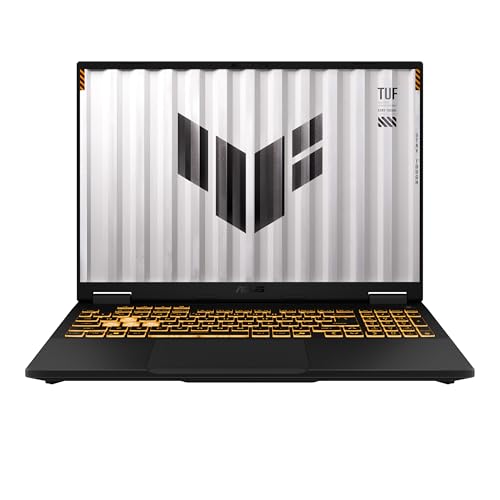
ASUS TUF Gaming F16 RTX 5060 32GB Laptop ranks first overall in this specification-based comparison under the published weighted criteria.
The final choice among the best tuf laptops depends on the documented features that match your intended use.
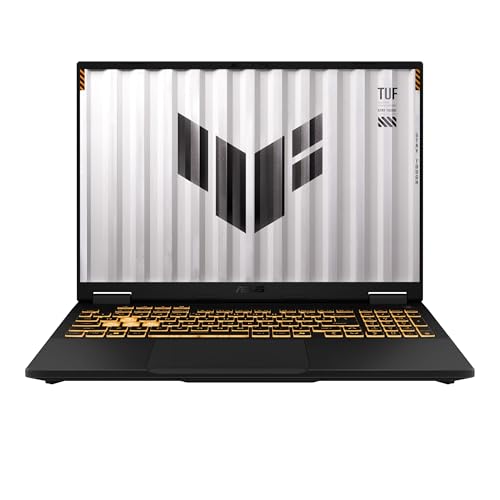
ASUS TUF A16 RTX 5060 Gaming Laptop is the first overall specification-based choice in this comparison. It combines RTX 5060 graphics, 32GB RAM, a 1TB SSD, a 165Hz 16:10 display, broad connectivity, and documented cooling and durability features without moving to the largest screen size.
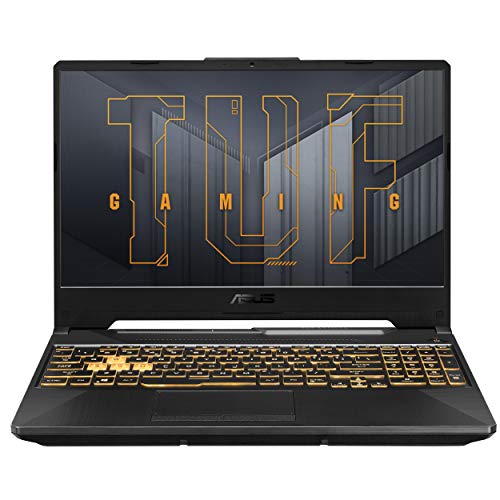
The ASUS TUF Gaming F16 RTX 5060 is the stronger alternative when Thunderbolt 4, extensive ports, and the Intel Core i7-14650HX matter most. For portability, the ASUS TUF Gaming A14 Ryzen AI Max+ 392 has the lightest listed weight and a high-resolution 165Hz display, though it uses integrated Radeon graphics. The ASUS TUF Gaming A15 Ryzen 5 RTX 3050 remains a reasonable lower-tier option for shoppers who prefer a 15.6-inch format and dedicated graphics.
Among the top tuf laptops here, the best match depends on the documented trade-off you value: newer graphics, a compact body, a color-capable display, more memory, or professional connectivity. Treat these rankings as a structured comparison of listing specifications rather than a substitute for independent testing.
Frequently Asked Questions
What should I prioritize when choosing the best tuf laptops?
Start with the GPU if gaming is the main purpose, then check the display refresh rate and resolution. After that, compare RAM, SSD capacity, ports, wireless networking, and the listed chassis features. A 32GB model with a 1TB SSD offers more capacity than a 16GB model with a 512GB SSD, while a 14-inch design is easier to carry than a larger 16-inch or 18-inch system.
Are all TUF laptops the same size?
No. The supplied examples include 14-inch A14 models, a 15.6-inch A15, several 16-inch A16 and F16 models, and larger A17 and A18 families. Screen size affects the viewing area and usually the overall footprint, so compare the exact dimensions and weight for the configuration you are considering.
Is 16GB RAM enough for a TUF gaming laptop?
The listings show 16GB configurations alongside 32GB models. Sixteen gigabytes is the lower memory capacity represented in this comparison, while 32GB provides more capacity for multitasking, streaming, creative applications, and large numbers of open programs. The Ryzen AI Max+ 392 A14 is different because it uses 32GB of unified LPDDR5X memory shared between system and graphics workloads.
Do TUF laptops include Ethernet and modern display connections?
Many selected models explicitly list RJ-45 Ethernet, HDMI, and multiple USB connections. Thunderbolt 4 appears on several F16 configurations, while USB4 appears on selected A16 models. Port layouts are configuration-specific, so verify the exact listing if you need a particular connector for an external display, wired network, or accessory.
Does MIL-STD-810H mean a TUF laptop is indestructible?
No. It means the listing documents testing to the MIL-STD-810H standard for the applicable model. That is useful durability information, but it is not a guarantee against every fall, spill, environmental condition, or type of damage. Handle the laptop carefully and check the exact warranty terms for the selected configuration.